| 在RHEL8中继续支持service,网络相关服务管理已经转移到NetworkManager不再是network了,本文档详细介绍RHEL8网络配置。 |
环境
Red Hat Enterprise Linux release 8.0
VMware Workstation Pro 14
在RHEL8中继续支持service
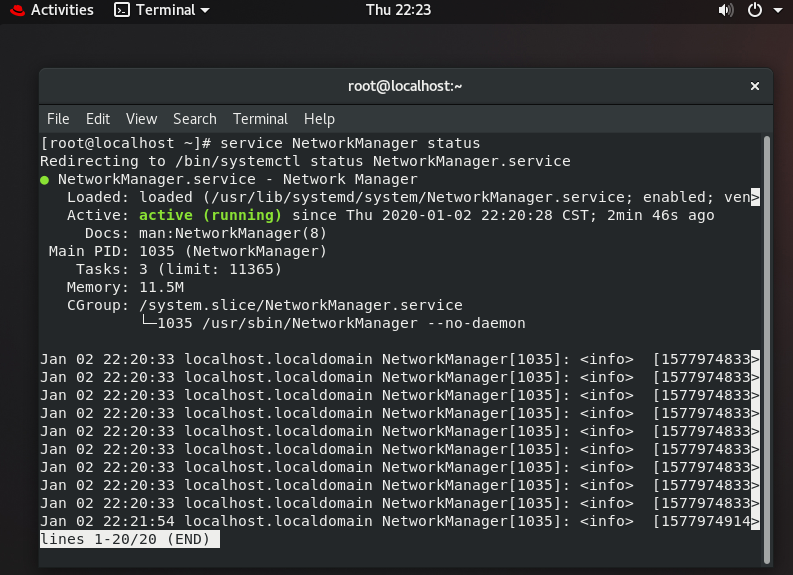
网络相关服务管理已经转移到NetworkManager不再是network了
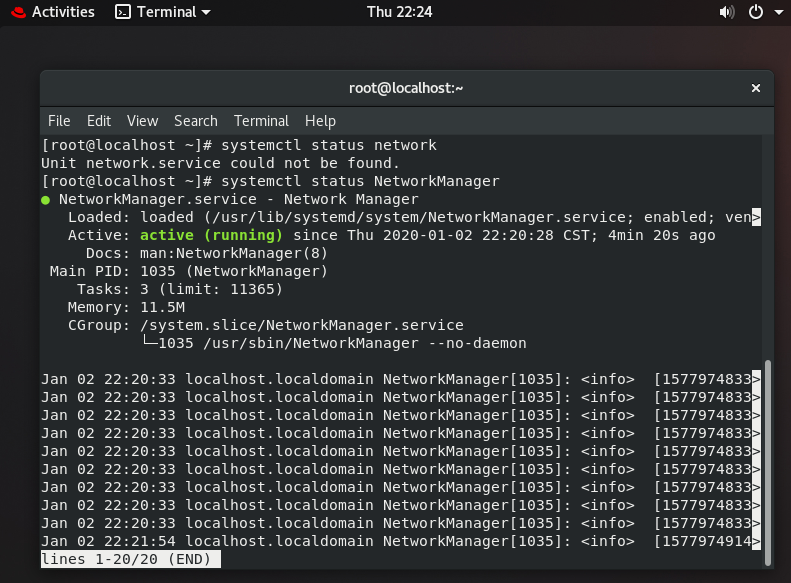
修改网卡配置文件,重启NetwrokManager服务新IP不生效!
[root@localhost ~]# vim /etc/sysconfig/network-scripts/ifcfg-ens33
TYPE=Ethernet
PROXY_METHOD=none
BROWSER_ONLY=no
BOOTPROTO=static
DEFROUTE=yes
IPV4_FAILURE_FATAL=no
IPV6INIT=yes
IPV6_AUTOCONF=yes
IPV6_DEFROUTE=yes
IPV6_FAILURE_FATAL=no
IPV6_ADDR_GEN_MODE=stable-privacy
NAME=ens33
UUID=eb51f723-244d-4a71-bf8d-c18593c64859
DEVICE=ens33
ONBOOT=yes
IPADDR=192.168.10.8
PREFIX=24
GATEWAY=192.168.10.2
DNS1=192.168.10.2
重启网卡要用nmcli connection down/up ens33
[root@localhost ~]# nmcli connection down ens33
Connection 'ens33' successfully deactivated (D-Bus active path: /org/freedesktop/NetworkManager/ActiveConnection/1)
[root@localhost ~]# nmcli connection up ens33
Connection successfully activated (D-Bus active path: /org/freedesktop/NetworkManager/ActiveConnection/4)
[root@localhost ~]# ifconfig
ens33: flags=4163<UP,BROADCAST,RUNNING,MULTICAST> mtu 1500
inet 192.168.10.8 netmask 255.255.255.0 broadcast 192.168.10.255
inet6 fe80::27d9:87a2:dc6c:7296 prefixlen 64 scopeid 0x20 ether 00:0c:29:a4:94:b4 txqueuelen 1000 (Ethernet)
RX packets 56 bytes 10885 (10.6 KiB)
RX errors 0 dropped 0 overruns 0 frame 0
TX packets 142 bytes 16312 (15.9 KiB)
TX errors 0 dropped 0 overruns 0 carrier 0 collisions 0

lo: flags=73<UP,LOOPBACK,RUNNING> mtu 65536
inet 127.0.0.1 netmask 255.0.0.0
inet6 ::1 prefixlen 128 scopeid 0x10
loop txqueuelen 1000 (Local Loopback)
RX packets 4 bytes 340 (340.0 B)
RX errors 0 dropped 0 overruns 0 frame 0
TX packets 4 bytes 340 (340.0 B)
TX errors 0 dropped 0 overruns 0 carrier 0 collisions 0

virbr0: flags=4099<UP,BROADCAST,MULTICAST> mtu 1500
inet 192.168.122.1 netmask 255.255.255.0 broadcast 192.168.122.255
ether 52:54:00:9c:ef:c6 txqueuelen 1000 (Ethernet)
RX packets 0 bytes 0 (0.0 B)
RX errors 0 dropped 0 overruns 0 frame 0
TX packets 0 bytes 0 (0.0 B)
TX errors 0 dropped 0 overruns 0 carrier 0 collisions 0
另一种重启网卡的方式
ifdown ens33 ifup ens33

[root@localhost ~]# ifdown ens33
Connection 'ens33' successfully deactivated (D-Bus active path: /org/freedesktop/NetworkManager/ActiveConnection/6)
[root@localhost ~]# ifconfig
ens33: flags=4163<UP,BROADCAST,RUNNING,MULTICAST> mtu 1500
inet6 fe80::20c:29ff:fea4:94b4 prefixlen 64 scopeid 0x20 ether 00:0c:29:a4:94:b4 txqueuelen 1000 (Ethernet)
RX packets 2968 bytes 3062890 (2.9 MiB)
RX errors 0 dropped 0 overruns 0 frame 0
TX packets 1444 bytes 156626 (152.9 KiB)
TX errors 0 dropped 0 overruns 0 carrier 0 collisions 0

lo: flags=73<UP,LOOPBACK,RUNNING> mtu 65536
inet 127.0.0.1 netmask 255.0.0.0
inet6 ::1 prefixlen 128 scopeid 0x10
loop txqueuelen 1000 (Local Loopback)
RX packets 168 bytes 14024 (13.6 KiB)
RX errors 0 dropped 0 overruns 0 frame 0
TX packets 168 bytes 14024 (13.6 KiB)
TX errors 0 dropped 0 overruns 0 carrier 0 collisions 0

virbr0: flags=4099<UP,BROADCAST,MULTICAST> mtu 1500
inet 192.168.122.1 netmask 255.255.255.0 broadcast 192.168.122.255
ether 52:54:00:9c:ef:c6 txqueuelen 1000 (Ethernet)
RX packets 0 bytes 0 (0.0 B)
RX errors 0 dropped 0 overruns 0 frame 0
TX packets 0 bytes 0 (0.0 B)
TX errors 0 dropped 0 overruns 0 carrier 0 collisions 0

virbr0-nic: flags=4099<UP,BROADCAST,MULTICAST> mtu 1500
ether 52:54:00:9c:ef:c6 txqueuelen 1000 (Ethernet)
RX packets 0 bytes 0 (0.0 B)
RX errors 0 dropped 0 overruns 0 frame 0
TX packets 0 bytes 0 (0.0 B)
TX errors 0 dropped 0 overruns 0 carrier 0 collisions 0

[root@localhost ~]# ifup ens33
Connection successfully activated (D-Bus active path: /org/freedesktop/NetworkManager/ActiveConnection/8)
[root@localhost ~]# ifconfig
ens33: flags=4163<UP,BROADCAST,RUNNING,MULTICAST> mtu 1500
inet 192.168.10.8 netmask 255.255.255.0 broadcast 192.168.10.255
inet6 fe80::aa34:3de3:b4d9:d26b prefixlen 64 scopeid 0x20 ether 00:0c:29:a4:94:b4 txqueuelen 1000 (Ethernet)
RX packets 2978 bytes 3065421 (2.9 MiB)
RX errors 0 dropped 0 overruns 0 frame 0
TX packets 1476 bytes 161083 (157.3 KiB)
TX errors 0 dropped 0 overruns 0 carrier 0 collisions 0

lo: flags=73<UP,LOOPBACK,RUNNING> mtu 65536
inet 127.0.0.1 netmask 255.0.0.0
inet6 ::1 prefixlen 128 scopeid 0x10
loop txqueuelen 1000 (Local Loopback)
RX packets 172 bytes 14364 (14.0 KiB)
RX errors 0 dropped 0 overruns 0 frame 0
TX packets 172 bytes 14364 (14.0 KiB)
TX errors 0 dropped 0 overruns 0 carrier 0 collisions 0

virbr0: flags=4099<UP,BROADCAST,MULTICAST> mtu 1500
inet 192.168.122.1 netmask 255.255.255.0 broadcast 192.168.122.255
ether 52:54:00:9c:ef:c6 txqueuelen 1000 (Ethernet)
RX packets 0 bytes 0 (0.0 B)
RX errors 0 dropped 0 overruns 0 frame 0
TX packets 0 bytes 0 (0.0 B)
TX errors 0 dropped 0 overruns 0 carrier 0 collisions 0

virbr0-nic: flags=4099<UP,BROADCAST,MULTICAST> mtu 1500
ether 52:54:00:9c:ef:c6 txqueuelen 1000 (Ethernet)
RX packets 0 bytes 0 (0.0 B)
RX errors 0 dropped 0 overruns 0 frame 0
TX packets 0 bytes 0 (0.0 B)
TX errors 0 dropped 0 overruns 0 carrier 0 collisions 0
nmcli修改IP
[root@localhost ~]# nmcli connection modify ens33 ipv4.addresses 192.168.10.20/24 ipv4.method manual ipv4.gateway 192.168.10.2 ipv4.dns 192.168.10.2
[root@localhost ~]# ifconfig
ens33: flags=4163<UP,BROADCAST,RUNNING,MULTICAST> mtu 1500
inet 192.168.10.8 netmask 255.255.255.0 broadcast 192.168.10.255
inet6 fe80::27d9:87a2:dc6c:7296 prefixlen 64 scopeid 0x20 ether 00:0c:29:a4:94:b4 txqueuelen 1000 (Ethernet)
RX packets 94 bytes 14309 (13.9 KiB)
RX errors 0 dropped 0 overruns 0 frame 0
TX packets 186 bytes 20173 (19.7 KiB)
TX errors 0 dropped 0 overruns 0 carrier 0 collisions 0

lo: flags=73<UP,LOOPBACK,RUNNING> mtu 65536
inet 127.0.0.1 netmask 255.0.0.0
inet6 ::1 prefixlen 128 scopeid 0x10
loop txqueuelen 1000 (Local Loopback)
RX packets 4 bytes 340 (340.0 B)
RX errors 0 dropped 0 overruns 0 frame 0
TX packets 4 bytes 340 (340.0 B)
TX errors 0 dropped 0 overruns 0 carrier 0 collisions 0

virbr0: flags=4099<UP,BROADCAST,MULTICAST> mtu 1500
inet 192.168.122.1 netmask 255.255.255.0 broadcast 192.168.122.255
ether 52:54:00:9c:ef:c6 txqueuelen 1000 (Ethernet)
RX packets 0 bytes 0 (0.0 B)
RX errors 0 dropped 0 overruns 0 frame 0
TX packets 0 bytes 0 (0.0 B)
TX errors 0 dropped 0 overruns 0 carrier 0 collisions 0

[root@localhost ~]# nmcli connection down ens33
Connection 'ens33' successfully deactivated (D-Bus active path: /org/freedesktop/NetworkManager/ActiveConnection/4)
[root@localhost ~]# nmcli connection up ens33
Connection successfully activated (D-Bus active path: /org/freedesktop/NetworkManager/ActiveConnection/5)
[root@localhost ~]# ifconfig
ens33: flags=4163<UP,BROADCAST,RUNNING,MULTICAST> mtu 1500
inet 192.168.10.20 netmask 255.255.255.0 broadcast 192.168.10.255
inet6 fe80::27d9:87a2:dc6c:7296 prefixlen 64 scopeid 0x20 ether 00:0c:29:a4:94:b4 txqueuelen 1000 (Ethernet)
RX packets 111 bytes 19094 (18.6 KiB)
RX errors 0 dropped 0 overruns 0 frame 0
TX packets 218 bytes 24127 (23.5 KiB)
TX errors 0 dropped 0 overruns 0 carrier 0 collisions 0

lo: flags=73<UP,LOOPBACK,RUNNING> mtu 65536
inet 127.0.0.1 netmask 255.0.0.0
inet6 ::1 prefixlen 128 scopeid 0x10
loop txqueuelen 1000 (Local Loopback)
RX packets 8 bytes 684 (684.0 B)
RX errors 0 dropped 0 overruns 0 frame 0
TX packets 8 bytes 684 (684.0 B)
TX errors 0 dropped 0 overruns 0 carrier 0 collisions 0

virbr0: flags=4099<UP,BROADCAST,MULTICAST> mtu 1500
inet 192.168.122.1 netmask 255.255.255.0 broadcast 192.168.122.255
ether 52:54:00:9c:ef:c6 txqueuelen 1000 (Ethernet)
RX packets 0 bytes 0 (0.0 B)
RX errors 0 dropped 0 overruns 0 frame 0
TX packets 0 bytes 0 (0.0 B)
TX errors 0 dropped 0 overruns 0 carrier 0 collisions 0
想要用之前的方式改需要装 network-scripts 这个包
[root@localhost ~]# yum install -y network-scripts
[root@localhost ~]# vim /etc/sysconfig/network-scripts/ifcfg-ens33
[root@localhost ~]# cat /etc/sysconfig/network-scripts/ifcfg-ens33
TYPE=Ethernet
PROXY_METHOD=none
BROWSER_ONLY=no
BOOTPROTO=static
DEFROUTE=yes
IPV4_FAILURE_FATAL=no
IPV6INIT=yes
IPV6_AUTOCONF=yes
IPV6_DEFROUTE=yes
IPV6_FAILURE_FATAL=no
IPV6_ADDR_GEN_MODE=stable-privacy
NAME=ens33
UUID=eb51f723-244d-4a71-bf8d-c18593c64859
DEVICE=ens33
ONBOOT=yes
IPADDR=192.168.10.21
PREFIX=24
GATEWAY=192.168.10.2
DNS1=192.168.10.2
[root@localhost ~]# systemctl restart network
[root@localhost ~]# ifconfig
ens33: flags=4163<UP,BROADCAST,RUNNING,MULTICAST> mtu 1500
inet 192.168.10.21 netmask 255.255.255.0 broadcast 192.168.10.255
inet6 fe80::27d9:87a2:dc6c:7296 prefixlen 64 scopeid 0x20 ether 00:0c:29:a4:94:b4 txqueuelen 1000 (Ethernet)
RX packets 189 bytes 25780 (25.1 KiB)
RX errors 0 dropped 0 overruns 0 frame 0
TX packets 327 bytes 34520 (33.7 KiB)
TX errors 0 dropped 0 overruns 0 carrier 0 collisions 0

lo: flags=73<UP,LOOPBACK,RUNNING> mtu 65536
inet 127.0.0.1 netmask 255.0.0.0
inet6 ::1 prefixlen 128 scopeid 0x10
loop txqueuelen 1000 (Local Loopback)
RX packets 12 bytes 1028 (1.0 KiB)
RX errors 0 dropped 0 overruns 0 frame 0
TX packets 12 bytes 1028 (1.0 KiB)
TX errors 0 dropped 0 overruns 0 carrier 0 collisions 0

virbr0: flags=4099<UP,BROADCAST,MULTICAST> mtu 1500
inet 192.168.122.1 netmask 255.255.255.0 broadcast 192.168.122.255
ether 52:54:00:9c:ef:c6 txqueuelen 1000 (Ethernet)
RX packets 0 bytes 0 (0.0 B)
RX errors 0 dropped 0 overruns 0 frame 0
TX packets 0 bytes 0 (0.0 B)
TX errors 0 dropped 0 overruns 0 carrier 0 collisions 0

[root@localhost ~]# ifdown ens33
WARN : [ifdown] You are using 'ifdown' script provided by 'network-scripts', which are now deprecated.
WARN : [ifdown] 'network-scripts' will be removed in one of the next major releases of RHEL.
WARN : [ifdown] It is advised to switch to 'NetworkManager' instead - it provides 'ifup/ifdown' scripts as well.
Device 'ens33' successfully disconnected.
[root@localhost ~]# ifconfig
ens33: flags=4163<UP,BROADCAST,RUNNING,MULTICAST> mtu 1500
ether 00:0c:29:a4:94:b4 txqueuelen 1000 (Ethernet)
RX packets 223 bytes 32689 (31.9 KiB)
RX errors 0 dropped 0 overruns 0 frame 0
TX packets 382 bytes 40364 (39.4 KiB)
TX errors 0 dropped 0 overruns 0 carrier 0 collisions 0

lo: flags=73<UP,LOOPBACK,RUNNING> mtu 65536
inet 127.0.0.1 netmask 255.0.0.0
inet6 ::1 prefixlen 128 scopeid 0x10
loop txqueuelen 1000 (Local Loopback)
RX packets 12 bytes 1028 (1.0 KiB)
RX errors 0 dropped 0 overruns 0 frame 0
TX packets 12 bytes 1028 (1.0 KiB)
TX errors 0 dropped 0 overruns 0 carrier 0 collisions 0

virbr0: flags=4099<UP,BROADCAST,MULTICAST> mtu 1500
inet 192.168.122.1 netmask 255.255.255.0 broadcast 192.168.122.255
ether 52:54:00:9c:ef:c6 txqueuelen 1000 (Ethernet)
RX packets 0 bytes 0 (0.0 B)
RX errors 0 dropped 0 overruns 0 frame 0
TX packets 0 bytes 0 (0.0 B)
TX errors 0 dropped 0 overruns 0 carrier 0 collisions 0

[root@localhost ~]# ifup ens33
WARN : [ifup] You are using 'ifup' script provided by 'network-scripts', which are now deprecated.
WARN : [ifup] 'network-scripts' will be removed in one of the next major releases of RHEL.
WARN : [ifup] It is advised to switch to 'NetworkManager' instead - it provides 'ifup/ifdown' scripts as well.
Connection successfully activated (D-Bus active path: /org/freedesktop/NetworkManager/ActiveConnection/7)
[root@localhost ~]# ifconfig
ens33: flags=4163<UP,BROADCAST,RUNNING,MULTICAST> mtu 1500
inet 192.168.10.21 netmask 255.255.255.0 broadcast 192.168.10.255
inet6 fe80::27d9:87a2:dc6c:7296 prefixlen 64 scopeid 0x20 ether 00:0c:29:a4:94:b4 txqueuelen 1000 (Ethernet)
RX packets 232 bytes 33761 (32.9 KiB)
RX errors 0 dropped 0 overruns 0 frame 0
TX packets 409 bytes 43528 (42.5 KiB)
TX errors 0 dropped 0 overruns 0 carrier 0 collisions 0

lo: flags=73<UP,LOOPBACK,RUNNING> mtu 65536
inet 127.0.0.1 netmask 255.0.0.0
inet6 ::1 prefixlen 128 scopeid 0x10
loop txqueuelen 1000 (Local Loopback)
RX packets 12 bytes 1028 (1.0 KiB)
RX errors 0 dropped 0 overruns 0 frame 0
TX packets 12 bytes 1028 (1.0 KiB)
TX errors 0 dropped 0 overruns 0 carrier 0 collisions 0

virbr0: flags=4099<UP,BROADCAST,MULTICAST> mtu 1500
inet 192.168.122.1 netmask 255.255.255.0 broadcast 192.168.122.255
ether 52:54:00:9c:ef:c6 txqueuelen 1000 (Ethernet)
RX packets 0 bytes 0 (0.0 B)
RX errors 0 dropped 0 overruns 0 frame 0
TX packets 0 bytes 0 (0.0 B)
TX errors 0 dropped 0 overruns 0 carrier 0 collisions 0

[root@localhost ~]# yum remove -y network-scripts
[root@localhost ~]# systemctl restart network
Failed to restart network.service: Access denied
See system logs and 'systemctl status network.service' for details.
[root@localhost ~]# ifdown ens33
Connection 'ens33' successfully deactivated (D-Bus active path: /org/freedesktop/NetworkManager/ActiveConnection/7)
[root@localhost ~]# ifconfig
ens33: flags=4163<UP,BROADCAST,RUNNING,MULTICAST> mtu 1500
ether 00:0c:29:a4:94:b4 txqueuelen 1000 (Ethernet)
RX packets 253 bytes 35974 (35.1 KiB)
RX errors 0 dropped 0 overruns 0 frame 0
TX packets 441 bytes 47192 (46.0 KiB)
TX errors 0 dropped 0 overruns 0 carrier 0 collisions 0

lo: flags=73<UP,LOOPBACK,RUNNING> mtu 65536
inet 127.0.0.1 netmask 255.0.0.0
inet6 ::1 prefixlen 128 scopeid 0x10
loop txqueuelen 1000 (Local Loopback)
RX packets 12 bytes 1028 (1.0 KiB)
RX errors 0 dropped 0 overruns 0 frame 0
TX packets 12 bytes 1028 (1.0 KiB)
TX errors 0 dropped 0 overruns 0 carrier 0 collisions 0

virbr0: flags=4099<UP,BROADCAST,MULTICAST> mtu 1500
inet 192.168.122.1 netmask 255.255.255.0 broadcast 192.168.122.255
ether 52:54:00:9c:ef:c6 txqueuelen 1000 (Ethernet)
RX packets 0 bytes 0 (0.0 B)
RX errors 0 dropped 0 overruns 0 frame 0
TX packets 0 bytes 0 (0.0 B)
TX errors 0 dropped 0 overruns 0 carrier 0 collisions 0

[root@localhost ~]# ifup ens33
Connection successfully activated (D-Bus active path: /org/freedesktop/NetworkManager/ActiveConnection/8)
[root@localhost ~]# ifconfig
ens33: flags=4163<UP,BROADCAST,RUNNING,MULTICAST> mtu 1500
inet 192.168.10.21 netmask 255.255.255.0 broadcast 192.168.10.255
inet6 fe80::27d9:87a2:dc6c:7296 prefixlen 64 scopeid 0x20 ether 00:0c:29:a4:94:b4 txqueuelen 1000 (Ethernet)
RX packets 271 bytes 37669 (36.7 KiB)
RX errors 0 dropped 0 overruns 0 frame 0
TX packets 479 bytes 51830 (50.6 KiB)
TX errors 0 dropped 0 overruns 0 carrier 0 collisions 0

lo: flags=73<UP,LOOPBACK,RUNNING> mtu 65536
inet 127.0.0.1 netmask 255.0.0.0
inet6 ::1 prefixlen 128 scopeid 0x10
loop txqueuelen 1000 (Local Loopback)
RX packets 16 bytes 1372 (1.3 KiB)
RX errors 0 dropped 0 overruns 0 frame 0
TX packets 16 bytes 1372 (1.3 KiB)
TX errors 0 dropped 0 overruns 0 carrier 0 collisions 0

virbr0: flags=4099<UP,BROADCAST,MULTICAST> mtu 1500
inet 192.168.122.1 netmask 255.255.255.0 broadcast 192.168.122.255
ether 52:54:00:9c:ef:c6 txqueuelen 1000 (Ethernet)
RX packets 0 bytes 0 (0.0 B)
RX errors 0 dropped 0 overruns 0 frame 0
TX packets 0 bytes 0 (0.0 B)
TX errors 0 dropped 0 overruns 0 carrier 0 collisions 0