jQuery菜单切换
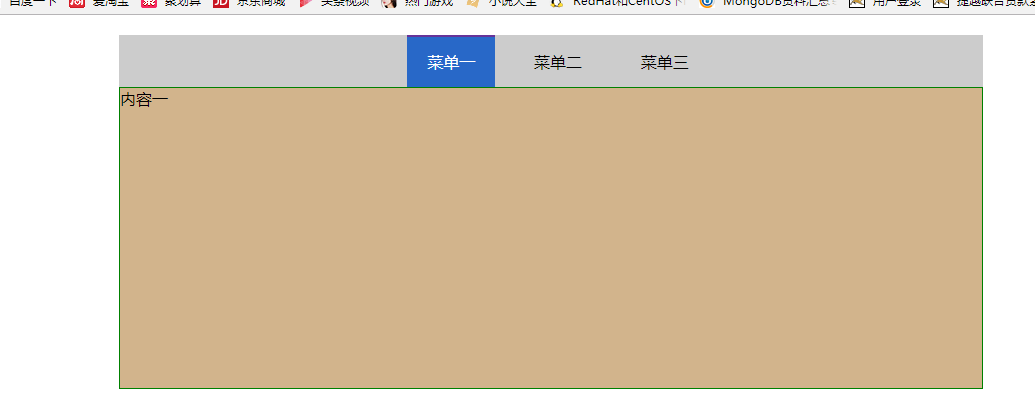
点击‘菜单一’,显示‘内容一’
点击‘菜单二’,显示‘内容二’
点击‘菜单三’,显示‘内容三’


 1 <!DOCTYPE html>
 2 <html lang="en">
 3 <head>
 4     <meta charset="UTF-8">
 5     <title>tab</title>
 6
 7     <style>
 8         *{
 9             margin: 0;
10             padding: 0;
11         }
12         .tab_outer{
13             margin: 20px auto;
14              60%;
15         }
16         .menu{
17             background-color: #cccccc;
18             /*border: 1px solid red;*/
19             line-height: 40px;
20             text-align: center;
21         }
22         .menu li{
23             display: inline-block;
24             margin-left: 14px;
25             padding:5px 20px;
26
27         }
28         .menu a{
29             border-right: 1px solid red;
30             padding: 11px;
31         }
32         .content{
33             background-color: tan;
34             border: 1px solid green;
35             height: 300px;
36
37         }
38         .hide{
39             display: none;
40         }
41
42         .current{
43             background-color: #2868c8;
44             color: white;
45             border-top: solid 2px rebeccapurple;
46         }
47     </style>
48 </head>
49 <body>
50       <div class="tab_outer">
51           <ul class="menu">
52               <li egon="c1" class="current">菜单一</li>
53               <li egon="c2" >菜单二</li>
54               <li egon="c3">菜单三</li>
55           </ul>
56           <div class="content">
57               <div id="c1">内容一</div>
58               <div id="c2" class="hide">内容二</div>
59               <div id="c3" class="hide">内容三</div>
60           </div>
61
62       </div>
63 </body>
64
65
66 <script src="jquery-3.1.1.js"></script>
67     <script>
68          $(".menu li").click(function () {
69
70              $(this).addClass("current").siblings().removeClass("current")
71
72              var index=$(this).attr("egon");
73
74              $("#"+index).removeClass("hide").siblings().addClass("hide")
75
76          })
77
78     </script>
79 </html>