zoukankan      html  css  js  c++  java
  • CentOS 7安装和配置ssh


    1. 安装openssh-server

    yum install -y openssl openssh-server

    2. 修改配置文件

    用vim打开配置文件/etc/ssh/sshd_config
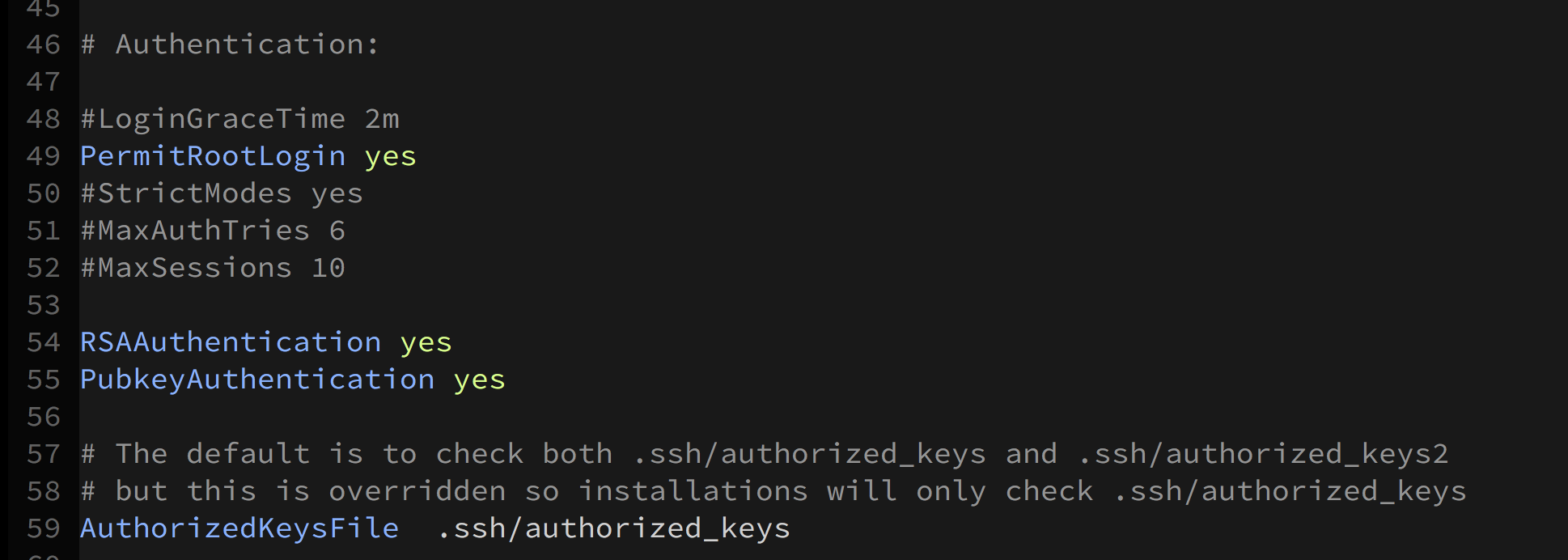
    将上图的PermitRootLogin,RSAAuthentication,PubkeyAuthentication的设置打开。

    启动ssh的服务:

    systemctl start sshd.service

    设置开机自动启动ssh服务

    systemctl enable sshd.service

    设置文件夹~/.ssh的访问权限:

    $ cd ~
    $ chmod 700 .ssh                                                                                                
    $ chmod 600 .ssh/*                                                                                              
    $ ls -la .ssh                                                                                                   
    total 16
    drwx------. 2 root root   58 May 15 00:23 .
    dr-xr-x---. 8 root root 4096 May 15 00:26 ..
    -rw-------. 1 root root  403 May 15 00:22 authorized_keys
    -rw-------. 1 root root 1766 May 15 00:21 id_rsa
    -rw-------. 1 root root  403 May 15 00:21 id_rsa.pub
    

    authorized_keys文件存储的是客户端的公共密钥。

  • 相关阅读:
    kafka副本
    kafka消息丢失
    kafka消费者
    RN8302b调试笔记
    MDK #pragma anon_unions
    [Python笔记]Strip
    [Python笔记]AnyAll
    [Python笔记]元组
    [Python笔记]列表
    嵌入式平台移植Python
  • 原文地址:https://www.cnblogs.com/liuhouhou/p/8975812.html
Copyright © 2011-2022 走看看