先看一下我的解决方案的目录结构吧~~~
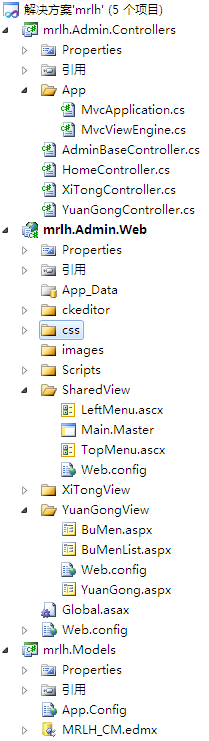
一:先把Controller程序提取出来
默认的情况是所有的****Controller.cs文件都会放在Web程序集下的一个叫Controllers的文件夹下
这样感觉有点不爽(你懂的...)
我们决定把所有的Controller程序放到一个自定义的应用程序集中去(上图中的mrlh.Admin.Controllers)
先把web程序集下的Global.asax.cs文件删掉
然后把Global.asax的标记代码改为如下:
<%@ Application Codebehind="mrlh.Admin.Controllers.App.MvcApplication" Inherits="mrlh.Admin.Controllers.App.MvcApplication" Language="C#" %>
这样应用程序启动时就会到我们自定义的应用程序集去执行相关的操作了
mrlh.Admin.Controllers.App.MvcApplication的相关代码如下
namespace mrlh.Admin.Controllers.App
{
    public class MvcApplication : System.Web.HttpApplication
    {
        public static void RegisterRoutes(RouteCollection routes)
        {
            routes.IgnoreRoute("{resource}.axd/{*pathInfo}");
            routes.MapRoute(
                "Default", // 路由名称
                "{controller}/{action}/{id}", // 带有参数的 URL
                new { controller = "XiTong", action = "Index", id = UrlParameter.Optional } // 参数默认值
            );
        }

        protected void Application_Start()
        {
            //以下两句为启用自定义的WebFormViewEngine
            ViewEngines.Engines.Clear();
            ViewEngines.Engines.Add(new MvcViewEngine());
            AreaRegistration.RegisterAllAreas();
            RegisterRoutes(RouteTable.Routes);

        }
    }
}
这样做之后
所有的Controller程序就不用集中写到web程序集中去了,
就可以写在mrlh.Admin.Controllers这个程序集中了
二:改变View文件夹的目录结构
默认的情况是所有的****.aspx文件都放在web程序集中的Views目录下
这样感觉也有点不爽(你懂的...)
如果想改变aspx文件的目录结构,就必须自定义WebFormViewEngine了
细心的读者会看到在上面的代码中Application_Start方法里前面三句话
 //以下两句为启用自定义的WebFormViewEngine
ViewEngines.Engines.Clear();
ViewEngines.Engines.Add(new MvcViewEngine());
这就是把自定义的 WebFormViewEngine添加到应用程序中去的方法
MvcViewEngine的代码如下
namespace mrlh.Admin.Controllers.App
{
    public class MvcViewEngine : VirtualPathProviderViewEngine
    {
        public MvcViewEngine()
        {
            MasterLocationFormats = new[] {
                "~/{1}View/{0}.master",
                "~/SharedView/{0}.master"
            };

            AreaMasterLocationFormats = new[] {
                "~/Areas/{2}/Views/{1}/{0}.master",
                "~/Areas/{2}/Views/Shared/{0}.master",
            };

            ViewLocationFormats = new[] {
                "~/{1}View/{0}.aspx",
                "~/{1}View/{0}.ascx",
                "~/SharedView/{0}.aspx",
                "~/SharedView/{0}.ascx"
            };

            AreaViewLocationFormats = new[] {
                "~/Areas/{2}/Views/{1}/{0}.aspx",
                "~/Areas/{2}/Views/{1}/{0}.ascx",
                "~/Areas/{2}/Views/Shared/{0}.aspx",
                "~/Areas/{2}/Views/Shared/{0}.ascx",
            };

            PartialViewLocationFormats = ViewLocationFormats;
            AreaPartialViewLocationFormats = AreaViewLocationFormats;
        }

        protected override IView CreatePartialView(ControllerContext controllerContext, string partialPath)
        {
            return new WebFormView(partialPath, null);
        }

        protected override IView CreateView(ControllerContext controllerContext, string viewPath, string masterPath)
        {
            return new WebFormView(viewPath, masterPath);
        }

    }
}
这样做之后类似这样的请求
http://localhost:12232/YuanGong/YuanGong
都会在web程序集中找到YuanGongView/YuanGong.aspx
然后再呈现给“观众”
注意:
这里不能试图把每个文件夹名字中后面的"View"字样去掉,
因为ASP.NET MVC如果发现服务器的物理路径上存在相应的文件,将直接输出了
也就是请求是这样的http://localhost:12232/YuanGong/YuanGong
发现服务web目录下对应有此文件YuanGong/YuanGong.aspx
将直接输出
三:自定义目录结构的好处
我之所以这样做一个是为了感官上的舒服,毕竟自己的程序跟自己的媳妇一样
不但要从触觉上考虑,还要从视觉上考虑
另外还可以把多个web程序集的controller程序放在同一个程序集中方便代码的重用
(忽然觉得好像面向服务编程)
其三目录结构改变了,也方便权限的控制