需求 是有好几个板块 里面各有自己的表格数据,当选择一个板块的表格数据,再点开其他板块禁止他们的表格选择

        <el-table-column
          v-if="!isSp"
          type="selection"
          width="35"
          :selectable='checkboxInit'
        >
        </el-table-column>

             checkboxInit(row,index){             //这个方法只能禁止每一行,看了方法并没有找到表头的全选
      if (!this.canSelect)//这个判断根据你的情况而定
        return 0;//不可勾选
      else
        return 1;//可勾选
      }
如代码 在table组件里面 定义一个初始值 canSelect 为true ,选择的事件外发出一个changeSelcount事件,把当前选择的公司id传出去,页面接收
      changeSelcount(count,id){
        if(count >0){
          this.companyId=id
        }else{
          this.companyId=0
        }
      }
把公司id在传回组件
:canSelect="companyId==0 || companyId== id" (id就是这个页面中赋值的公司id, 判断没有选择 或者选择的是他自己)
在table组件里 给table定义一个动态的id (this.tableId = Math.random()),在watch里监测 canSeect
      canSelect()
      {
        if( document.getElementById(this.tableId)==null ||  document.getElementById(this.tableId).getElementsByClassName("el-checkbox").length==0)
          return
        if(!this.canSelect)
        {

          document.getElementById(this.tableId).getElementsByClassName("el-checkbox")[0].style.display = "none";
        }
        else
        {
          document.getElementById(this.tableId).getElementsByClassName("el-checkbox")[0].style.display = "block";
        }
      }
后续优化提示 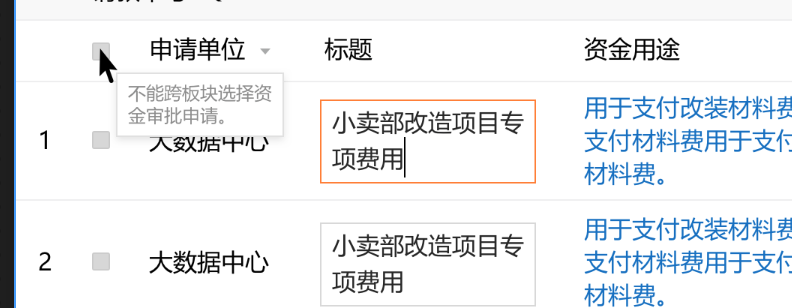
      showTooltip(obj, id, html, width, height,className,isIE) {
        if (document.getElementById(id) == null) {
            let tooltipBox;
            tooltipBox = document.createElement('div');
            tooltipBox.className = className;
            tooltipBox.id = id;
            tooltipBox.innerHTML = html;

            obj.appendChild(tooltipBox);

            if (!width && isIE) {
                tooltipBox.style.width = tooltipBox.offsetWidth;
            }

            tooltipBox.style.position = "absolute";
            tooltipBox.style.display = "block";
            obj.addEventListener('mouseleave',function () {
                setTimeout(function () {
                    document.getElementById(id).style.display = "none";
                }, 100);
            })

        } else {
            document.getElementById(id).style.display = "block";
        }
      }

      canSelect()
      {
        if( document.getElementById(this.tableId)==null ||  document.getElementById(this.tableId).getElementsByClassName("el-checkbox").length==0)
          return
        if(!this.canSelect)              //   在不能全选里面加入
        {
            const self = this;
            let t1 =document.getElementsByClassName('el-checkbox__inner')        //   获取表格里所有的checkbox框
            for(let i= 0;i<t1.length;i++){
              let  className = 'tooltip-box';                                                                //    定义一个类名
              let  isIE = navigator.userAgent.indexOf('MSIE') != -1;                           //    浏览器兼容
              t1[i].addEventListener('mouseover',function(){                                     //     为每一个添加 鼠标浮入事件
                let showText
                if(self.sqbm)
                  showText = '不能跨公司选择资金审批申请。'
                else
                  showText = '不能跨板块选择资金审批申请。'
                self.showTooltip(this,'tooltip'+i,showText,112,43,className,isIE);
              },false)
            }
          document.getElementById(this.tableId).getElementsByClassName("el-checkbox")[0].style.display = "none";
        }
        else
        {

          document.getElementById(this.tableId).getElementsByClassName("el-checkbox")[0].style.display = "block";
        }
      }