研究了两天javascript日期相关的内容,一句话总结:“浏览器可以用上十万年,因为javascript支持的时间范围就是这么长”。
通过实验来看,比较好用的是type="date",及type="datetime-local"
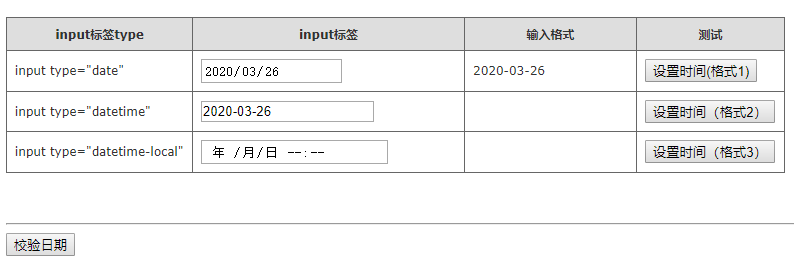
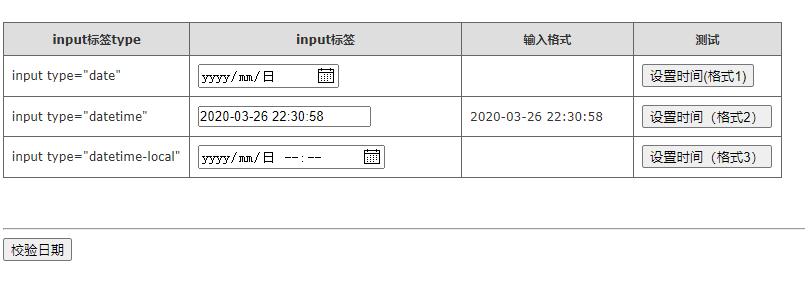
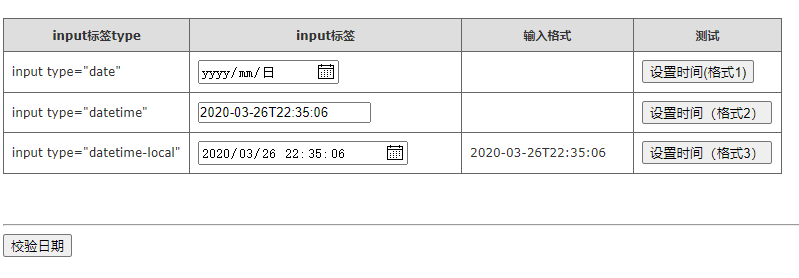
关于设置值的结论:
(1)2020-03-26格式可用于date、datetime
(2)2020-03-26 22:32:07格式仅可以用于datetime
(3)2020-03-26T22:33:03格式可以用于datetime、datetime-local
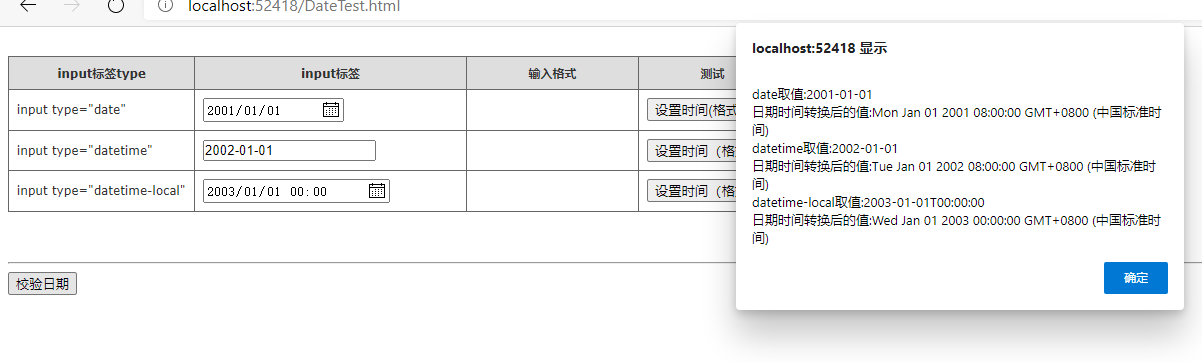
关于输入及校验日期的正确性:能输入不代表就能正确转换成日期
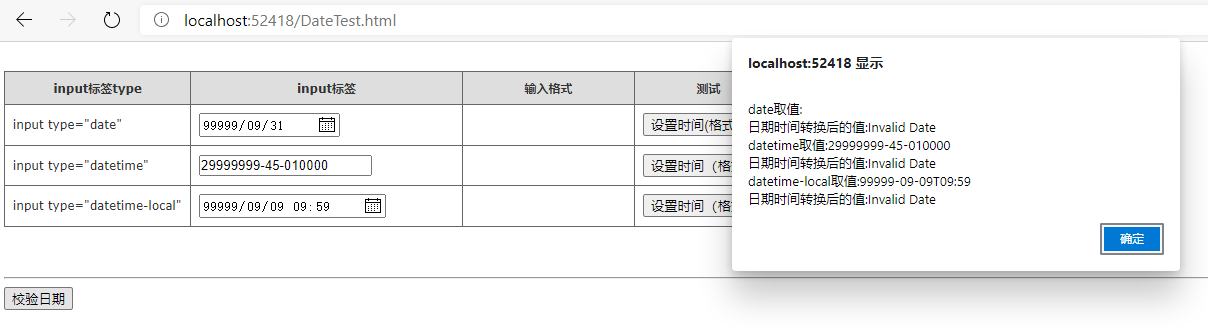
代码:没写过WEB程序,算是个练习,将就着看吧。
<!DOCTYPE html>
<html>
<head>
    <meta charset="utf-8" />
    <title></title>
</head>
<body>
    <style type="text/css">
        table.gridtable {
            font-family: verdana,arial,sans-serif;
            font-size: 11px;
            color: #333333;
            border-width: 1px;
            border-color: #666666;
            border-collapse: collapse;
        }

            table.gridtable th {
                border-width: 1px;
                padding: 8px;
                border-style: solid;
                border-color: #666666;
                background-color: #dedede;
                text-align: center;
            }

            table.gridtable td {
                border-width: 1px;
                padding: 8px;
                border-style: solid;
                border-color: #666666;
                background-color: #ffffff;
            }
    </style>
    <script src='assets/js/jquery-2.0.3.min.js'></script>
    <br />
    <script type="text/javascript">
        function FormatDate() {
            //var current = new Date();
            var now = new Date();

            var year = now.getFullYear();
            //month返回数组(0-11)
            var month = ("0" + (now.getMonth() + 1)).slice(-2);
            //getDate返回日期(1-31)
            var day = ("0" + now.getDate()).slice(-2);
            var formatedDate = year + "-" + month + "-" + day;

            //alert("系统时间:" + now + "
格式化时间:" + formatedDate);
            return formatedDate;
        }
        function FormatDate1() {
            //var current = new Date();
            var now = new Date();

            var year = now.getFullYear();
            //month返回数组(0-11)
            var month = ("0" + (now.getMonth() + 1)).slice(-2);
            //getDate返回日期(1-31)
            var day = ("0" + now.getDate()).slice(-2);
            var formatedDate = year + "/" + month + "/" + day;

            //alert("系统时间:" + now + "
格式化时间:" + formatedDate);
            return formatedDate;
        }
        function FormatDateTime() {
            //var current = new Date();
            var now = new Date();

            var year = now.getFullYear();
            //month返回数组(0-11)
            var month = ("0" + (now.getMonth() + 1)).slice(-2);
            //getDate返回日期(1-31)
            var day = ("0" + now.getDate()).slice(-2);
            //
            var hour = ("0" + now.getHours()).slice(-2);
            var minute = ":" + ("0" + now.getMinutes()).slice(-2);
            var second = ":" + ("0" + now.getSeconds()).slice(-2);

            var formatedDate = year + "-" + month + "-" + day + " " + hour + minute + second;

            //alert("系统时间:" + now + "
格式化时间:" + formatedDate);
            return formatedDate;
        }
        function FormatDateTimeLocal() {
            //var current = new Date();
            var now = new Date();

            var year = now.getFullYear();
            //month返回数组(0-11)
            var month = ("0" + (now.getMonth() + 1)).slice(-2);
            //getDate返回日期(1-31)
            var day = ("0" + now.getDate()).slice(-2);
            //
            var hour = ("0" + now.getHours()).slice(-2);
            var minute = ":" + ("0" + now.getMinutes()).slice(-2);
            var second = ":" + ("0" + now.getSeconds()).slice(-2);

            var formatedDate = year + "-" + month + "-" + day + "T" + hour + minute + second;


            return formatedDate;
        }
    </script>

    <table class="gridtable">
        <thead>
            <tr>
                <th>input标签type</th>
                <th width="255px">input标签</th>
                <th width="155px">输入格式</th>
                <th>测试</th>
            </tr>


        </thead>
        <tr>
            <td>
                input type="date"
            </td>
            <td>
                <input type="date" id="mydate00001" value="2001-01-01" />
            </td>
            <td>
                <label id="lb00001"></label>
            </td>
            <td>
                <input type="button" onclick="setDate1()" value="设置时间(格式1)" />
            </td>
        </tr>
        <tr>
            <td>
                input type="datetime"
            </td>
            <td>
                <input type="datetime" id="mydate00002" value="2002-01-01" />
            </td>
            <td>
                <label id="lb00002"></label>
            </td>
            <td>
                <input type="button" onclick="setDate2()" value="设置时间(格式2)" />
            </td>
        </tr>
        <tr>
            <td>
                input type="datetime-local"
            </td>
            <td>
                <input type="datetime-local" id="mydate00003" value="2003-01-01T00:00:00" />
            </td>
            <td>
                <label id="lb00003"></label>
            </td>
            <td>

                <input type="button" onclick="setDate3()" value="设置时间(格式3)" />
            </td>
        </tr>
    </table>


    <br />


    <!--jquery中attr和prop的区别介绍:
    •对于HTML元素本身就带有的固有属性,在处理时,使用prop方法。
    •对于HTML元素我们自己自定义的DOM属性,在处理时,使用attr方法。-->
    <script type="text/javascript">
        function setDate1() {

            var str = FormatDate();
            $("#lb00001").prop("innerHTML", str);

            $('#mydate00001').prop('value',str );
            $('#mydate00002').prop('value', str);
            $('#mydate00003').prop('value', str)
        }
        function setDate2() {

            var str = FormatDateTime();
            $("#lb00002").prop("innerHTML", str);

            $('#mydate00001').prop('value', str);
            $('#mydate00002').prop('value', str);
            $('#mydate00003').prop('value', str);
        }
        function setDate3() {

            var str = FormatDateTimeLocal();
            $("#lb00003").prop("innerHTML", str);

            $('#mydate00001').prop('value',str);
            $('#mydate00002').prop('value', str);
            $('#mydate00003').prop('value', str);
        }
    </script>

    <br />
    <hr />
    <script type="text/javascript">
        function dateTest() {

            var result="";

            $("input[type='date']")
                .each(function () {
                    var v = new Date($(this).val());
                    result += "
date取值:" + $(this).val() + "
日期时间转换后的值:" + v

                }
            );
            $("input[type='datetime']")
                .each(function () {
                    var v = new Date($(this).val());
                    result += "
datetime取值:" + $(this).val() + "
日期时间转换后的值:" + v
                }
                );
            $("input[type='datetime-local']")
                .each(function () {
                    var v = new Date($(this).val());
                    result += "
datetime-local取值:" + $(this).val() + "
日期时间转换后的值:" + v
                }
            );
            alert(result);
        };
    </script>
    <input type="button" onclick="dateTest()" value="校验日期" />

</body>
</html>