(1)部署redis
1丶安装redis
yum install epel-release -y
yum install redis -y
2丶修改配置文件
#vim /etc/redis.conf
bind 0.0.0.0
daemonize yes
save ""
requirepass 123456
3.启动redis
systemctl enable redis
systemctl restart redis
(2)配置logstash将日志写入到redis中
1丶修改配置文件
input {
        file {
                path => "/var/log/messages"
                type => "systemlog"
                start_position => "beginning"
                stat_interval => "2"
        }
}

output {
        if [type] == "systemlog" {
                redis {
                        data_type => "list"
                        host => "192.168.1.31"
                        db => "6"
                        port => "6379"
                        password => "123456"
                        key => "systemlog"
                }
        }
}
2丶启动
logstash -f /etc/logstash/conf.d/redis.conf  -t
logstash -f /etc/logstash/conf.d/redis.conf
3丶写入日志到messages日志中
cat /etc/hosts >>/var/log/messages
4丶登录redis查看
# redis-cli -h 192.168.1.31
192.168.1.31:6379> auth 123456
OK
192.168.1.31:6379> select 6
OK
192.168.1.31:6379[6]> keys *
1) "systemlog"
192.168.1.31:6379[6]> llen systemlog
(integer) 11292
192.168.1.31:6379[6]> lpop systemlog
(3)配置logstash从redis中取出数据到elasticsearch
1丶修改配置文件
input {
        redis {
                type => "systemlog"
                host => "192.168.1.31"
                password => '123456'
                port => "6379"
                db => "6"
                data_type => "list"
                key => "systemlog"
                }
}
output {
        if [type] == "systemlog" {
                elasticsearch {
                        hosts => ["192.168.1.31:9200"]
                        index => "redis-systemlog-%{+YYYY.MM.dd}"
                                }
                        }
        }
2丶启动
logstash -f /etc/logstash/conf.d/redis.conf  -t
logstash -f /etc/logstash/conf.d/redis.conf
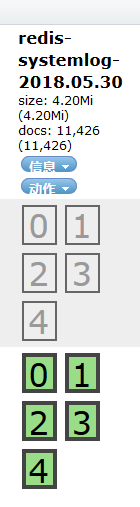
3丶启动head插件查看索引