本人微信公众号:微软动态CRM专家罗勇 ,回复288或者20181205可方便获取本文,同时可以在第一间得到我发布的最新博文信息,follow me!我的网站是 www.luoyong.me 。
使用Microsoft Dynamics 365有时候会碰到类似如下的错误提示:Microsoft Dynamics 365 has encounted an error.
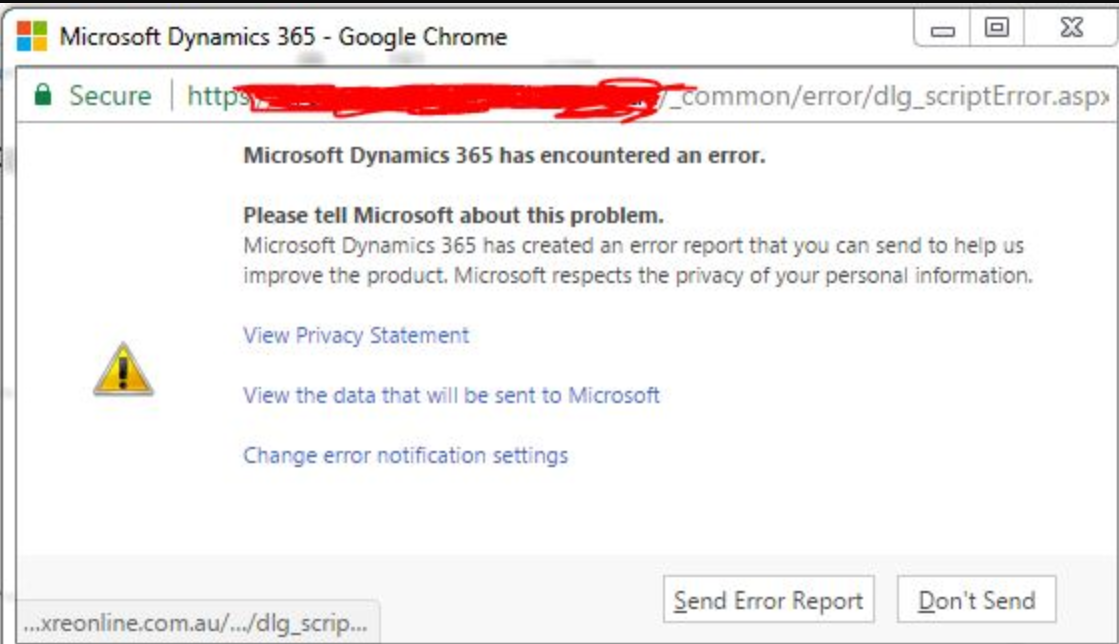
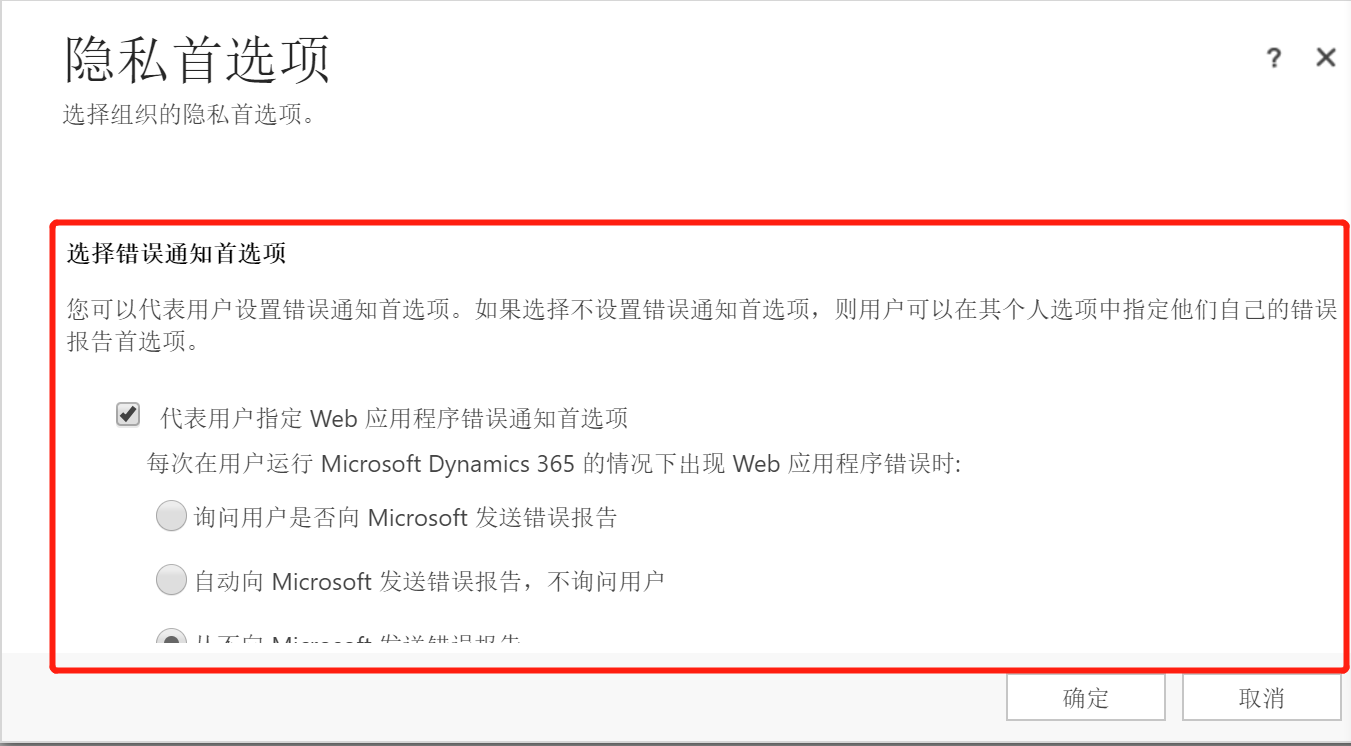
很多时候为了避免这个提示干扰用户操作,系统管理员会在安装后设置不弹出这个提示框。在【设置】>【管理】> 【隐私首选项】做如下设置即可。
- 选中【代表用户指定 Web 应用程序错误通知首选项】
- 选中【从不向 Microsoft 发送错误报告】

当然用户个人也是可以自己设置的,通过【选项】 > 【隐私】,选中【从不向 Microsoft 发送有关 Microsoft Dynamics 365 的错误报告】并确认保存。
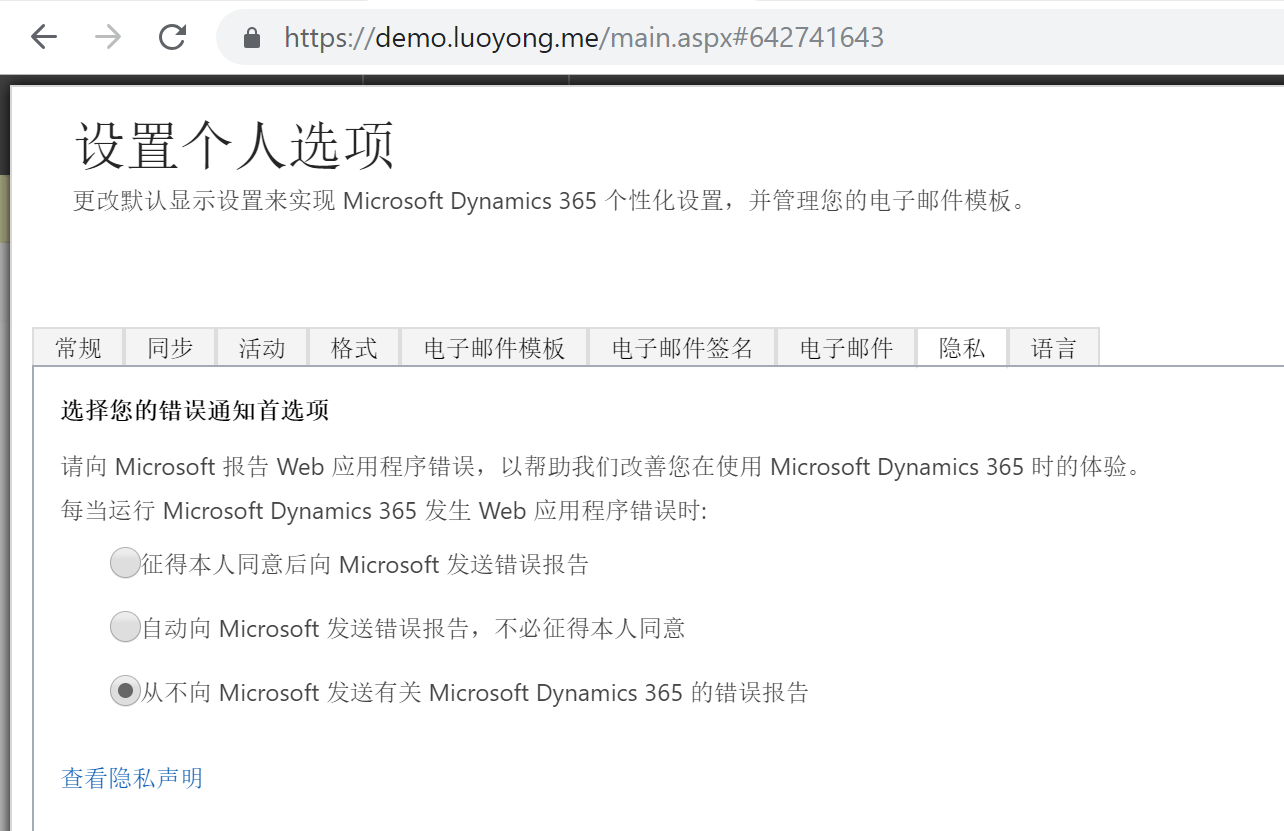
但是有的Dynamics 365版本如下部分不会出现,怎么做个全局设置呢?
办法也是有的,可以使用消息来更新Organiaztion实体的 reportscripterrors 属性值,通过MetadataBrowser可以知道该属性是选项集,有如下四个选项:
- 0 代表 没有用于向 Microsoft 发送有关 Microsoft Dynamics 365 错误报告的首选项
- 1 代表 征得本人同意后向 Microsoft 发送错误报告
- 2 代表 自动向 Microsoft 发送错误报告,不必征得本人同意
- 3 代表 从不向 Microsoft 发送有关 Microsoft Dynamics 365 的错误报告
我是用如下的代码来更新为 0 看看:
using Microsoft.Crm.Sdk.Messages;
using Microsoft.Xrm.Sdk;
using Microsoft.Xrm.Sdk.Client;
using Microsoft.Xrm.Sdk.Query;
using System;
using System.Collections.Generic;
using System.Configuration;
using System.Linq;
using System.ServiceModel.Description;
using System.Text;
using System.Threading.Tasks;

namespace UpdateOrgAttribute
{
    class Program
    {
        static void Main(string[] args)
        {
            IServiceManagement<IOrganizationService> orgServiceMgr = ServiceConfigurationFactory.CreateManagement<IOrganizationService>(new Uri(ConfigurationManager.AppSettings["orgUrl"]));
            AuthenticationCredentials orgAuCredentials = new AuthenticationCredentials();
            orgAuCredentials.ClientCredentials.UserName.UserName = ConfigurationManager.AppSettings["userName"];
            orgAuCredentials.ClientCredentials.UserName.Password = ConfigurationManager.AppSettings["passWord"];
            using (OrganizationServiceProxy orgSvc = GetProxy<IOrganizationService, OrganizationServiceProxy>(orgServiceMgr, orgAuCredentials))
            {
                WhoAmIRequest whoReq = new WhoAmIRequest();
                WhoAmIResponse whoRep = orgSvc.Execute(whoReq) as WhoAmIResponse;
                var userEntity = orgSvc.Retrieve("systemuser", whoRep.UserId, new ColumnSet("fullname"));
                Console.WriteLine(string.Format("登录组织{0}成功,欢迎{1},继续操作请输入y!", ConfigurationManager.AppSettings["orgUrl"], userEntity.GetAttributeValue<string>("fullname")));
                var input = Console.ReadLine().ToString().ToUpper();
                if (input == "Y")
                {
                    QueryExpression pagequery = new QueryExpression("organization");
                    pagequery.ColumnSet.AllColumns = true;
                    Console.WriteLine("组织的各项属性及其值如下:");
                    foreach (var attr in orgSvc.RetrieveMultiple(pagequery).Entities[0].Attributes.Where(t => t.Key != "sitemapxml" && t.Key != "referencesitemapxml").OrderBy(t => t.Key))
                    {
                        Console.WriteLine(string.Format("{0} : {1}", attr.Key, attr.Value.GetType() == typeof(Microsoft.Xrm.Sdk.OptionSetValue) ? ((OptionSetValue)attr.Value).Value : attr.Value));
                        Console.WriteLine("==============================================");
                    }
                    Console.WriteLine("请为【reportscripterrors】输入你要设置的值:");
                    Console.WriteLine("0 代表 没有用于向 Microsoft 发送有关 Microsoft Dynamics 365 错误报告的首选项");
                    Console.WriteLine("1 代表 征得本人同意后向 Microsoft 发送错误报告");
                    Console.WriteLine("2 代表 自动向 Microsoft 发送错误报告,不必征得本人同意");
                    Console.WriteLine("3 代表 从不向 Microsoft 发送有关 Microsoft Dynamics 365 的错误报告");
                    input = Console.ReadLine().ToString().Trim();
                    var orgEntity = new Entity("organization", orgSvc.RetrieveMultiple(pagequery).Entities[0].Id);
                    orgEntity["reportscripterrors"] = new OptionSetValue(Convert.ToInt32(input));
                    orgSvc.Update(orgEntity);
                    Console.WriteLine("更新成功!");
                }
            }
            Console.WriteLine("程序执行完毕!");
            Console.ReadKey();
        }

        private static TProxy GetProxy<TService, TProxy>(
IServiceManagement<TService> serviceManagement,
AuthenticationCredentials authCredentials)
            where TService : class
            where TProxy : ServiceProxy<TService>
        {
            Type classType = typeof(TProxy);

            if (serviceManagement.AuthenticationType !=
                AuthenticationProviderType.ActiveDirectory)
            {
                AuthenticationCredentials tokenCredentials =
                    serviceManagement.Authenticate(authCredentials);
                return (TProxy)classType
                    .GetConstructor(new Type[] { typeof(IServiceManagement<TService>), typeof(SecurityTokenResponse) })
                    .Invoke(new object[] { serviceManagement, tokenCredentials.SecurityTokenResponse });
            }
            return (TProxy)classType
                .GetConstructor(new Type[] { typeof(IServiceManagement<TService>), typeof(ClientCredentials) })
                .Invoke(new object[] { serviceManagement, authCredentials.ClientCredentials });
        }
    }
}
下面是执行截图:
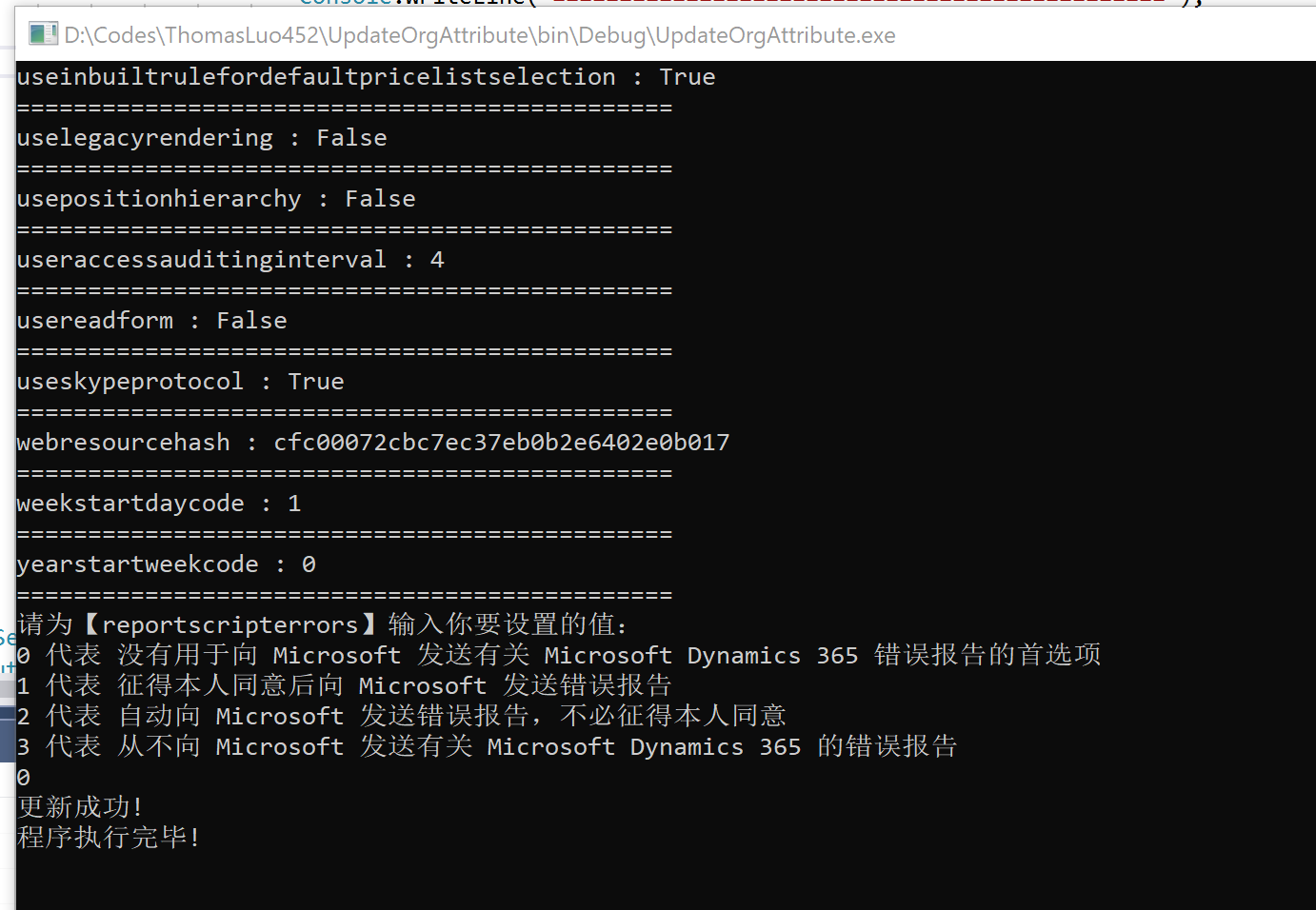
这样更新后,界面上会显示不出来,对CRM的应用程序池执行一下【回收...】就可以看到效果了。