今天遇到一个坑爹的问题,查找了半天原因,终于解决了,在此特地记录一下。
运行环境:Windows eclipse
我在eclipse中配置了python的运行环境,在eclipse中编写python代码。
操作步骤:
1.在python交互命令行中,输入import utils,不报错;
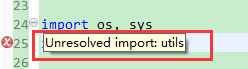
2.在eclipse的pydev Project中,输入import utils,报错:Unresolved import:utils
解决方法:
1.eclipse中,点击Window-preferences-PyDev-Interpreters-Jython Interpreter,在Libraries中,点击New Folder,加入utils目录"src"的路径->点击"ok"
2.重启eclipse,即可解决
同样,可以如下解决:
1.在project右击打开菜单 ->选择properties->选择"PyDev-Interpreter/Grammar"->点击链接"Click here to configure an interpreter not listed." -> 在"Libraries"tab内,点击"new folder",加入utils的路径->点击"ok"
2.重启eclipse
这种方法,可以解决eclipse PyDev中,import时报错:Unresolved import