1.声明一个manager ,再声明一个notification
        NotificationManager notificationManager = (NotificationManager) getSystemService(Context.NOTIFICATION_SERVICE);
        Notification n = new Notification(R.mipmap.push_icon, str, System.currentTimeMillis());
notification的参数:
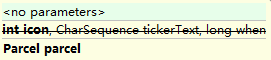
所以也可以单独设置如
n.icon=R.drawable.xxx
n.tickerText="xxx"
2.设置参数flag
FLAG_AUTO_CANCEL 该通知能被状态栏的清除按钮给清除掉
FLAG_NO_CLEAR 该通知不能被状态栏的清除按钮给清除掉
FLAG_ONGOING_EVENT 通知放置在正在运行
n.flags |= Notification.FLAG_AUTO_CANCEL;
3.执行这个通知
notificationManager.notify(0,n);
notification和PendingIntent联用即点击跳转 。
...to be continue