二维码简单介绍
二维条形码是可以在行,列上进行信息的存储,用点(方点、圆点或其他形状)的出现表示二进制"1",点的不出现表示二进制的"0",常见的形状是矩阵型二维码
目前矩阵型二维码流行的三大国际标准:
- PDF417:不支持中文
- DM:专利未公开,需要支付专利费用
- QR Code:专利公开,支持中文
现在常用的就是QR Code,全称:Quick Response Code。这种标准识别速度比较快,占用空间也比较小,由日本发明,但是专利已经公开,可以放心使用
QR Code存在一定的容错性,即使图形存在部分损坏,只要在一定的范围内也是可以识别的
容错级别:
- L级:约可纠错7%的数据码字
- M级:约可纠错15%的数据码字,较为常用
- Q级:约可纠错25%的数据码字
- H级:约可纠错30%的数据码字
如果设置的容错等级越高,可存入的数据就越少
生成QR Code
使用google-zxing工具生成/解析二维码,实际上这个工具不仅仅可以处理QR Code二维码,其他规范二维码,条形码等其他条码也是可以使用的,这里只记录下QR Code的使用方法,首先引入依赖
<dependency>
    <groupId>com.google.zxing</groupId>
    <artifactId>javase</artifactId>
    <version>3.4.0</version>
</dependency>
生成代码
int width = 300;
int height = 300;
// 图片格式
String format = "png";
// 二维码数据内容
String content = "https://www.cnblogs.com";

// 定义二维码参数
HashMap hints = new HashMap();
// 设置字符集
hints.put(EncodeHintType.CHARACTER_SET, "utf-8");
// 设置容错等级
hints.put(EncodeHintType.ERROR_CORRECTION, ErrorCorrectionLevel.M);
// 设置二维码与外边框边距
hints.put(EncodeHintType.MARGIN, 2);

// 生成二维码
try {
	BitMatrix bitMatrix = new MultiFormatWriter().encode(content, BarcodeFormat.QR_CODE, width, height, hints);
	// 这里使用文件路径的方式,也可以使用IO流的方式,将二维码作为响应流输出 MatrixToImageWriter.writeToStream
	Path path = new File("D:/qrCode.png").toPath();
	MatrixToImageWriter.writeToPath(bitMatrix, format, path);
} catch (Exception e) {
	e.printStackTrace();
}
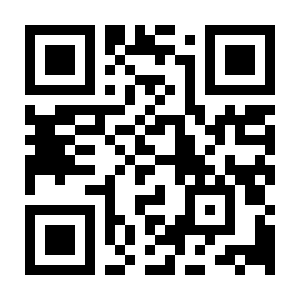
生成的二维码如下
解析QR Code
MultiFormatReader reader = new MultiFormatReader();
File file = new File("D:/qrCode.png");
try {
	BufferedImage bufferedImage = ImageIO.read(file);
	BinaryBitmap binaryBitmap = new BinaryBitmap(new HybridBinarizer(new BufferedImageLuminanceSource(bufferedImage)));

	// 定义二维码参数
	HashMap hints = new HashMap();
	// 设置字符集
	hints.put(EncodeHintType.CHARACTER_SET, "utf-8");

	Result result = reader.decode(binaryBitmap, hints);
	System.out.println("解析结果: " + result.toString());
	System.out.println("二维码格式:" + result.getBarcodeFormat());
	System.out.println("文本内容:" + result.getText());
} catch (IOException e) {
	e.printStackTrace();
} catch (NotFoundException e) {
	e.printStackTrace();
}
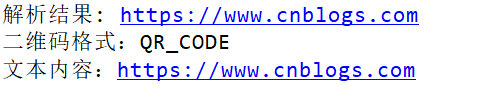
解析结果
js生成QR Code
除了使用Java生成/解析QR Code二维码,使用jQuery插件也可以,插件地址:jquery-qrcode
<!DOCTYPE html>
<html>
<head>
    <meta http-equiv="Content-Type" content="text/html;charset=UTF-8" />
    <title>QR Code二维码</title>
</head>
<body>
    <div id="qrcode"></div>
</body>
<script type="text/javascript" src="jquery-3.1.1.min.js"></script>
<script type="text/javascript" src="jquery.qrcode.min.js"></script>
<script type="text/javascript">
	$('#qrcode').qrcode({ 300, height: 300, text: "https://www.cnblogs.com"});
</script>
</html>