问题描述
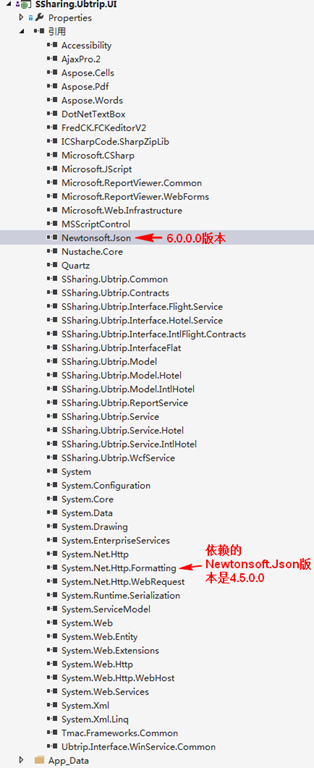
当运行站点或者控制台等程序时,如果项目引用的dll版本与其它dll所依赖的dll版本不一致,就会报未能加载程序集的错误。错误信息为:
未能加载文件或程序集“Newtonsoft.Json, Version=4.5.0.0, Culture=neutral, PublicKeyToken=30ad4fe6b2a6aeed”或它的某一个依赖项。找到的程序集清单定义与程序集引用不匹配。 (异常来自 HRESULT:0x80131040)
原因分析
分析如下图。
解决方案
在web.config或app.config中添加以下节点。


  1 <!--dll版本向下兼容-->
  2   <runtime>
  3     <assemblyBinding xmlns="urn:schemas-microsoft-com:asm.v1">
  4       <dependentAssembly>
  5         <assemblyIdentity name="Newtonsoft.Json" publicKeyToken="30ad4fe6b2a6aeed" culture="neutral" />
  6         <bindingRedirect oldVersion="0.0.0.0-6.0.0.0" newVersion="6.0.0.0" />
  7       </dependentAssembly>
  8     </assemblyBinding>
  9   </runtime>
 10