GoogleGears 是一个开源的浏览器扩展,用于创建可离线使用的 web 应用程序,目前尚在 beta 阶段。
其主页地址在:http://code.google.com/apis/gears/
网上论坛:http://groups.google.com/group/google-gears/
Blog: http://gearsblog.blogspot.com/ (好像暂时不能访问了。。。)
GoogleGears 主要包含3个模块:
1. 本地 web 服务器(用于提供 HTML, JavaScript, 图片等的访问请求)
2. 数据库
3. WorkerPool
通过异步的方式在后台进行资源访问的操作(比如同步本地用户数据到服务器),使浏览器程序保持快速响应。
首先,需要安装 GoogleGears:
http://code.google.com/apis/gears/install.html
那么如何在自己的应用程序上线后,检查客户电脑上是否安装了 GoogleGears 呢?
首先必须在页面里面包含这一段 js:
http://code.google.com/apis/gears/tools/gears_init.js
然后,可以通过相关对象来判断并提示用户安装。
示例代码如下:
<script>
if (!window.google || !google.gears) {
location.href = "http://gears.google.com/?action=install&message=<meil blog>" +
"&return=http://meil.livebaby.cn";
}
</script>
我们看到其中提示用户安装的地址允许定制两个自定义信息:
message: 用户提示信息,不超过150个字。
return: 安装完毕后返回的地址,也就是我们自己的 web 程序页面。
看一下 gears_init.js 会发现,对 Windows 而言,实际上 GoogleGears 在客户端安装了一个 ActiveX 对象:
GoogleGears 的所有功能调用都是通过操纵该对象来完成的。
下面来学习几个例子。
1. 数据库 Demo
http://code.google.com/apis/gears/samples/hello_world_database.html
这个例子允许用户输入一些信息,并显示出最近输入的3条。在用户下次访问时仍然存在。
其界面如下: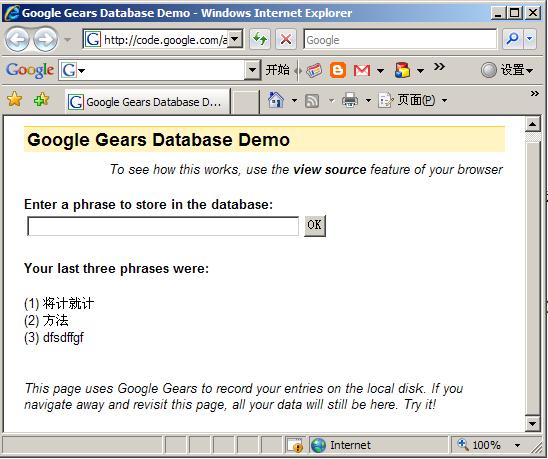
首先在 HTML 页面里面包含如下代码,用于 gears 的安装探测,这个是每个页面必须的:
下面执行一些初始化工作,并打开数据库:
var db;
init();
// 打开本页面对应的本地数据库.
function init() {
if (!window.google || !google.gears) {
return;
}
try {
db = google.gears.factory.create('beta.database', '1.0');
} catch (ex) {
setError('Could not create database: ' + ex.message);
}
if (db) {
db.open('database-demo'); // 打开数据库
// 创建表的语法
db.execute('create table if not exists Demo' +
' (Phrase varchar(255), Timestamp int)');
//

}
//
}
获取最新的3条记录,并删除其他老的记录的实现代码:
try {
// 这里打开的实际上是一个记录集的游标(cursor),和 ASP 的经典写法很类似。
var rs = db.execute('select * from Demo order by Timestamp desc');
var index = 0;
while (rs.isValidRow()) {
if (index < 3) {
recentPhrases[index] = rs.field(0);
} else {
// 这里可以看到 Tempstamp(时间戳)被当作主键使用了。
db.execute('delete from Demo where Timestamp=?', [rs.field(1)]);
}
++index;
rs.next();
}
rs.close();
} catch (e) {
throw new Error(e.message);
}
用户输入数据提交时,用如下逻辑实现插入数据的功能:
if (!google.gears.factory || !db) {
return;
}
var elm = document.getElementById('submitValue');
var phrase = elm.value;
// 注意 getTime() 方法返回的是日期对象相当于某个基准时间的毫秒数,是一个大整数
var currTime = new Date().getTime();
// 插入新记录
// Gears 数据库能自动转义/反转义插入的值。
// (The Gears database automatically escapes/unescapes inserted values.)
db.execute('insert into Demo values (?, ?)', [phrase, currTime]);
// Update the UI.
elm.value = '';
displayRecentPhrases();
}
关闭浏览器后,重新打开看这个页面,果然数据还在。可以将 Google 的这个 demo 页面代码复制到本地,
打开 html 离线执行,其功能是一样的。