最常用属性:


<?xml version="1.0" encoding="utf-8"?>
<RelativeLayout xmlns:android="http://schemas.android.com/apk/res/android"
    android:layout_width="match_parent"
    android:layout_height="match_parent">

    <View
        android:id="@+id/view_1"
        android:layout_width="100dp"
        android:layout_height="100dp"
        android:background="#000000"
        android:layout_alignParentBottom="true"
        android:layout_alignParentRight="true"/>

</RelativeLayout>
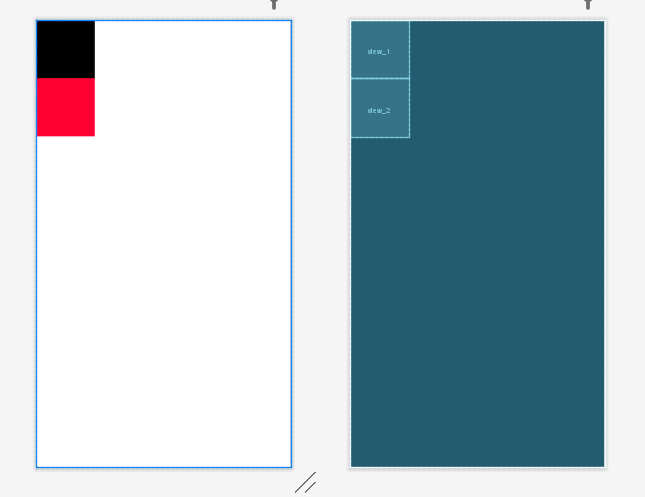
<?xml version="1.0" encoding="utf-8"?>
<RelativeLayout xmlns:android="http://schemas.android.com/apk/res/android"
    android:layout_width="match_parent"
    android:layout_height="match_parent">

    <View
        android:id="@+id/view_1"
        android:layout_width="100dp"
        android:layout_height="100dp"
        android:background="#000000" />
    <View
        android:id="@+id/view_2"
        android:layout_width="100dp"
        android:layout_height="100dp"
        android:background="#FF0033"
        android:layout_below="@id/view_1"/>
</RelativeLayout>

<?xml version="1.0" encoding="utf-8"?>
<RelativeLayout xmlns:android="http://schemas.android.com/apk/res/android"
    android:layout_width="match_parent"
    android:layout_height="match_parent">

    <View
        android:id="@+id/view_1"
        android:layout_width="100dp"
        android:layout_height="100dp"
        android:background="#000000" />
    <View
        android:id="@+id/view_2"
        android:layout_width="100dp"
        android:layout_height="100dp"
        android:background="#FF0033"
        android:layout_below="@id/view_1"/>
    <LinearLayout
        android:layout_width="match_parent"
        android:layout_height="200dp"
        android:layout_below="@id/view_2"
        android:orientation="horizontal"
        android:background="#0066FF"
        android:padding="15dp">
        <View
            android:layout_width="100dp"
            android:layout_height="match_parent"
            android:background="#FF0033"/>
        <RelativeLayout
            android:layout_width="match_parent"
            android:layout_height="match_parent"
            android:background="#000000"
            android:padding="15dp">
            <View
                android:id="@+id/view_3"
                android:layout_width="100dp"
                android:layout_height="match_parent"
                android:background="#FF9900"/>
            <View
                android:id="@+id/view_4"
                android:layout_width="100dp"
                android:layout_height="match_parent"
                android:background="#FF9900"
                android:layout_toRightOf="@id/view_3"
                android:layout_marginLeft="10dp"/>
        </RelativeLayout>

    </LinearLayout>
</RelativeLayout>