一个简化版。完全木有使用渐变和阴影,也没使用keyframes。
只用到了圆角border-radius和变换transform。
哈哈。。好玩儿。
浏览器效果如下。
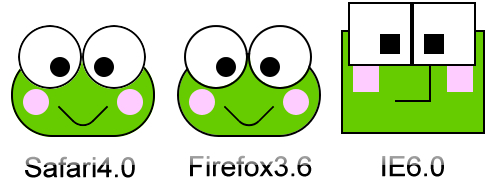
将以下代码另存为htm即可:
1 <style type="text/css">
2 div{
3 border:2px #000000 solid;
4 }
5 #froggy{
6 margin:80px;
7 border:none;
8 }
9 div.head{
10 position:relative;
11 width:140px;
12 height:80px;
13 color: #000000;">:60px;
14 -moz-border-radius: 60px;
15 background:#66CC00;
16 }
17 div.eye{
18 position:relative;
19 width:60px;
20 height:60px;
21 left:5px;
22 top:-30px;
23 color: #000000;">:60px;
24 -moz-border-radius: 60px;
25 float:left;
26 background:#ffffff;
27 }
28 div.apple{
29 position:relative;
30 top:30px;
31 width:20px;
32 height:20px;
33 border:none;
34 background:#000000;
35 color: #000000;">:10px;
36 -moz-border-radius: 10px;
37 }
38 div.left-apple{
39 left:30px;
40 }
41 div.right-apple{
42 left:10px;
43 }
44 div.face{
45 position:relative;
46 top:-30px;
47 width:26px;
48 height:26px;
49 border:none;
50 background:#FFCCFF;
51 color: #000000;">:15px;
52 -moz-border-radius: 15px;
53 float:left;
54 }
55 div.left-face{
56 left:10px;
57 }
58 div.right-face{
59 left:78px;
60 }
61 div.mouse{
62 position:relative;
63 float:left;
64 width:34px;
65 height:34px;
66 top:-30px;
67 border:#000000 2px solid;
68 border-left:none;
69 border-top:none;
70 color: #000000;">: rotate(45deg);
71 -moz-transform: rotate(45deg);
72 color: #000000;">:15px;
73 -moz-border-radius-bottomright: 15px;
74 }
75 </style>
76 <div id="froggy">
77 <div class="head">
78 <div class ="eye ">
79 <div class="apple left-apple">
80 </div>
81 </div>
82 <div class ="eye ">
83 <div class="apple right-apple">
84 </div>
85 </div>
86 <div class="face left-face">
87 </div>
88 <div class="face right-face">
89 </div>
90 <div class="mouse">
91 </div>
92 </div>
93 </div>
2 div{
3 border:2px #000000 solid;
4 }
5 #froggy{
6 margin:80px;
7 border:none;
8 }
9 div.head{
10 position:relative;
11 width:140px;
12 height:80px;
13 color: #000000;">:60px;
14 -moz-border-radius: 60px;
15 background:#66CC00;
16 }
17 div.eye{
18 position:relative;
19 width:60px;
20 height:60px;
21 left:5px;
22 top:-30px;
23 color: #000000;">:60px;
24 -moz-border-radius: 60px;
25 float:left;
26 background:#ffffff;
27 }
28 div.apple{
29 position:relative;
30 top:30px;
31 width:20px;
32 height:20px;
33 border:none;
34 background:#000000;
35 color: #000000;">:10px;
36 -moz-border-radius: 10px;
37 }
38 div.left-apple{
39 left:30px;
40 }
41 div.right-apple{
42 left:10px;
43 }
44 div.face{
45 position:relative;
46 top:-30px;
47 width:26px;
48 height:26px;
49 border:none;
50 background:#FFCCFF;
51 color: #000000;">:15px;
52 -moz-border-radius: 15px;
53 float:left;
54 }
55 div.left-face{
56 left:10px;
57 }
58 div.right-face{
59 left:78px;
60 }
61 div.mouse{
62 position:relative;
63 float:left;
64 width:34px;
65 height:34px;
66 top:-30px;
67 border:#000000 2px solid;
68 border-left:none;
69 border-top:none;
70 color: #000000;">: rotate(45deg);
71 -moz-transform: rotate(45deg);
72 color: #000000;">:15px;
73 -moz-border-radius-bottomright: 15px;
74 }
75 </style>
76 <div id="froggy">
77 <div class="head">
78 <div class ="eye ">
79 <div class="apple left-apple">
80 </div>
81 </div>
82 <div class ="eye ">
83 <div class="apple right-apple">
84 </div>
85 </div>
86 <div class="face left-face">
87 </div>
88 <div class="face right-face">
89 </div>
90 <div class="mouse">
91 </div>
92 </div>
93 </div>