react开发工具create-react-app+vscode
(1)第一步,配置tomcat项目可跨域访问
    我的react项目端口是3000,java的项目端口是8080,所以第一步实现跨域访问(请参考地址http://blog.csdn.net/u012500848/article/details/51162449自己实现)
(2)springmvc后台登录代码
    @RequestMapping(value = { "/test/login" }, method = RequestMethod.POST)
    @ResponseBody
    public String Login(HttpServletRequest request) {
        String username = request.getParameter("username");
        String pwd = request.getParameter("userpwd");
        if (username == null || username.isEmpty()) {
            return "帐号为空";
        }
        if (pwd == null || pwd.isEmpty()) {
            return "密码为空";
        }
        if (username.equals("test") && pwd.equals("123456")) {
            return "登录成功";
        } else {
            return "帐号或密码错误";
        }
    }
(3)使用fetch实现登录功能,要先在项目中安装fetch(yarn add whatwg-fetch)
import React from 'react';
import {Form, Icon, Input, Button, message} from 'antd';
import 'whatwg-fetch';
import './Login.css';

const FormItem = Form.Item;
class Login extends React.Component {
    //登录事件
    handleSubmit = (e) => {
        e.preventDefault();
        let url = "http://localhost:8080/shiro/test/login";
        let formData = new FormData();
        formData.append('username', this.props.form.getFieldValue("username"));
        formData.append('userpwd', this.props.form.getFieldValue("userpwd"));
        fetch(url, {
                method: 'post',
                mode: 'cors',
                body: formData
            }).then(function (response) {
            return response.text()
        }).then(function (body) {
                message.info(body);
            });
    }
    render() {
        const {getFieldDecorator} = this.props.form;
        return (
            <Form onSubmit={this.handleSubmit} className="login-form">
                <FormItem>
                    {getFieldDecorator('username', {})(
                        <Input
                            prefix={< Icon type = "user" style = {{ fontSize: 13 }}/>}
                            placeholder="帐号"/>
                    )}
                </FormItem>
                <FormItem>
                    {getFieldDecorator('userpwd', {})(
                        <Input
                            prefix={< Icon type = "lock" style = {{ fontSize: 13 }}/>}
                            type="password"
                            placeholder="密码"/>
                    )}
                </FormItem>
                <FormItem>
                    <Button type="primary" htmlType="submit" className="login-form-button">
                        登录
                    </Button>
                </FormItem>
            </Form>
        );
    }
}
const WrappedNormalLoginForm = Form.create()(Login);
export default WrappedNormalLoginForm;
this.props.form.getFieldValue方法用来获取input输入的值。
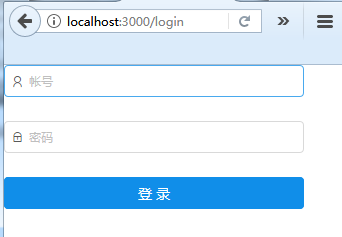
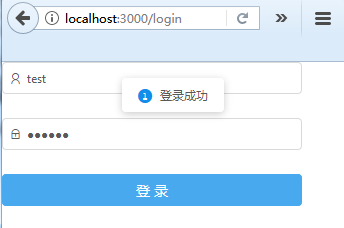
(4)实现效果