1.确认对话框
Ext.MessageBox.alert( title,content,fn)
Ext.onReady(function () {
Ext.Msg.alert("好吧,成功", "yahoo!ExtJs",fn);
});
Ext.Msg.alert("好吧,成功", "yahoo!ExtJs",fn);
});

2.选择对话框
Ext.MessageBox.confirm(title,content,fn)
回调函数接收参数e,表示按钮,e='yes'或='ok'(不区分大小写)都说明用户点击了确定。
//此方法提示确认和取消,如果将此方法放在函数中执行则出现在confirm方法后的代码永远不会执行,所以以后的操作逻辑必须放入fn回调函数,
Ext.Msg.confirm("", "确定删除此权限?", function (e) {
if (e != "yes") { return; }
//……此处执行操作
});
Ext.Msg.confirm("", "确定删除此权限?", function (e) {
if (e != "yes") { return; }
//……此处执行操作
});
3.输入数据对话框
Ext.MessageBox.prompt(title,content,fn,obj,m)
m:布尔值或数字(用以指示是否是多行或直接用数字指示多行的行数)
Ext.onReady(function () {
Ext.Msg.prompt("input", "input your name", function (e, text) {
if (e == "ok") {
var value = text;
Ext.MessageBox.alert("output", "你输入的文字是:" + text);
}
}, null, 400);
});
Ext.Msg.prompt("input", "input your name", function (e, text) {
if (e == "ok") {
var value = text;
Ext.MessageBox.alert("output", "你输入的文字是:" + text);
}
}, null, 400);
});

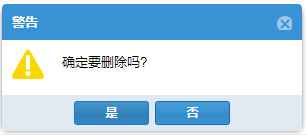
4.自定义弹窗
Ext.MessageBox.show(options)
包含了以上弹出窗口的所有功能。
title:标题
msg:内容
multiline:行数
icon:Ext.MessageBox.ERROR | Ext.Msg.QUESTION
buttons: Ext.MessageBox.OKCANCEL | Ext.MessageBox.YESNOCANCEL
fn:function(e):回调时判断e值可知道用户点击的是哪个按钮,按钮小写的名字就是e的值。
//Ext.MeesageBox有100多个config,通过Ext.window.MessageBox创建的对话框可以使用这些配置项,详情查阅API
Ext.create('Ext.window.MessageBox', {
style: "border:none;",
frame: false,
border: false
}).show({
title: "警告",
msg: "确定要删除吗?",
buttons: Ext.MessageBox.YESNO,
width: 300,
icon: Ext.MessageBox.WARNING,
fn: function (m) {
if (m == "yes") {
Ext.Ajax.request({
method: "post",
url: "/StockTable/DelStockTable",
params: { ID: record.get("StockTableId"), delType: "Single" },
success: function (m) {
var m = Ext.decode(m.responseText);
Ext.Msg.alert("", m.msg);
Ext.getStore("StockTableStore").removeAt(rowIndex);
},
failure: function () {
Ext.Msg.alert("", "http错误");
}
});
}
}
});
Ext.create('Ext.window.MessageBox', {
style: "border:none;",
frame: false,
border: false
}).show({
title: "警告",
msg: "确定要删除吗?",
buttons: Ext.MessageBox.YESNO,
width: 300,
icon: Ext.MessageBox.WARNING,
fn: function (m) {
if (m == "yes") {
Ext.Ajax.request({
method: "post",
url: "/StockTable/DelStockTable",
params: { ID: record.get("StockTableId"), delType: "Single" },
success: function (m) {
var m = Ext.decode(m.responseText);
Ext.Msg.alert("", m.msg);
Ext.getStore("StockTableStore").removeAt(rowIndex);
},
failure: function () {
Ext.Msg.alert("", "http错误");
}
});
}
}
});
进度条
Ext.onReady(function () {
Ext.MessageBox.show({
msg: "wait 5 seconds!",
progress: true,
progressText: "正在加载……",
wait: true,
width: 300,
waitConfig: {
interval: 555,//间隔555毫秒进度条前进一次,总时长÷9
duration: 5000,//经过5000毫秒后停止
fn: function () {
Ext.MessageBox.hide();
}
}
});
});
Ext.MessageBox.show({
msg: "wait 5 seconds!",
progress: true,
progressText: "正在加载……",
wait: true,
width: 300,
waitConfig: {
interval: 555,//间隔555毫秒进度条前进一次,总时长÷9
duration: 5000,//经过5000毫秒后停止
fn: function () {
Ext.MessageBox.hide();
}
}
});
});

Ext.onReady(function () {
Ext.MessageBox.show({
title: '请等待',
msg: '读取数据中……',
width: 240,
progress: true,
closable: false
});
var dynamic = function (v) {
return function () {
if (v == 11) {
Ext.MessageBox.hide();
} else {
Ext.MessageBox.updateProgress(v / 10, '正在读取第 ' + v + ' 个,一共10个。');
}
};
};
for (var i = 1; i < 12; i++) {
setTimeout(dynamic(i), i * 500);
}
});
Ext.MessageBox.show({
title: '请等待',
msg: '读取数据中……',
width: 240,
progress: true,
closable: false
});
var dynamic = function (v) {
return function () {
if (v == 11) {
Ext.MessageBox.hide();
} else {
Ext.MessageBox.updateProgress(v / 10, '正在读取第 ' + v + ' 个,一共10个。');
}
};
};
for (var i = 1; i < 12; i++) {
setTimeout(dynamic(i), i * 500);
}
});

5.遮罩
Ext.create('Ext.LoadMask', {//请求数据之前先定义一个等待蒙版
id: "mask",
msg: '处理中...',
target: Ext.getBody(),
autoShow: true
});
Ext.getCmp("mask").destroy();
id: "mask",
msg: '处理中...',
target: Ext.getBody(),
autoShow: true
});
Ext.getCmp("mask").destroy();