常用接口
用于比较接口
IComparable<T>
接口内部定义了用于比较两个对象大小的CompareTo(T t)方法,>参数时返回1,=参数时返回0,<参数时返回-1。集合类型的Sort方法的排序逻辑正是隐式地调用了此接口的CompareTo方法,Sort方法按CompareTo方法返回的值来确定应如何对元素进行排序,默认情况下是按从小到大进行排序。如果不喜欢使用此接口指定比较逻辑来排序,还可以直接使用Comparison<T>(T t1,T t2)委托,该委托作为Sort方法的参数被自动调用,你可以传递给Sort方法一个匹配Comparison<T>委托签名的lambda表达式用以指定比较的逻辑。
{
public int Score { get; set; }
//比较成绩
public int CompareTo(Student other)
{
return Score > other.Score ? 1 : Score < other.Score ? -1 : 0;
}
}
public class Programe
{
static void Main(string[] args)
{
Student stu1 = new Student { Score = 100 };
Student stu2 = new Student { Score = 90 };
int result=stu1.CompareTo(stu2);
Console.WriteLine(result); //print 1
}
}
IComparer<T>
接口内部定义了用于比较两个对象大小的Compare(T x, T y)方法,x>y时返回1,x=y时返回0,x<y返回-1。应创建一个新的类来实现此接口。集合类型的Sort方法可以排序逻辑可以接收IComparer的一个实例,Sort方法会自动调用该接口实例的Compare方法,Sort方法按Compare方法返回的值来确定应如何对元素进行排序。如果不喜欢使用此接口指定比较逻辑来排序,还可以直接使用Comparison<T>(T t1,T t2)委托,该委托作为Sort方法的参数被自动调用,你可以传递给Sort方法一个匹配Comparison<T>委托签名的lambda表达式用以指定比较的逻辑。
{
//比较成绩
public int Compare(Student x, Student y)
{
return x.Score > y.Score ? 1 : x.Score < y.Score ? -1 : 0;
}
}
public class Student
{
public int Score { get; set; }
}
public class Programe
{
static void Main(string[] args)
{
Student stu1 = new Student { Score = 100 };
Student stu2 = new Student { Score = 90 };
int result = new CompareObject().Compare(stu1, stu2);
Console.WriteLine(result); //print 1
}
}
用于测试相等性的比较接口
IEquatable<T>
接口内部定义了用于测试相等性的Equals(T other)方法。当前对象和参数对象相等则返回true,否则返回false。
{
public long Id { get; set; }
public string Name { get; set; }
public bool Equals(Employee other)
{
return other == null ? false : other.Name == Name ? true : false;
}
}
public class Programe
{
static void Main(string[] args)
{
var em = new Employee { Id = 1, Name = "sam" };
var em2 = new Employee { Id = 1, Name = "sam" };
Console.WriteLine(em.Equals(em2)); //print true
}
}
IEqualityComparer<T>
接口内部定义了用于测试相等性的Equals(T x , T y)方法和GetHashCode(T obj)方法。x和y相等则返回true,否则返回false。
如果想要两个版本的Equals()方法,比如一个用于测试两个对象的地址引用的相等性,另一个用于测试两个对象的属性的等同性,可考虑保持继承的Object的Equals()方法和GetHashCode()方法不变,然后通过实现IEqualityComparer<T>的Equals()和GetHashCode()来实现自定义的比较。如果需要将某个类型添加到泛型字典中,要么重写object的Equals()和GetHashCode(),要么实现IEqualityComparer<T>,这样就保持了两个版本的比较器,而要让泛型字典使用IEqualityComparer<T>的版本,则需要在初始化泛型字典时将实现IEqualityComparer<T>接口的类实例作为其构造函数的参数传递进去即可。如果没有传递这样的参数,则泛型字典将默认使用Object版本的Equals()和GetHashCode()。
{
public class Employee
{
public long Id { get; set; }
public string Name { get; set; }
}
public class EmployeesEqualName : IEqualityComparer<Employee>
{
public bool Equals(Employee x, Employee y)
{
return object.ReferenceEquals(x, y) ? true : x == null || y == null ? false : x.Name == y.Name ? true : false;
}
public int GetHashCode(Employee obj)
{
return obj.Name.GetHashCode();
}
}
public class Programe
{
static void Main(string[] args)
{
var em = new Employee { Id = 1, Name = "sam" };
var em2 = new Employee { Id = 1, Name = "sam" };
Console.WriteLine(new EmployeesEqualName().Equals(em, em2)); //print true
Dictionary<Employee, string> dictionarys = new Dictionary<Employee, string>(new EmployeesEqualName())
{
{ em,"1" },
{ em2,"2"}
};
Console.WriteLine(dictionarys.ContainsKey(em2));//抛出异常 因为属性值相等,em2不会作为key被添加
}
}
}
用于类型转换的接口
IConvertible<T>
接口内部定义了17个方法用于类型的强制转换,可实现自定义的转换规则。
用于泛型集合的接口

IEnumerable<T>
接口内部只有一个方法,这个方法叫做GetEnumerator(),该方法返回一个IEnumerator<T>实例,IEnumerator<T>称为枚举数。任何实现了IEnumerable<T>接口的类型都具有GetEnumerator()方法的实现,GetEnumerator()返回枚举数用于迭代。另外,Enumerable类为IEnumerable<T>扩展了几十个用于Linq查询的泛型扩展方法。实现了IEnumerable<T>的类型都能调用Linq查询。
IEnumerator<T>
接口内部定义了获取泛型集合中的当前元素、将指针移动到下一个元素、将指针归位的方法,所有实现了IEnumerable接口的泛型集合类型都通过实现其GetEnumerator()方法,该方法返回一个实现了迭代集合枚举数:IEnumerator实例,因为枚举的复杂度,C#已隐藏枚举的具体实现,建议通过foreach语句迭代集合元素。 最后注意,任何正在进行迭代的集合,都不要试图在这个过程中为集合执行添加、删除、修改操作,这些行为将被视为无效,如果修改值,编译器会提示错误,添加、删除不会提示错误,但这些行为是无效的。因为这样做会引起歧义,正在迭代当中却试图为集合执行增删改,那么枚举数就不知道接下来应该将改动视为一次迭代还是应忽视它们。
Current
//当前枚举中的元素
MoveNext()
//将枚举器的指针移动到下一个元素
Reset()
//将枚举器的指针归位,在索引0之前
内置的集合类型都可以使用for、foreach、集合.GetEnumerator()方法这三种方式迭代集合,但如果你要想让自定义的泛型集合也可以被迭代,你就必须手动实现IEnumerable<T>和IEnumerator<T>接口或者直接使用yied关键字
利用集合接口实现自定义泛型集合
自定义集合的初始化器
自定义一个公开的Add(Object obj)方法用于使集合初始化器可以正确添加项。下面是一个简陋的例子,只为说明如何为自定义集合添加初始化器:
{
public string Name { get; set; }
}
public class TestCollection : IEnumerable
{
public void Add(Animal a)
{
throw new NotImplementedException();
}
public IEnumerator GetEnumerator()
{
throw new NotImplementedException();
}
}
TestCollection myLlist = new TestCollection
{
new Animal{ Name="sam" },
new Animal{ Name="korn" }
};
实现的步骤
1.定义支持集合初始化器的方法,一个Add(T obj)方法
2.实现IEnumerable<T>和IEnumerable接口,因为IEnumerable<T>派生自IEnumerable,有了这两个实现,就成功创建了表示集合的类型
3.定义支持通过索引获取项的索引器,有了索引器就可以使用for语句迭代每个项
4.创建一个可迭代的枚举器,必须实现IEnumerator<T>接口。有了可迭代的枚举器就可以使用IEnumerator的方法或foreach语句迭代每个项
{
public class Programe
{
public class Animal
{
public string Name { get; set; }
}
public class Aggregates<T> : IEnumerable<T>, IEnumerable
{
private List<T> Elms = new List<T>();
//集合的初始化器
public void Add(T t)
{
Elms.Add(t);
}
//索引器
public T this[int index]
{
get
{
return Elms.Any() ? index > (Elms.Count - 1) ? default(T) : Elms[index] : default(T);
}
set
{
if (Elms.Any())
{
if (index <= (Elms.Count - 1))
{
Elms[index] = value;
}
}
}
}
public IEnumerator<T> GetEnumerator()
{
return new AggregatesEnumerator<T>(Elms);
}
IEnumerator IEnumerable.GetEnumerator()
{
return GetEnumerator();
}
}
public class AggregatesEnumerator<T> : IEnumerator<T>
{
public List<T> list;
private int indexer;
public T Current => list[indexer];
object IEnumerator.Current => list[indexer];
public AggregatesEnumerator(List<T> xAggregates)
{
list = xAggregates;
indexer = -1;
}
public void Dispose() { }
public bool MoveNext()
{
indexer++;
return indexer != list.Count();
}
public void Reset()
{
indexer = -1;//游标归位
}
}
static void Main(string[] args)
{
Aggregates<Animal> list = new Aggregates<Animal>
{
new Animal{ Name="sam" },
new Animal{ Name="korn" },
new Animal{ Name="landy" }
};
//IEnumerator迭代
var ItemRator = list.GetEnumerator();
while (ItemRator.MoveNext())
{
Console.WriteLine(ItemRator.Current.Name);
}
//foreach迭代
foreach (var item in list)
{
Console.WriteLine(item.Name);
}
//for迭代
for (int i = 0; i < list.Count(); i++)
{
Console.WriteLine(list[i].Name);
}
}
}
}
以上实现起始内部依然是通过将项存储在一个List<T>中,所以AggregatesEnumerator<T>类完全可以省略不写,然后在Aggregates<T>类的两个GetEnumerator()方法中直接返回List<T>的GetEnumerator()。
{
return Elms.GetEnumerator ( );
}
IEnumerator IEnumerable.GetEnumerator ( )
{
return GetEnumerator ( );
}
yield关键字
{
yield return "leo"; //"运行时"会自动保存当前迭代的状态,下一次迭代时将根据被保存的迭代状态直接从上一次的位置向下移动一个项
yield return "sam";
yield return "korn";
yield return "landy";
}
{
for ( int i = 0 ; i < Elms.Count ; i++ )
{
yield return Elms [ i ];
}
}
//或:
public IEnumerator<T> GetEnumerator ( )
{
for ( int i = 0 ; i < Elms.Count ; i++ )
{
if ( Elms [ i ] == null )
{
yield break; //取消当前迭代
}
yield return Elms [ i ];
}
}
yield return仅支持在返回IEnumerator<T>或IEnumerable<T>的方法中使用。如果需要实现倒序迭代,利用这个特点就可以定义一个Reverse的版本:
public IEnumerable<T> GetReverseEnumerator ( )
{
for ( int i = Elms.Count - 1 ; i >= 0 ; i-- )
{
yield return Elms [ i ];
}
}
foreach ( var item in 你的自定义的集合.GetReverseEnumerator ( ) )
{
Console.WriteLine ( item.Name );
}
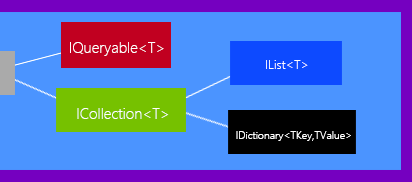
IQueryable<T>
提供针对特定数据源评估查询的功能。IQueryable <T>同时派生自IEnumerable、IEnumerable<T>,IQueryable 。Enumerable类为IEnumerable<T>扩展了用于查询内存中的对象的linq查询方法。而Queryable为IQueryable <T>扩展了对远程数据源进行linq查询的方法。 IQueryable <T>有一个IQueryProvider(Linq查询提供程序)的属性,该属性通过解析扩展方法中的参数所指定的表达式树(Expression<Func<T>>)以便生成纯的SQL语句,IQueryProvider是一个可以自定义的Linq查询提供程序。Linq To Sql 和Linq To Entity都是查询数据库记录,必须生成Sql语句,这跟Linq To Object的查询不一样,后者只需要传入一个Func<T>(比如一个匹配Func<T>委托的Lambda表达式)就可以执行查询,而IQueryable <T的扩展方法需要你提供一棵表达式树(Expression<Func<T>>)以便IQueryProvider可以将表达式树解析为SQL查询字符串用于发送到数据库中执行远程查询。
ICollection<T>
Count
//获取项的总量
Add(T t)
//将参数添加到集合
Clear()
//从字典中移除所有的键和值
Contains(T t)
//确定集合是否包含参数指定的项
GetEnumerator()
//获取枚举数
Remove(T t)
//从集合中移除参数所指定的项
CopyTo(T[] TArray, int index)
//拷贝数组到参数指定的数组,可指定从哪个索引作为拷贝的起始位置。如果是引用类型则会发生一次浅拷贝,两个数组会指向同一个引用
实现了ICollection<T>接口的泛型集合
Queue<T>;
Stack<T>;
Dictionary<TKey, TValue>;
SortedList<TKey, TValue>;
IDictionary<TKey,TValue>
接口内部定义了泛型字典集合的属性与方法
Count
//获取项的总量
Keys
//获取键的集合
Values
//获取值的集合
Add(TKey, TValue)
//将指定的键和值添加到字典中
Clear()
//从字典中移除所有的键和值
ContainsKey(TKey)
//确定字典是否包含指定的键
ContainsValue(TValue)
//确定字典是否包含指定的值
Equals(object x)
//确定相等性
GetEnumerator()
//获取枚举数
GetHashCode()
//获取哈希值
GetObjectData(SerializationInfo info, StreamingContext context)
//实现System.Runtime.Serialization.ISerializable接口,并返回序列化Dictionary<TKey,TValue>实例所需的数据
Remove(TKey)
//从字典中移除键所指定的记录
IList<T>
接口内部定义了泛型列表集合的属性与方法
Count
//获取列表的项个数
Contains(T item)
//列表是否包含参数指定的元素
FindAll(Predicate<in T> match)
//根据泛型委托执行搜索
//示例:
var records = list.FindAll((employee) => (employee.Id | 1) != employee.Id); //Id是偶数的记录
BinarySearch(T item)
//使用二进制搜索查找元素,查不到返回-1,此方法与线性查找的效率相比,数据量大应采用BinarySearch,否则采用线性查找
CopyTo(T[] TArray, index)
//拷贝数组到参数指定的数组,可指定从哪个索引作为拷贝的起始位置。如果是引用类型则会发生一次浅拷贝,两个数组会指向同一个引用
Add(T item)
//向列表添加元素,数组没有实现这个方法,因为数组的长度是恒定的
Remove(T item)
//移除列表中由参数指定的元素,数组没有实现这个方法
RemoveAt(int index)
//移除列表中由参数指定的索引处的元素,数组没有实现这个方法
Insert(int index, T item)
//在参数指定的索引处插入一个新的元素,数组没有实现这个方法
Clear()
//清空列表,数组没有实现这个方法
泛型集合(Generic)
Dictionary<TKey,TValue> 哈希字典集合类
此类实现了IDictionary<TKey,TValue>接口,具体属性和方法参考IDictionary<TKey,TValue>。
SortedList<TKey,TValue> 可排序哈希字典集合类
此类实现了IDictionary<TKey,TValue>接口,表示一个可存储键值对的字典集合。它的性能不如Hashtable优异,因为集合的元素按照键进行了排序,所以可通过索引对元素进行访问。默认容量(capacity)是16,如果容量达到16则其容量会x2倍增。可通过重载的构造函数指定这个参数,也可通过添加元素使容量自动增长。
List<T> 列表集合类
此类实现了IList<T>接口,具体属性和方法参考IList<T>。
List<int> intList= list.ConvertAll(item => int.Parse(item)); //接收一个 Converter<in T, out X>的泛型委托,调用lambda将每次转换的结果返回给结果集
Stack<T> 栈集合类
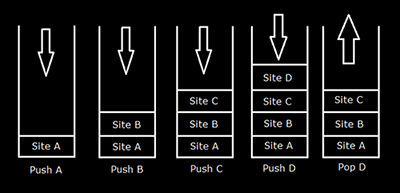
此类实现了ICollection接口,它表示一个后进先出的栈集合,虽然元素有其索引,但因为元素压入之后只能从顶部取出,所以并不支持索引访问元素、也不支持初始化器。栈元素的插入称为入栈,元素的删除称为出栈。默认容量(capacity)是10,可通过重载的构造函数指定这个参数,也可以通过添加元素使容量自动增长。
stack.Push(new Person { Name = "sam" });
stack.Push(new Person { Name = "leo" });
stack.Push(new Person { Name = "korn" });
Console.WriteLine(stack.Count);
int[] intArray = { 1, 2, 3 };
Stack stack2 = new Stack(intArray);
Console.Write(stack.Peek()); // print 3
Queue<T> 单项队列集合类
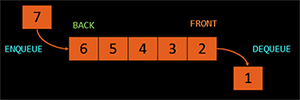
此类实现了ICollection接口,表示一个先进先出的队列集合,虽然元素有其索引,但因为元素压入之后只能从右边出口取出,所以并不支持索引访问元素、也不支持初始化器。队列元素的插入称为入队,元素的删除称为出队。默认容量(capacity)是32,增量系数是2.0(growthFactor),如果容量达到32则其容量会x2倍增。可通过重载的构造函数指定这两个参数,也可以通过添加元素使容量自动增长。类似的有Queue<T>