ThinkPHP 轻量级框架,国人框架,入门容易
thinkphp 3.2版本
'URL_CASE_INSENSITIVE' => true, // 默认false 表示URL区分大小写 true则表示不区分大小写,这句有BUG
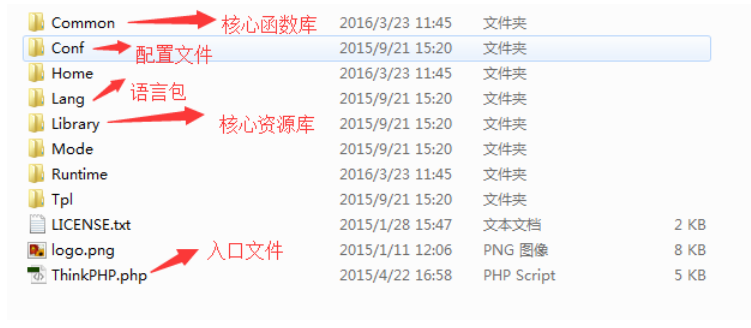
解压tp打开可以看到下图:

其中ThinkPHP是核心,index.php是入口文件
点开ThinkPHP如下图:
点开Conf可以看到下图:

convention.php是核心配置文件,基本上所有的配置都在其中。
library是核心资源库,library中的Think囊括了tp中的大多数函数类:

创建入口文件:
- 在ThinkPHP目录下创建一个入口文件index.php
// 检测PHP环境
if(version_compare(PHP_VERSION,'5.3.0','<'))  die('require PHP > 5.3.0 !');//php版本大于5.3.0方可使用tp3.2
// 开启调试模式 建议开发阶段开启 部署阶段注释或者设为false
define('APP_DEBUG',True);

 // 定义应用目录
define('APP_PATH','./JiaoWu/');

// 引入ThinkPHP入口文件
require './ThinkPHP/ThinkPHP.php'; - 访问入口文件的同时系统会自动把对应的应用目录文件JiaoWu创建出来

- 打开Home文件夹

- MVC模式
M:Model 数据模型层,负责数据操作
V:View 视图层,负责显示视图
C:Controller 控制器,实现业务逻辑
-
tp框架url地址可以由以下四种
- http://网址/index.php?m=XX&c=XX&a=XX 基本get模式
- http://网址/index.php/模块/控制器/操作方法 路径模式pathinfo
- http://网址/模块/控制器/操作方法 rewrite重写模式
- http://网址/index.php?s=/模块/控制器/方法 兼容模式
具体url地址模式设置(配置文件ThinkPHP/Conf/convertion.php)
URL_MODEL = 0/1/2/3 分别代表四种url地址模式


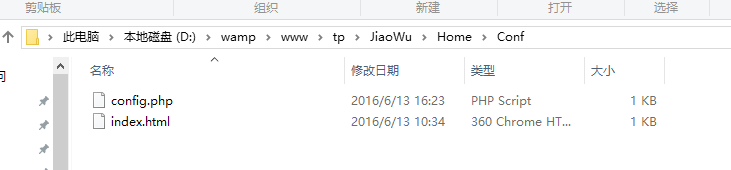
config.php是我们当前自己项目的配置文件,我们可以通过修改该文件达到配置变量的目录
<?php
return array(
    //'配置项'=>'配置值'
    'SHOW_PAGE_TRACE'       =>  TRUE,//显示TRACE信息
    'DB_DEBUG'              =>  TRUE, // 数据库调试模式 开启后可以记录SQL日志
    'URL_MODEL'             =>  1,       // URL访问模式,可选参数0、1、2、3,代表以下四种模式:
    // 0 (普通模式); 1 (PATHINFO 模式); 2 (REWRITE  模式); 3 (兼容模式)  默认为PATHINFO 模式
    'TMPL_L_DELIM'          =>  '<{',            // 模板引擎普通标签开始标记
    'TMPL_R_DELIM'          =>  '}>',            // 模板引擎普通标签结束标记
);
如果要自己创建一个控制器Main:在ShopHomeController文件夹下新建一个控制器文件MainController.class.php
注意:文件命名规则,按照驼峰法命名
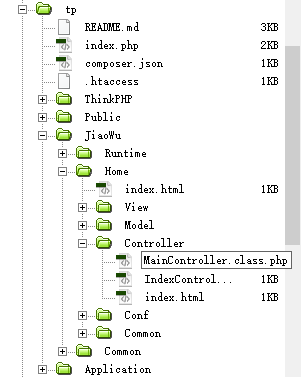
打开该文件,在里面造控制器Main类
MainController.class.php
<?php
namespace HomeController; //命名空间
use ThinkController; //引入父类命名空间
class MainController extends Controller{
    public function _before_showq()//前置操作方法
    {
        echo"之前 ";
    }

    public function showq()
    {
        //echo $name." "."tianqiyubao";
        //echo "tianqiyubao";
        //echo C('URL_MODEL'); //读取配置也可以来修改配置
        //C('URL_MODEL',1);
        //echo U("showq"); //生成路径
        echo $_POST["wenben"];
    }

    public function _after_showq()//后置操作方法
    {
        echo" 之后";
    }

    public function ceshi()
    {
        //$this->assign("tianqi","天气"); //注册变量
        //$this->display(); //调用ceshi模板
        var_dump(get_defined_constants(true));//获取系统常量信息,加true会分组显示
    }

    public function denglu()//实现两个逻辑,显示页面,实现登录
    {
        if(empty($_POST))//判断获取的post数组是否为空,为空代表显示页面
        {
          $this->display();
        }
        else  //实现登录
        {
            echo"登录成功";
        }
    }


}
denglu.html
<!DOCTYPE html PUBLIC "-//W3C//DTD XHTML 1.0 Transitional//EN" "http://www.w3.org/TR/xhtml1/DTD/xhtml1-transitional.dtd">
<html xmlns="http://www.w3.org/1999/xhtml">
<head>
<meta http-equiv="Content-Type" content="text/html; charset=utf-8" />
<title>无标题文档</title>
</head>

<body>
<form action="__ACTION__" method="post">//注意看这里的action:常量__ACTION__代替了之前的路径
用户名:<input type="text" name="uid" />
密码:<input type="password" name="pwd" />
<input type="submit" value="登录" />
</form>
</body>
</html>
ceshi.html
<!DOCTYPE html PUBLIC "-//W3C//DTD XHTML 1.0 Transitional//EN" "http://www.w3.org/TR/xhtml1/DTD/xhtml1-transitional.dtd">
<html xmlns="http://www.w3.org/1999/xhtml">
<head>
<meta http-equiv="Content-Type" content="text/html; charset=utf-8" />
<title>无标题文档</title>
</head>

<body>
<h1>tianqibuhao</h1>
<h1><{$tianqi}></h1>
<a href="/tp/index.php/Home/Main/showq/name/simon">调用显示</a>

<form action="/tp/index.php/Home/Main/showq" method="post">//注意看这里action哦,不是页面是具体的action操作方法
<input type="text" name="wenben" />
<input type="submit"  value="提交"/>
</form>
</body>
</html>
