Configure Many-to-Many relationship:
Here, we will learn how to configure Many-to-Many relationship between the Student and Course entity classes. Student can join multiple courses and multiple students can join one course.
Visit Entity Relationship section to understand how EF manages one-to-one, one-to-many and many-to-many relationships between the entities.
Configure Many-to-Many relationship using DataAnnotation:
Student class should have a collection navigation property for Course, and Course should have a collection navigation property for student, which will create a Many-to-Many relationship between student and course as shown below:
public class Student
{
    public Student() { }

    public int StudentId { get; set; }
    [Required]
    public string StudentName { get; set; }

    public int StdandardId { get; set; }

    public virtual ICollection<Course> Courses { get; set; }
}

public class Course
{
    public Course()
    {
        this.Students = new HashSet<Student>();
    }

    public int CourseId { get; set; }
    public string CourseName { get; set; }

    public virtual ICollection<Student> Students { get; set; }
}
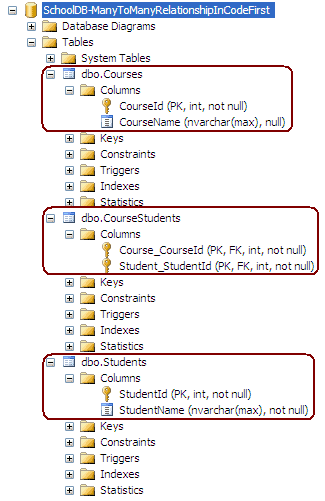
The code shown above will create the following database, where Code-First will create a third joining table, CourseStudent, which will consist of the PK of both the tables, i.e. StudentId & CourseId:
Configure Many-to-Many relationship using Fluent API:
You can use the Fluent API to configure a Many-to-Many relationship between Student and Course, as shown below:
protected override void OnModelCreating(DbModelBuilder modelBuilder)
{

    modelBuilder.Entity<Student>()
                .HasMany<Course>(s => s.Courses)
                .WithMany(c => c.Students)
                .Map(cs =>
                        {
                            cs.MapLeftKey("StudentRefId");
                            cs.MapRightKey("CourseRefId");
                            cs.ToTable("StudentCourse");
                        });

}
As you can see in the above example, .HasMany<Course>(s => s.Courses).WithMany(c => c.Students) says that Student and Course has many-to-many relationship with Students navigation property in Course class and Courses navigation property in Student class.
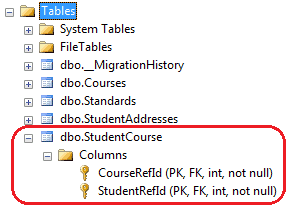
Map method takes Action type delegate, hence, we can pass lambda expression wherein we will specify FK property name of Student (we start with Student entity, so it will be left table) and FK of Course table. ToTable will create StudentCourse table.
This will create a new joining table StudentCourse with two Primary Keys which will also be Foreign Keys, as shown below: