【未经作者本人同意,请勿以任何形式转载】
经常看到有点的小伙伴在群里问小程序用户数据解密流程,所以打算写一篇关于小程序用户敏感数据解密教程;
加密过程微信服务器完成,解密过程在小程序和自身服务器完成,即由 encryptData 得到如下数据:
{
    "openId": "OPENID",
    "nickName": "NICKNAME",
    "gender": GENDER,
    "city": "CITY",
    "province": "PROVINCE",
    "country": "COUNTRY",
    "avatarUrl": "AVATARURL",
    "unionId": "UNIONID",
    "watermark":
    {
        "appid":"APPID",
        "timestamp":TIMESTAMP
    }
}
准备知识:
- Base64编解码
- AES算法、填充模式、偏移向量
- session_key会话密钥,以及怎么存储和获取
以上3点对于理解解密流程非常重要。
根据官方文档,我梳理了大致的解密流程,如下:
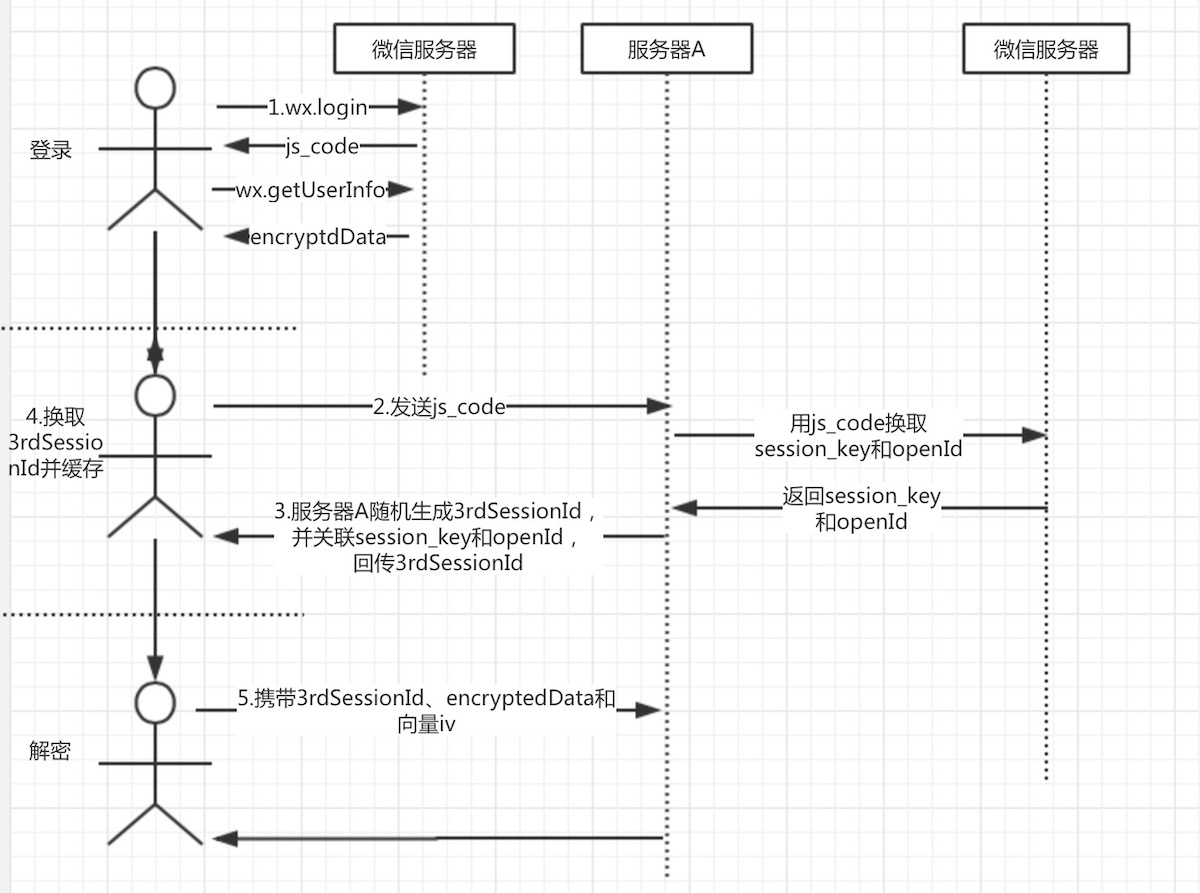
- 小程序客户端调用wx.login,回调里面包含js_code。
- 然后将js_code发送到服务器A(开发者服务器),服务器A向微信服务器发起请求附带js_code、appId、secretkey和grant_type参数,以换取用户的openid和session_key(会话密钥)。
- 服务器A拿到session_key后,生成一个随机数我们叫3rd_session,以3rdSessionId为key,以session_key + openid为value缓存到redis或memcached中;因为微信团队不建议直接将session_key在网络上传输,由开发者自行生成唯一键与session_key关联。其作用是:
- 将3rdSessionId返回给客户端,维护小程序登录态。
- 通过3rdSessionId找到用户session_key和openid。
- 客户端拿到3rdSessionId后缓存到storage,
- 通过wx.getUserIinfo可以获取到用户敏感数据encryptedData 。
- 客户端将encryptedData、3rdSessionId和偏移量一起发送到服务器A
- 服务器A根据3rdSessionId从缓存中获取session_key
- 在服务器A使用AES解密encryptedData,从而实现用户敏感数据解密
重点在6、7、8三个环节。
AES解密三个参数:
- 密文 encryptedData
- 密钥 aesKey
- 偏移向量 iv
服务端解密流程:
- 密文和偏移向量由客户端发送给服务端,对这两个参数在服务端进行Base64_decode解编码操作。
- 根据3rdSessionId从缓存中获取session_key,对session_key进行Base64_decode可以得到aesKey,aes密钥。
- 调用aes解密方法,算法为 AES-128-CBC,数据采用PKCS#7填充。
下面结合小程序实例说明解密流程:
- 微信登录,获取用户信息
var that = this;
wx.login({
	success: function (res) {
		//微信js_code
		that.setData({wxcode: res.code});
		//获取用户信息
        wx.getUserInfo({
            success: function (res) {
				//获取用户敏感数据密文和偏移向量
				that.setData({encryptedData: res.encryptedData})
				that.setData({iv: res.iv})
            }
        })
	}
})
- 使用code换取3rdSessionId
var httpclient = require('../../utils/httpclient.js')
VAR that = this
//httpclient.req(url, data, method, success, fail)
httpclient.req(
      'http://localhost:8090/wxappservice/api/v1/wx/getSession',
      {
          apiName: 'WX_CODE',
          code: this.data.wxcode
      },
      'GET',
      function(result){
        var thirdSessionId = result.data.data.sessionId;
        that.setData({thirdSessionId: thirdSessionId})
		//将thirdSessionId放入小程序缓存
        wx.setStorageSync('thirdSessionId', thirdSessionId)
      },
      function(result){
        console.log(result)
      }
);
- 发起解密请求
//httpclient.req(url, data, method, success, fail)
httpclient.req(
	'http://localhost:8090/wxappservice/api/v1/wx/decodeUserInfo',
      {
        apiName: 'WX_DECODE_USERINFO',
        encryptedData: this.data.encryptedData,
        iv: this.data.iv,
        sessionId: wx.getStorageSync('thirdSessionId')
      },
      'GET',
      function(result){
	  //解密后的数据
        console.log(result.data)
      },
      function(result){
        console.log(result)
      }
);
- 服务端解密实现(java)
/**
	 * 解密用户敏感数据
	 * @param encryptedData 明文
	 * @param iv			加密算法的初始向量
	 * @param sessionId		会话ID
	 * @return
	 */
	@Api(name = ApiConstant.WX_DECODE_USERINFO)
	@RequestMapping(value = "/api/v1/wx/decodeUserInfo", method = RequestMethod.GET, produces = "application/json")
	public Map<String,Object> decodeUserInfo(@RequestParam(required = true,value = "encryptedData")String encryptedData,
			@RequestParam(required = true,value = "iv")String iv,
			@RequestParam(required = true,value = "sessionId")String sessionId){

		//从缓存中获取session_key
		Object wxSessionObj = redisUtil.get(sessionId);
		if(null == wxSessionObj){
			return rtnParam(40008, null);
		}
		String wxSessionStr = (String)wxSessionObj;
		String sessionKey = wxSessionStr.split("#")[0];

		try {
			AES aes = new AES();
			byte[] resultByte = aes.decrypt(Base64.decodeBase64(encryptedData), Base64.decodeBase64(sessionKey), Base64.decodeBase64(iv));
			if(null != resultByte && resultByte.length > 0){
				String userInfo = new String(resultByte, "UTF-8");
				return rtnParam(0, userInfo);
			}
		} catch (InvalidAlgorithmParameterException e) {
			e.printStackTrace();
		} catch (UnsupportedEncodingException e) {
			e.printStackTrace();
		}
		return rtnParam(50021, null);
	}
- AES解密核心代码
public byte[] decrypt(byte[] content, byte[] keyByte, byte[] ivByte) throws InvalidAlgorithmParameterException {
		initialize();
		try {
			Cipher cipher = Cipher.getInstance("AES/CBC/PKCS7Padding");
			Key sKeySpec = new SecretKeySpec(keyByte, "AES");

			cipher.init(Cipher.DECRYPT_MODE, sKeySpec, generateIV(ivByte));// 初始化
			byte[] result = cipher.doFinal(content);
			return result;
		} catch (NoSuchAlgorithmException e) {
			e.printStackTrace();
		} catch (NoSuchPaddingException e) {
			e.printStackTrace();
		} catch (InvalidKeyException e) {
			e.printStackTrace();
		} catch (IllegalBlockSizeException e) {
			e.printStackTrace();
		} catch (BadPaddingException e) {
			e.printStackTrace();
		} catch (NoSuchProviderException e) {
			// TODO Auto-generated catch block
			e.printStackTrace();
		} catch (Exception e) {
			// TODO Auto-generated catch block
			e.printStackTrace();
		}
最后的效果如下:
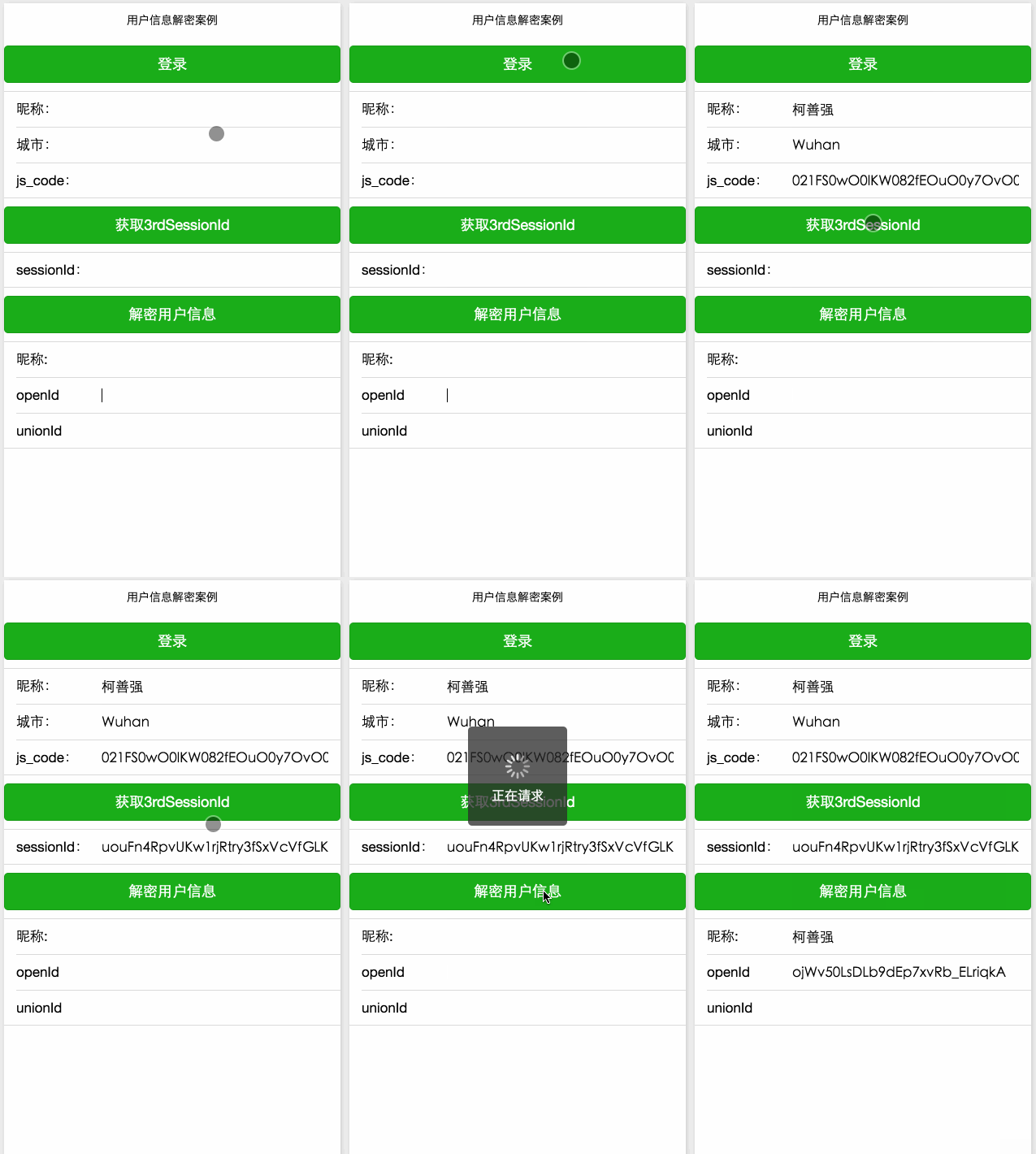
如果你的小程序没有绑定微信开放平台,解密的数据中不包含unionid参数
小程序绑定微信开放平台连接
总结
从解密的数据看,算得上敏感的数据只有appid;个人觉得openid不是敏感数据,每个用户针对每个公众号会产生一个安全的openid;openid只有在appid的作用域下可用。除非你的appid也泄露了。
那么可以从解密数据得到appid,微信小程序团队是何用意呢?还是前面那句话,openid脱离了appid就什么都不是,openid和appid一起为了方便小程序开发者做到不同小程序应用之间用户区分和隔离,同时能够将微信用户体系与第三方业务体系结合。
所以我认为敏感数据解密的主要用处不是解密后回传给客户端,而是在服务端将微信用户信息融入到自身业务当中。
详细学习请参考:
小程序数据解密:https://github.com/cocoli/weixin_smallexe/tree/master/chaptor_05
java解密实现:https://github.com/cocoli/springboot-weapp-demo
相关讨论专题:http://www.wxappclub.com/topic/429
你也可以关注我的微信公众号『ITNotes』, 一起交流学习 。