四、编辑WebTest
3、添加提取规则和自定义提取规则
添加提取规则
1、当必须从特定页中捕获一部分数据并且供另一个页使用时,就需要用到提取规则。可以使用提取规则从响应中复制字符串,然后将字符串存储到上下文变量中,以供任何后续请求使用。通过显示“详细信息”窗格,可以在 Web 测试查看器中检查上下文。
2、WebTest中提供了六个提取规则: 
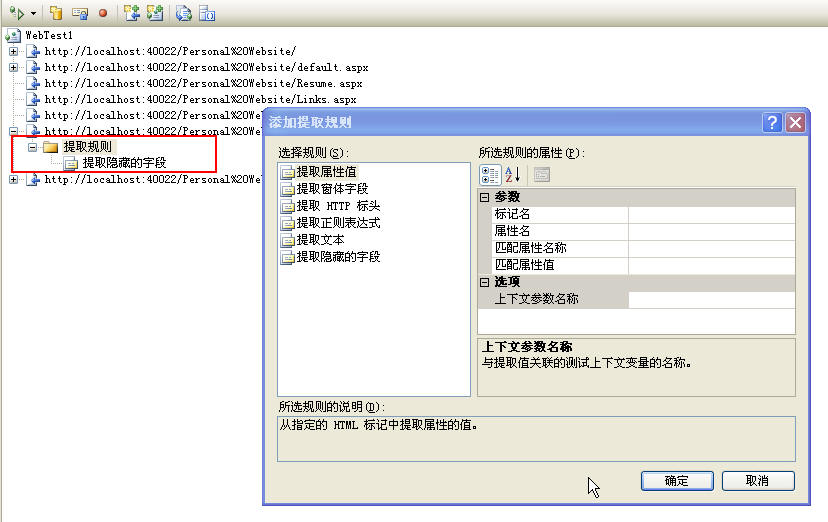
自定义提取规则
通过从 ExtractionRule 类派生可以创建自己的提取规则。
1、创建一个自定义提取规则的类库项目
2、同样,在类库中需要添加引用Microsoft.VisualStudio.TestTools.WebTesting
3、创建一个从
using System;
using System.Collections.Generic;
using Microsoft.VisualStudio.TestTools.WebTesting;
using System.Globalization;
namespace ClassLibrary2
{
public class MyExtractionRule : ExtractionRule
{
private string name;
public string Name
{
get { return name; }
set { name = value; }
}
public override string RuleName
{
get { return "MyExtractionRuleName"; }
}
public override string RuleDescription
{
get { return "MyExtractionRuleDescription"; }
}
public override void Extract(object sender, ExtractionEventArgs e)
{
if (e.Response.HtmlDocument != null)
{
foreach (HtmlTag tag in e.Response.HtmlDocument.GetFilteredHtmlTags(new string[] { "input" }))
{
if (String.Equals(tag.GetAttributeValueAsString("name"), name, StringComparison.InvariantCultureIgnoreCase))
{
string formFieldValue = tag.GetAttributeValueAsString("value");
if (formFieldValue == null)
{
formFieldValue = String.Empty;
}
e.WebTest.Context.Add(this.ContextParameterName, formFieldValue);
e.Success = true;
return;
}
}
}
e.Success = false;
e.Message = String.Format(CultureInfo.CurrentCulture, "Not Found: {0}", name);
}
}
}
4、Build
5、向测试项目中添加引用
6、在“添加提取规则”对话框中显示自定义提取规则
7、MyExtractionRule Demo下载