说到PopupWindow,我个人感觉是又爱又恨,没有深入使用之前总觉得这个东西应该很简单,很好用,但是真正使用PopupWindow实现一些效果的时候总会遇到一些问题,但是即便是人家的api有问题,作为程序员也没有办法,只能去想办法去补救。
下面是我在使用过程中发现的关于PopupWindow的几个痛点:
痛点一:不设置背景就不能响应返回键和点击外部消失的,这个我已经有一篇文章进行分析过http://www.cnblogs.com/popfisher/p/5608717.html,这个我认为就是api留下的bug,有些版本里面修复了这个问题,感兴趣的可以多看看几个版本的源码,还可以看出Google是怎么修改的。
痛点二:showAsDropDown(View anchorView)方法使用也会遇到坑,如果不看api注释,会认为PopupWindow只能显示在anchorView的下面(与anchorView左下角对齐显示),但是看了方法注释之后发现此方法是可以让PopupWindow显示在anchorView的上面的(anchorView左上角对齐显示)。如果真这样,那实现自适应带箭头的上下文菜单不就很容易了么,事实证明还是会有些瑕疵。
痛点三:个人觉得api设计得不好使,不过这个只能怪自己对api理解不够深刻,不过下面几个api组合使用还是得介绍一下。
// 如果不设置PopupWindow的背景,有些版本就会出现一个问题:无论是点击外部区域还是Back键都无法dismiss弹框
popupWindow.setBackgroundDrawable(new ColorDrawable());

// setOutsideTouchable设置生效的前提是setTouchable(true)和setFocusable(false)
popupWindow.setOutsideTouchable(true);

// 设置为true之后,PopupWindow内容区域 才可以响应点击事件
popupWindow.setTouchable(true);

// true时,点击返回键先消失 PopupWindow
// 但是设置为true时setOutsideTouchable,setTouchable方法就失效了(点击外部不消失,内容区域也不响应事件)
// false时PopupWindow不处理返回键
popupWindow.setFocusable(false);
popupWindow.setTouchInterceptor(new View.OnTouchListener() {
    @Override
    public boolean onTouch(View v, MotionEvent event) {
        return false;   // 这里面拦截不到返回键
    }
});
将理论始终听起来很形象,通过实例可以让人更加印象深刻,第一点已经有文章介绍了,下面实现一个带箭头的上下文菜单体会一下痛点二和三,到底怎么个痛法。先上效果再上代码,代码里面的注释标注了痛点的地方。
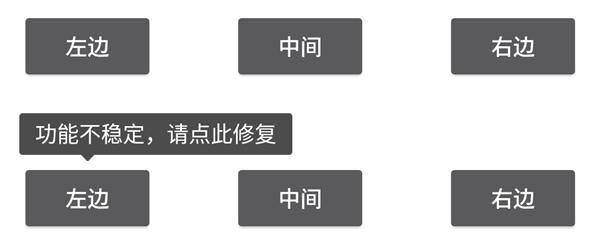
上下文菜单效果图
默认向下弹出

下面空间不足时先上弹出
特例出现了,我希望第一排右边按钮点击时PopupWindow在下面,但是我失望了
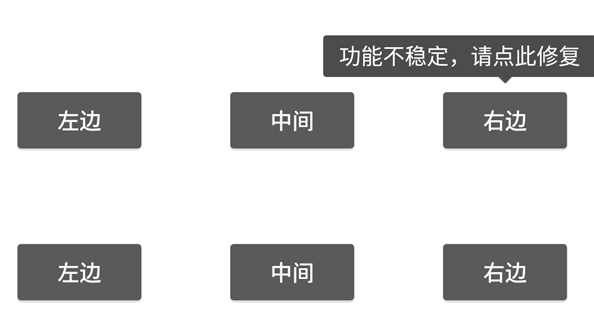
虽然达不到我要的效果,但是作为学习资源还是不错的,下面贴出代码
import android.app.Activity;
import android.graphics.drawable.ColorDrawable;
import android.os.Bundle;
import android.view.LayoutInflater;
import android.view.MotionEvent;
import android.view.View;
import android.view.ViewTreeObserver;
import android.widget.PopupWindow;
import android.widget.RelativeLayout;
import android.widget.Toast;

public class TopBottomArrowPopupActivity extends Activity implements View.OnClickListener {

    private View mButton1;
    private View mButton2;
    private View mButton3;
    private View mButton4;
    private View mButton5;
    private View mButton6;
    private PopupWindow mCurPopupWindow;

    @Override
    protected void onCreate(Bundle savedInstanceState) {
        super.onCreate(savedInstanceState);
        setContentView(R.layout.activity_top_arrow_pos_window);
        mButton1 = findViewById(R.id.buttion1);
        mButton2 = findViewById(R.id.buttion2);
        mButton3 = findViewById(R.id.buttion3);
        mButton4 = findViewById(R.id.buttion4);
        mButton5 = findViewById(R.id.buttion5);
        mButton6 = findViewById(R.id.buttion6);
        mButton1.setOnClickListener(this);
        mButton2.setOnClickListener(this);
        mButton3.setOnClickListener(this);
        mButton4.setOnClickListener(this);
        mButton5.setOnClickListener(this);
        mButton6.setOnClickListener(this);
    }

    @Override
    public void onClick(View v) {
        int id = v.getId();
        switch (id) {
            case R.id.buttion1:
                mCurPopupWindow = showTipPopupWindow(mButton1, new View.OnClickListener() {
                    @Override
                    public void onClick(View v) {
                        Toast.makeText(getBaseContext(), "点击到弹窗内容", Toast.LENGTH_SHORT).show();
                    }
                });
                break;
            case R.id.buttion2:
                mCurPopupWindow = showTipPopupWindow(mButton2, new View.OnClickListener() {
                    @Override
                    public void onClick(View v) {
                        Toast.makeText(getBaseContext(), "点击到弹窗内容", Toast.LENGTH_SHORT).show();
                    }
                });
                break;
            case R.id.buttion3:
                mCurPopupWindow = showTipPopupWindow(mButton3, new View.OnClickListener() {
                    @Override
                    public void onClick(View v) {
                        Toast.makeText(getBaseContext(), "点击到弹窗内容", Toast.LENGTH_SHORT).show();
                    }
                });
                break;
            case R.id.buttion4:
                mCurPopupWindow = showTipPopupWindow(mButton4, new View.OnClickListener() {
                    @Override
                    public void onClick(View v) {
                        Toast.makeText(getBaseContext(), "点击到弹窗内容", Toast.LENGTH_SHORT).show();
                    }
                });
                break;
            case R.id.buttion5:
                showTipPopupWindow(mButton5, new View.OnClickListener() {
                    @Override
                    public void onClick(View v) {
                        Toast.makeText(getBaseContext(), "点击到弹窗内容", Toast.LENGTH_SHORT).show();
                    }
                });
                break;
            case R.id.buttion6:
                mCurPopupWindow = showTipPopupWindow(mButton6, new View.OnClickListener() {
                    @Override
                    public void onClick(View v) {
                        Toast.makeText(getBaseContext(), "点击到弹窗内容", Toast.LENGTH_SHORT).show();
                    }
                });
                break;
        }
    }

    public PopupWindow showTipPopupWindow(final View anchorView, final View.OnClickListener onClickListener) {
        final View contentView = LayoutInflater.from(anchorView.getContext())
                  .inflate(R.layout.popuw_content_top_arrow_layout, null);
        contentView.measure(View.MeasureSpec.UNSPECIFIED, View.MeasureSpec.UNSPECIFIED);
        // 创建PopupWindow时候指定高宽时showAsDropDown能够自适应
        // 如果设置为wrap_content,showAsDropDown会认为下面空间一直很充足(我以认为这个Google的bug)
        // 备注如果PopupWindow里面有ListView,ScrollView时,一定要动态设置PopupWindow的大小
        final PopupWindow popupWindow = new PopupWindow(contentView,
                contentView.getMeasuredWidth(), contentView.getMeasuredHeight(), false);

        contentView.setOnClickListener(new View.OnClickListener() {
            @Override
            public void onClick(View v) {
                popupWindow.dismiss();
                onClickListener.onClick(v);
            }
        });

        contentView.getViewTreeObserver().addOnGlobalLayoutListener(new ViewTreeObserver.OnGlobalLayoutListener() {
            @Override
            public void onGlobalLayout() {
                // 自动调整箭头的位置
                autoAdjustArrowPos(popupWindow, contentView, anchorView);
                contentView.getViewTreeObserver().removeGlobalOnLayoutListener(this);
            }
        });
        // 如果不设置PopupWindow的背景,有些版本就会出现一个问题:无论是点击外部区域还是Back键都无法dismiss弹框
        popupWindow.setBackgroundDrawable(new ColorDrawable());

        // setOutsideTouchable设置生效的前提是setTouchable(true)和setFocusable(false)
        popupWindow.setOutsideTouchable(true);

        // 设置为true之后,PopupWindow内容区域 才可以响应点击事件
        popupWindow.setTouchable(true);

        // true时,点击返回键先消失 PopupWindow
        // 但是设置为true时setOutsideTouchable,setTouchable方法就失效了(点击外部不消失,内容区域也不响应事件)
        // false时PopupWindow不处理返回键
        popupWindow.setFocusable(false);
        popupWindow.setTouchInterceptor(new View.OnTouchListener() {
            @Override
            public boolean onTouch(View v, MotionEvent event) {
                return false;   // 这里面拦截不到返回键
            }
        });
        // 如果希望showAsDropDown方法能够在下面空间不足时自动在anchorView的上面弹出
        // 必须在创建PopupWindow的时候指定高度,不能用wrap_content
        popupWindow.showAsDropDown(anchorView);
        return popupWindow;
    }

    private void autoAdjustArrowPos(PopupWindow popupWindow, View contentView, View anchorView) {
        View upArrow = contentView.findViewById(R.id.up_arrow);
        View downArrow = contentView.findViewById(R.id.down_arrow);

        int pos[] = new int[2];
        contentView.getLocationOnScreen(pos);
        int popLeftPos = pos[0];
        anchorView.getLocationOnScreen(pos);
        int anchorLeftPos = pos[0];
        int arrowLeftMargin = anchorLeftPos - popLeftPos + anchorView.getWidth() / 2 - upArrow.getWidth() / 2;
        upArrow.setVisibility(popupWindow.isAboveAnchor() ? View.INVISIBLE : View.VISIBLE);
        downArrow.setVisibility(popupWindow.isAboveAnchor() ? View.VISIBLE : View.INVISIBLE);

        RelativeLayout.LayoutParams upArrowParams = (RelativeLayout.LayoutParams) upArrow.getLayoutParams();
        upArrowParams.leftMargin = arrowLeftMargin;
        RelativeLayout.LayoutParams downArrowParams = (RelativeLayout.LayoutParams) downArrow.getLayoutParams();
        downArrowParams.leftMargin = arrowLeftMargin;
    }

    @Override
    public void onBackPressed() {
        if (mCurPopupWindow != null && mCurPopupWindow.isShowing()) {
            mCurPopupWindow.dismiss();
        } else {
            super.onBackPressed();
        }
    }
}
结束语
虽然不能完全把PopupWindow的问题描述清楚,但是只要知道有这些坑,以后写代码的时候就会多留意下,知道PopupWindow的那几个常用api相互组合会出现什么样的结果。坚持写文章不容易,但是感觉遇到的问题就应该记录下来,好记性不如烂笔头,时间长了可以通过文章记录的知识快速为自己找到问题的解决方法。
有需要源码可以点击下载地址 https://github.com/PopFisher/SmartPopupWindow 上面还有关于PopupWindow的一些其他用法,遇到新的问题时会更新记录一下
思考:怎么使得PopupWindow可以实现点击外部可以消失,内容区域可以响应点击事件,同时还能拦截返回键?