1. 设置spring boot的parent
<parent>
        <groupId>org.springframework.boot</groupId>
        <artifactId>spring-boot-starter-parent</artifactId>
        <version>1.5.2.RELEASE</version>
    </parent>
说明:Spring boot的项目必须要将parent设置为spring boot的parent,该parent包含了大量默认的配置,大大简化了我们的开发。
2. 导入spring boot的web支持
<dependency>
            <groupId>org.springframework.boot</groupId>
            <artifactId>spring-boot-starter-web</artifactId>
        </dependency>
3. 添加Spring boot的插件
<plugin>
                <groupId>org.springframework.boot</groupId>
                <artifactId>spring-boot-maven-plugin</artifactId>
            </plugin>
最终的pom.xml:
<project xmlns="http://maven.apache.org/POM/4.0.0" xmlns:xsi="http://www.w3.org/2001/XMLSchema-instance"
    xsi:schemaLocation="http://maven.apache.org/POM/4.0.0 http://maven.apache.org/xsd/maven-4.0.0.xsd">
    <modelVersion>4.0.0</modelVersion>
    <groupId>cn.qiaoliqiang</groupId>
    <artifactId>spring-boot</artifactId>
    <version>0.0.1-SNAPSHOT</version>
    <packaging>war</packaging>

    <parent>
        <groupId>org.springframework.boot</groupId>
        <artifactId>spring-boot-starter-parent</artifactId>
        <version>1.5.2.RELEASE</version>
    </parent>

    <dependencies>
        <dependency>
            <groupId>org.springframework.boot</groupId>
            <artifactId>spring-boot-starter-web</artifactId>
        </dependency>
        <dependency>
            <groupId>org.springframework</groupId>
            <artifactId>spring-webmvc</artifactId>
            <version>4.3.7.RELEASE</version>
        </dependency>
        <!-- 连接池 -->
        <dependency>
            <groupId>com.jolbox</groupId>
            <artifactId>bonecp-spring</artifactId>
            <version>0.8.0.RELEASE</version>
        </dependency>
    </dependencies>
    <build>
        <finalName>${project.artifactId}</finalName>
        <plugins>
        <plugin>
                <groupId>org.springframework.boot</groupId>
                <artifactId>spring-boot-maven-plugin</artifactId>
            </plugin>
            <!-- 资源文件拷贝插件 -->
            <plugin>
                <groupId>org.apache.maven.plugins</groupId>
                <artifactId>maven-resources-plugin</artifactId>
                <configuration>
                    <encoding>UTF-8</encoding>
                </configuration>
            </plugin>
            <!-- java编译插件 -->
            <plugin>
                <groupId>org.apache.maven.plugins</groupId>
                <artifactId>maven-compiler-plugin</artifactId>
                <configuration>
                    <source>1.7</source>
                    <target>1.7</target>
                    <encoding>UTF-8</encoding>
                </configuration>
            </plugin>
        </plugins>
        <pluginManagement>
            <plugins>
                <!-- 配置Tomcat插件 -->
                <plugin>
                    <groupId>org.apache.tomcat.maven</groupId>
                    <artifactId>tomcat7-maven-plugin</artifactId>
                    <version>2.2</version>
                </plugin>
            </plugins>
        </pluginManagement>
    </build>


</project>
4. 编写第一个Spring Boot的应用
@Controller
@SpringBootApplication
@Configuration
public class HelloApplication {

    @RequestMapping("hello")
    @ResponseBody
    public String hello(){
        return "hello world!";
    }

    public static void main(String[] args) {
        SpringApplication.run(HelloApplication.class, args);
    }

}
代码说明:
1、@SpringBootApplication:Spring Boot项目的核心注解,主要目的是开启自动配置。;
2、@Configuration:这是一个配置Spring的配置类;
3、@Controller:标明这是一个SpringMVC的Controller控制器;
4、main方法:在main方法中启动一个应用,即:这个应用的入口;
5. 启动应用
在Spring Boot项目中,启动的方式有两种,一种是直接run Java Application另外一种是通过Spring Boot的Maven插件运行。
第一种:
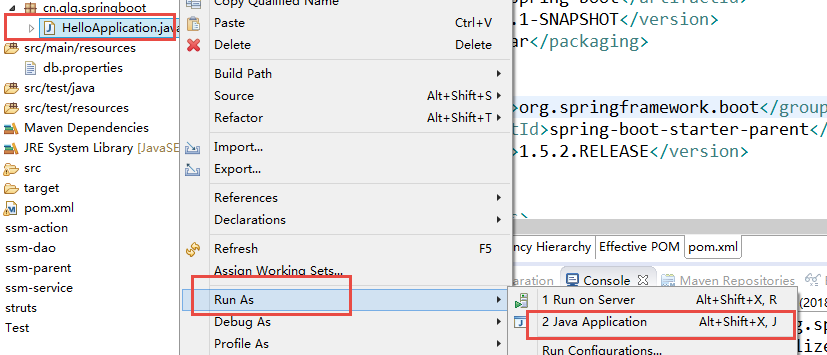
结果:
  .   ____          _            __ _ _
 /\ / ___'_ __ _ _(_)_ __  __ _
( ( )\___ | '_ | '_| | '_ / _` |
 \/  ___)| |_)| | | | | || (_| |  ) ) ) )
  '  |____| .__|_| |_|_| |_\__, | / / / /
 =========|_|==============|___/=/_/_/_/
 :: Spring Boot ::        (v1.5.2.RELEASE)

2018-01-11 16:54:36.745  INFO 882716 --- [           main] cn.qlq.springboot.HelloApplication       : Starting HelloApplication on root with PID 882716 (E:MavenEclipseWorkspacespring-boot	argetclasses started by liqiang in E:MavenEclipseWorkspacespring-boot)
2018-01-11 16:54:36.750  INFO 882716 --- [           main] cn.qlq.springboot.HelloApplication       : No active profile set, falling back to default profiles: default
2018-01-11 16:54:36.872  INFO 882716 --- [           main] ationConfigEmbeddedWebApplicationContext : Refreshing org.springframework.boot.context.embedded.AnnotationConfigEmbeddedWebApplicationContext@67dd2285: startup date [Thu Jan 11 16:54:36 CST 2018]; root of context hierarchy
2018-01-11 16:54:40.517  INFO 882716 --- [           main] s.b.c.e.t.TomcatEmbeddedServletContainer : Tomcat initialized with port(s): 8080 (http)
2018-01-11 16:54:40.678  INFO 882716 --- [           main] o.apache.catalina.core.StandardService   : Starting service Tomcat
2018-01-11 16:54:40.680  INFO 882716 --- [           main] org.apache.catalina.core.StandardEngine  : Starting Servlet Engine: Apache Tomcat/8.5.11
2018-01-11 16:54:40.998  INFO 882716 --- [ost-startStop-1] o.a.c.c.C.[Tomcat].[localhost].[/]       : Initializing Spring embedded WebApplicationContext
2018-01-11 16:54:40.999  INFO 882716 --- [ost-startStop-1] o.s.web.context.ContextLoader            : Root WebApplicationContext: initialization completed in 4131 ms
2018-01-11 16:54:41.365  INFO 882716 --- [ost-startStop-1] o.s.b.w.servlet.ServletRegistrationBean  : Mapping servlet: 'dispatcherServlet' to [/]
2018-01-11 16:54:41.372  INFO 882716 --- [ost-startStop-1] o.s.b.w.servlet.FilterRegistrationBean   : Mapping filter: 'characterEncodingFilter' to: [/*]
2018-01-11 16:54:41.373  INFO 882716 --- [ost-startStop-1] o.s.b.w.servlet.FilterRegistrationBean   : Mapping filter: 'hiddenHttpMethodFilter' to: [/*]
2018-01-11 16:54:41.373  INFO 882716 --- [ost-startStop-1] o.s.b.w.servlet.FilterRegistrationBean   : Mapping filter: 'httpPutFormContentFilter' to: [/*]
2018-01-11 16:54:41.373  INFO 882716 --- [ost-startStop-1] o.s.b.w.servlet.FilterRegistrationBean   : Mapping filter: 'requestContextFilter' to: [/*]
2018-01-11 16:54:42.097  INFO 882716 --- [           main] s.w.s.m.m.a.RequestMappingHandlerAdapter : Looking for @ControllerAdvice: org.springframework.boot.context.embedded.AnnotationConfigEmbeddedWebApplicationContext@67dd2285: startup date [Thu Jan 11 16:54:36 CST 2018]; root of context hierarchy
2018-01-11 16:54:42.240  INFO 882716 --- [           main] s.w.s.m.m.a.RequestMappingHandlerMapping : Mapped "{[/hello]}" onto public java.lang.String cn.qlq.springboot.HelloApplication.hello()
2018-01-11 16:54:42.250  INFO 882716 --- [           main] s.w.s.m.m.a.RequestMappingHandlerMapping : Mapped "{[/error]}" onto public org.springframework.http.ResponseEntity<java.util.Map<java.lang.String, java.lang.Object>> org.springframework.boot.autoconfigure.web.BasicErrorController.error(javax.servlet.http.HttpServletRequest)
2018-01-11 16:54:42.251  INFO 882716 --- [           main] s.w.s.m.m.a.RequestMappingHandlerMapping : Mapped "{[/error],produces=[text/html]}" onto public org.springframework.web.servlet.ModelAndView org.springframework.boot.autoconfigure.web.BasicErrorController.errorHtml(javax.servlet.http.HttpServletRequest,javax.servlet.http.HttpServletResponse)
2018-01-11 16:54:42.351  INFO 882716 --- [           main] o.s.w.s.handler.SimpleUrlHandlerMapping  : Mapped URL path [/webjars/**] onto handler of type [class org.springframework.web.servlet.resource.ResourceHttpRequestHandler]
2018-01-11 16:54:42.351  INFO 882716 --- [           main] o.s.w.s.handler.SimpleUrlHandlerMapping  : Mapped URL path [/**] onto handler of type [class org.springframework.web.servlet.resource.ResourceHttpRequestHandler]
2018-01-11 16:54:42.481  INFO 882716 --- [           main] o.s.w.s.handler.SimpleUrlHandlerMapping  : Mapped URL path [/**/favicon.ico] onto handler of type [class org.springframework.web.servlet.resource.ResourceHttpRequestHandler]
2018-01-11 16:54:43.241  INFO 882716 --- [           main] o.s.j.e.a.AnnotationMBeanExporter        : Registering beans for JMX exposure on startup
2018-01-11 16:54:43.414  INFO 882716 --- [           main] s.b.c.e.t.TomcatEmbeddedServletContainer : Tomcat started on port(s): 8080 (http)
2018-01-11 16:54:43.429  INFO 882716 --- [           main] cn.qlq.springboot.HelloApplication       : Started HelloApplication in 8.809 seconds (JVM running for 9.52)
2018-01-11 17:04:05.722  INFO 882716 --- [nio-8080-exec-1] o.a.c.c.C.[Tomcat].[localhost].[/]       : Initializing Spring FrameworkServlet 'dispatcherServlet'
2018-01-11 17:04:05.722  INFO 882716 --- [nio-8080-exec-1] o.s.web.servlet.DispatcherServlet        : FrameworkServlet 'dispatcherServlet': initialization started
2018-01-11 17:04:05.804  INFO 882716 --- [nio-8080-exec-1] o.s.web.servlet.DispatcherServlet        : FrameworkServlet 'dispatcherServlet': initialization completed in 82 ms
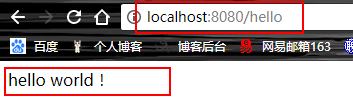
访问:
第二种:以spring-boot插件的方式运行:
(1)添加一个maven常用命令

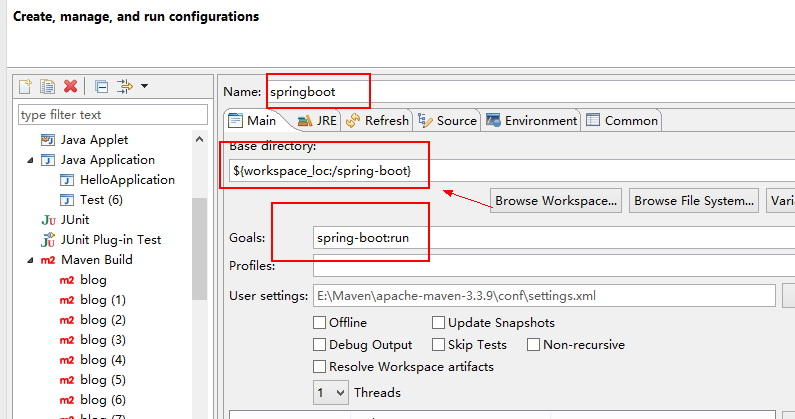
(2)运行上面建的maven命令:
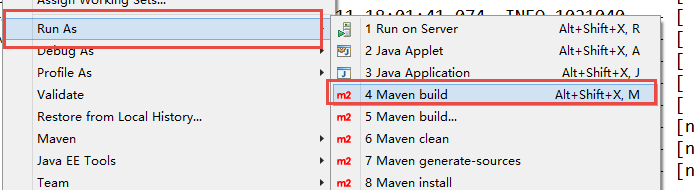

结果与上面一样
看到如下信息就说明启动成功了:
2018-01-11 18:01:42.242 INFO 1021040 --- [ main] cn.qlq.springboot.HelloApplication : Started HelloApplication in 6.845 seconds (JVM running for 16.07)
测试: