- 延迟队列存储的对象肯定是对应的延时消息,所谓”延时消息”是指当消息被发送以后,并不想让消费者立即拿到消息,而是等待指定时间后,消费者才拿到这个消息进行消费。
- 应用场景:
- 在订单系统中,一个用户下单之后通常有30分钟的时间进行支付,如果30分钟之内没有支付成功,那么这个订单将进行取消处理。这时就可以使用延时队列将订单信息发送到延时队列。
- 下单后,30分钟未支付,取消订单,回滚库存。
- 新用户注册成功30分钟后,发送短信问候。
- 在RabbitMQ中并未提供延迟队列功能。但是可以使用:TTL+死信队列 组合实现延迟队列的效果。
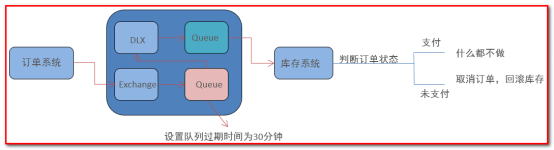
- 代码实现:
- 生产者:
- spring-rabbitmq-producer.xml
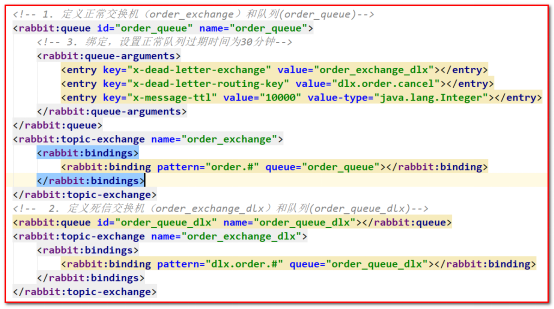
- 发送消息
@Test
public  void testDelay() throws InterruptedException {
	//1.发送订单消息。 将来是在订单系统中,下单成功后,发送消息
	rabbitTemplate.convertAndSend("order_exchange","order.msg","订单信息:id=1,time=2020年4月30日16:41:47");

	//2.打印倒计时10秒
	for (int i = 10; i > 0 ; i--) {
		System.out.println(i+"...");
		Thread.sleep(1000);
	}
}
- spring-rabbitmq-producer.xml
- 消费者:
- spring-rabbitmq-consumer.xml
<?xml version="1.0" encoding="UTF-8"?> <beans xmlns="http://www.springframework.org/schema/beans" xmlns:xsi="http://www.w3.org/2001/XMLSchema-instance" xmlns:context="http://www.springframework.org/schema/context" xmlns:rabbit="http://www.springframework.org/schema/rabbit" xsi:schemaLocation="http://www.springframework.org/schema/beans http://www.springframework.org/schema/beans/spring-beans.xsd http://www.springframework.org/schema/context https://www.springframework.org/schema/context/spring-context.xsd http://www.springframework.org/schema/rabbit http://www.springframework.org/schema/rabbit/spring-rabbit.xsd"> <!--加载配置文件--> <context:property-placeholder location="classpath:rabbitmq.properties"/> <!-- 定义rabbitmq connectionFactory --> <rabbit:connection-factory id="connectionFactory" host="${rabbitmq.host}" port="${rabbitmq.port}" username="${rabbitmq.username}" password="${rabbitmq.password}" virtual-host="${rabbitmq.virtual-host}"/> <context:component-scan base-package="com.atguigu.listener" /> <!--定义监听器容器 acknowledge="manual":手动签收 acknowledge="auto" 自动签收 --> <rabbit:listener-container connection-factory="connectionFactory" acknowledge="manual"> <!--<rabbit:listener ref="ackListener" queue-names="test_queue_confirm"></rabbit:listener>--> <!--<rabbit:listener ref="qosListener" queue-names="test_queue_confirm"></rabbit:listener>--> <!--定义监听器,监听正常队列--> <!--<rabbit:listener ref="dlxListener" queue-names="test_queue_dlx"></rabbit:listener>--> <!--延迟队列效果实现: 一定要监听的是 死信队列!!!--> <rabbit:listener ref="orderListener" queue-names="order_queue_dlx"></rabbit:listener> </rabbit:listener-container> </beans> - 消费者监听代码:
@Component
public class OrderListener implements ChannelAwareMessageListener {

	@Override
	public void onMessage(Message message, Channel channel) throws Exception {
		long deliveryTag = message.getMessageProperties().getDeliveryTag();

		try {
			//1.接收转换消息
			System.out.println(new String(message.getBody()));

			//2. 处理业务逻辑
			System.out.println("处理业务逻辑...");
			System.out.println("根据订单id查询其状态...");
			System.out.println("判断状态是否为支付成功");
			System.out.println("取消订单,回滚库存....");
			//3. 手动签收
			channel.basicAck(deliveryTag,true);
		} catch (Exception e) {
			//e.printStackTrace();
			System.out.println("出现异常,拒绝接受");
			//4.拒绝签收,不重回队列 requeue=false
			channel.basicNack(deliveryTag,true,false);
		}
	}
}
- spring-rabbitmq-consumer.xml
- 生产者: