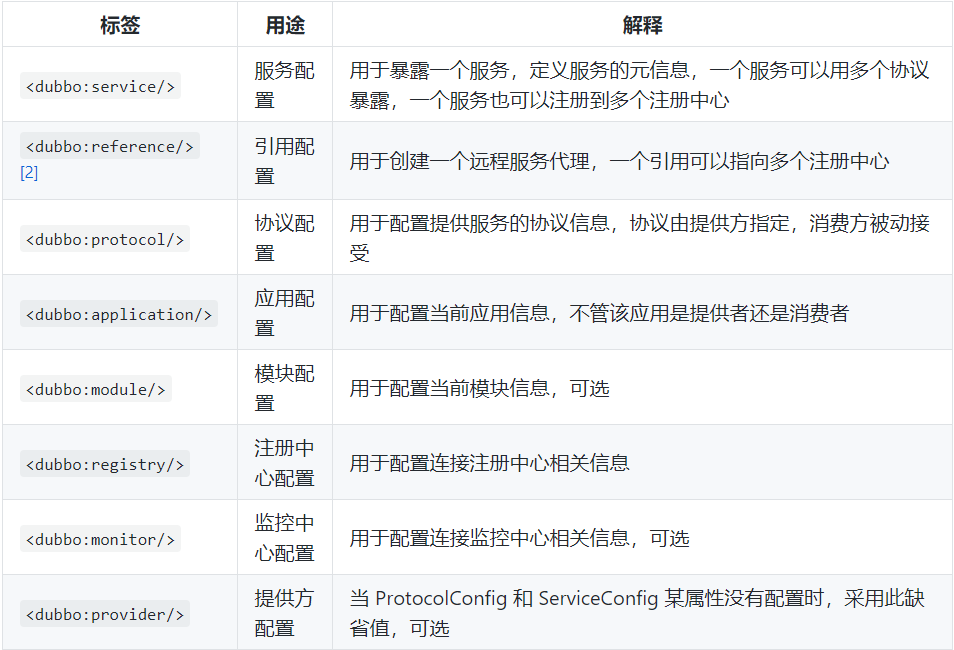
provider(生产者)
<beans xmlns:xsi="http://www.w3.org/2001/XMLSchema-instance"
       xmlns:dubbo="http://dubbo.apache.org/schema/dubbo"
       xmlns="http://www.springframework.org/schema/beans"
       xsi:schemaLocation="http://www.springframework.org/schema/beans http://www.springframework.org/schema/beans/spring-beans.xsd
       http://dubbo.apache.org/schema/dubbo http://dubbo.apache.org/schema/dubbo/dubbo.xsd">
    <!--配置应用名-->
    <dubbo:application name="demo-provider"/>
    <!--配置注册中心-->
    <dubbo:registry address="zookeeper://127.0.0.1:2181"/>
    <!--配置服务协议-->
    <dubbo:protocol name="dubbo" port="20890"/>
    <!--配置服务暴露-->
    <bean id="demoService" class="org.apache.dubbo.samples.basic.impl.DemoServiceImpl"/>
    <dubbo:service interface="org.apache.dubbo.samples.basic.api.DemoService" ref="demoService"/>
</beans>
consumer(消费者)
<beans xmlns:xsi="http://www.w3.org/2001/XMLSchema-instance"
       xmlns:dubbo="http://dubbo.apache.org/schema/dubbo"
       xmlns="http://www.springframework.org/schema/beans"
       xsi:schemaLocation="http://www.springframework.org/schema/beans http://www.springframework.org/schema/beans/spring-beans.xsd
       http://dubbo.apache.org/schema/dubbo http://dubbo.apache.org/schema/dubbo/dubbo.xsd">
    <!--配置应用名-->
    <dubbo:application name="demo-consumer"/>
    <!--配置注册中心-->
    <dubbo:registry group="aaa" address="zookeeper://127.0.0.1:2181"/>
    <!--配置代理-->
    <dubbo:reference id="demoService" check="false" interface="org.apache.dubbo.samples.basic.api.DemoService"/>
</beans>
monitor(监视器)
<!--配置监控器:通过注册中心获取monitor地址后建立链接-->
<dubbo:monitor protocal="registry"/>
<!--配置监控器:绕过注册中心,直连monitor-->
<dubbo:monitor address="dubbo://127.0.0.1:7070/xxxMonitorService"/>
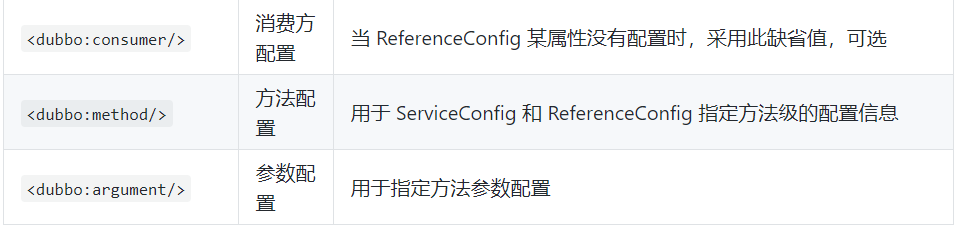
常用标签