背景:记录写hostmanger中用户下拉框关联部门遇到的问题及解决方法
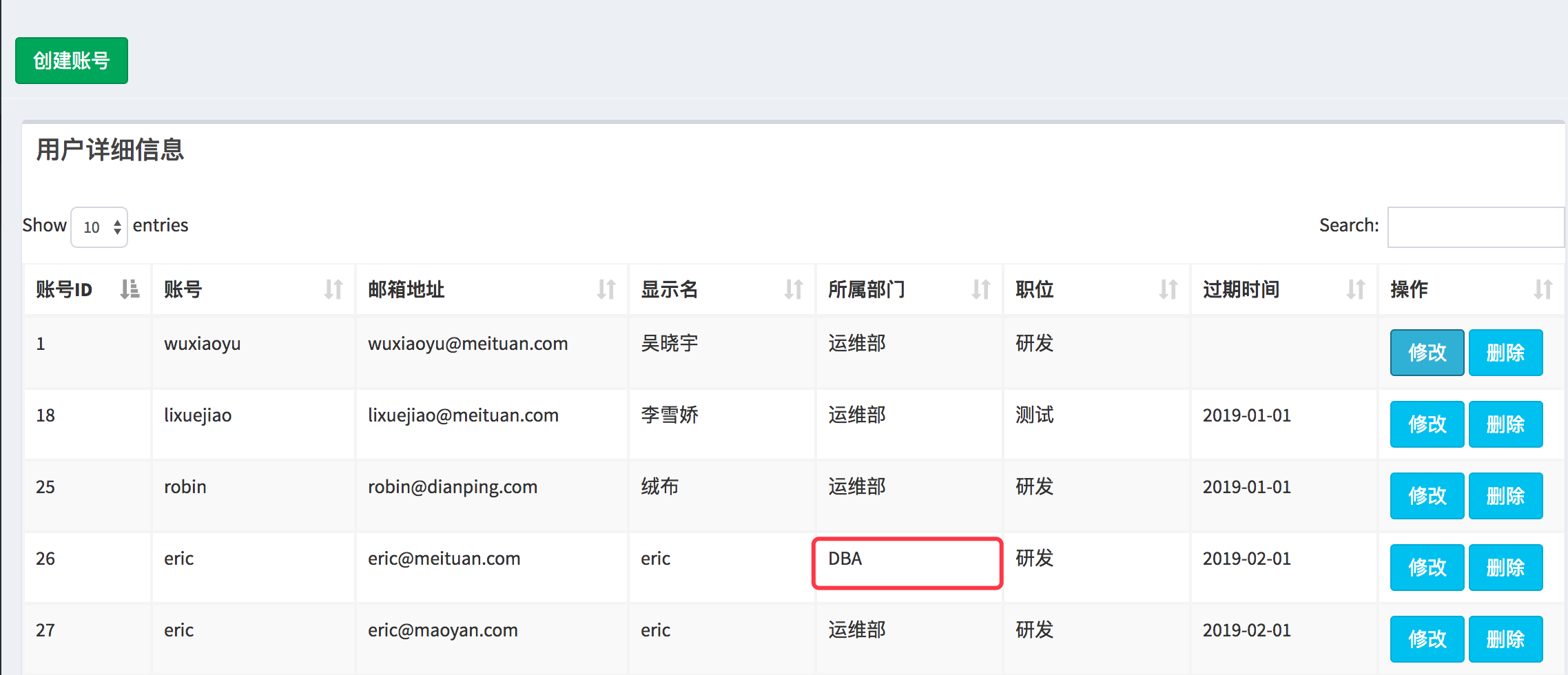
问题:需求是展示页面展示用户所属的部门,点击修改按钮后,弹出对应的model,这个时候部门的select要默认选中用户所在的select
如下图所示:
点击修改弹出model如下:
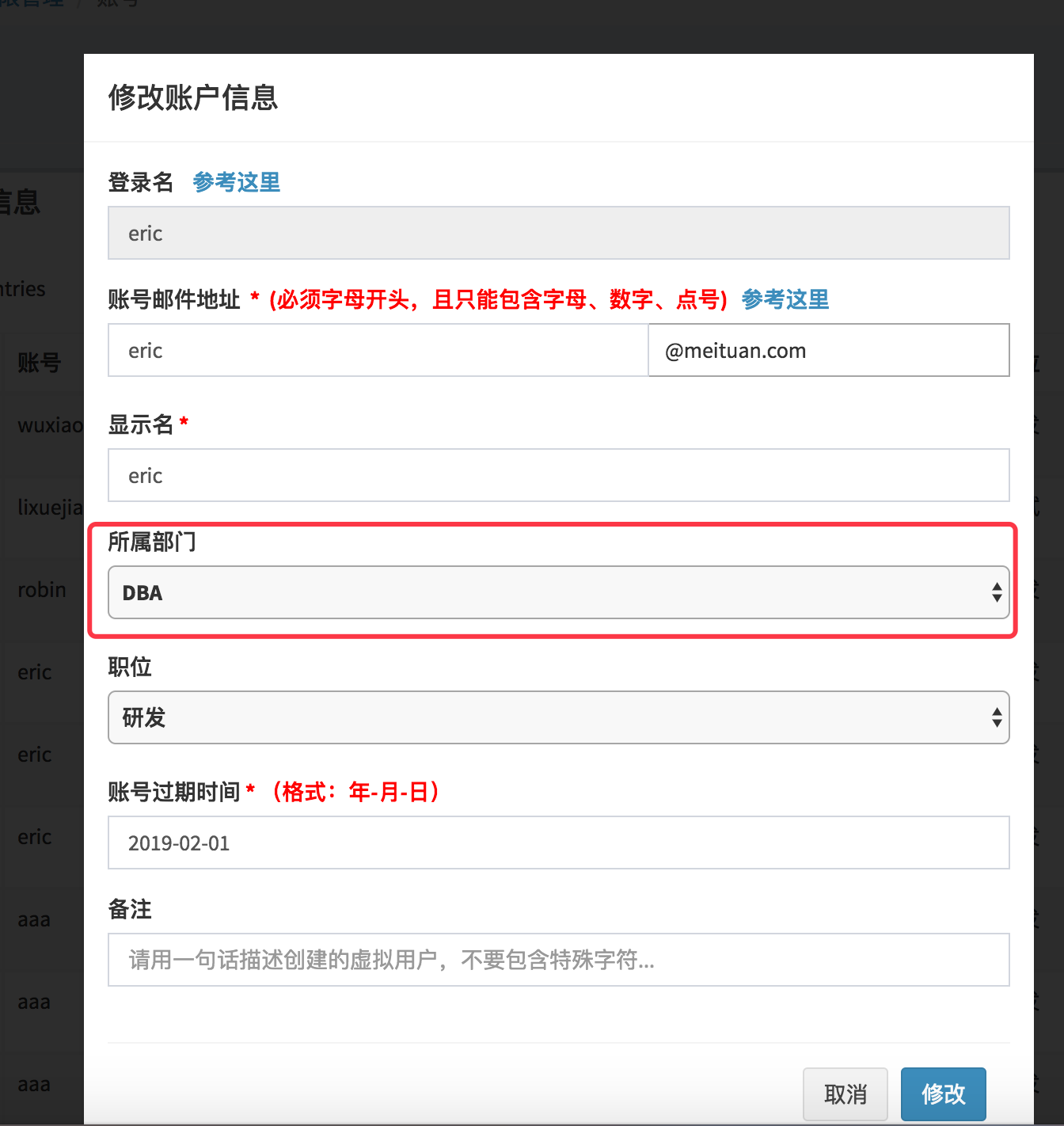
默认这块显示的是select的第一个option
解决办法:
在点击【修改】按钮的时候,可以首先取到这行数据部门列的id和value,在model弹出后,对model中的select元素做操作,如果select中的option的值等于刚才取到的value,则给这个option添加selected=selected属性
首先想到的是利用bootstrap的事件如shown.bs.modal来实现
但是测试的问题是,这个事件并不是在模态对话框出来后执行,而是在模态对话框之前执行,示例如下:
<!DOCTYPE html>
<html lang="en">
<head>
    <meta charset="UTF-8">
    <meta http-equiv="x-ua-compatible" content="IE=edge">
    <meta name="viewport" content="width=device-width, initial-scale=1">
    <title>Title</title>
    <link rel="stylesheet" href="bootstrap.css" %}">
</head>
<body>
    <!--表格展示-->
    <section class="content">
      <div class="row">
        <div class="col-xs-12">
           <div class="box">
              <div class="box-header">
                <h3 class="box-title">用户详细信息</h3>
              </div>
              <div class="box-body">
                <div id="example1_wrapper" class="dataTables_wrapper form-inline dt-bootstrap">
                </div>
              </div>
                  <!-- Table field -->
              <div class="row">
                    <div class="col-sm-12">
                      <table id="example1" class="table table-bordered table-striped dataTable" role="grid" aria-describedby="example1_info">
                        <!--thead-->
                        <thead>
                          <tr role="row">
                            <th class="sorting_asc" tabindex="0" aria-controls="example1" rowspan="1" colspan="1" aria-sort="ascending" aria-label="Rendering engine: activate to sort column descending" style=" 50px;">账号ID</th>
                            <th class="sorting" tabindex="0" aria-controls="example1" rowspan="1" colspan="1" aria-label="Browser: activate to sort column ascending" style=" 80px;">账号</th>
                            <th class="sorting" tabindex="0" aria-controls="example1" rowspan="1" colspan="1" aria-label="Engine version: activate to sort column ascending" style=" 90px;">操作</th>
                          </tr>
                        </thead>
                        <!--tbody-->
                        <tbody>
                              <tr role="row" class="odd">
                                  <td class="sorting_1" id="id">1</td>
                                  <td id="department_name">robin</td>
                                  <td>
                                      <!--<button type="button" class="btn btn-primary btn-lg" onclick="openModal();"></button>-->
                                      <button id="modify_user" data-toggle="modal" data-target="#modify_user_modal" class="btn btn-info" onclick="openModal();">修改</button>
                                      <button id="delete_user" data-toggle="modal" data-target="#delete_user_modal" class="btn btn-info">删除</button>
                                  </td>
                              </tr>

                        </tbody>
                        <!--tfoot-->
                      </table>
                    </div>
                  </div>
           </div>
        </div>
      </div>
    </section>


    <!--修改用户模态对话框-->
    <div id="myModal" class="modal">
      <div class="modal-dialog" style="margin-top: 200px;">
        <div class="modal-content">
          <div class="modal-header">
            <h4 class="modal-title">修改账户信息</h4>
          </div>
          <div class="modal-body">
            <form id="modify_user_form" action="/page/userinfo/" role="form"  method="post">

              <div class="form-group">
                <label>登录名</label>
                <input type="text" class="form-control" id="modify_user_name" name='modify_user_name' placeholder="如: sys.yourname"  readonly autofocus >
              </div>


              <div class="form-group">
                <label>备注</label>
                <input type="textarea" class="form-control" id="add_user_description" name='add_user_description'
                       placeholder="请用一句话描述创建的虚拟用户,不要包含特殊字符...">
              </div>

              <div class="modal-footer">
                <input type="text" name="request-type" value="modify" class="hide">
                <button id="modify_user_cancel_btn" type="submit" class="btn btn-default" data-dismiss="modal">取消</button>
                <button id="modify_user_confirm_btn" type="submit" class="btn btn-primary disabled">修改</button>
              </div>
            </form>
          </div>
        </div>
      </div>
    </div>

    <script src="jquery-3.2.1.js"> </script>
    <script src="bootstrap.js"> </script>

    <script>
            function openModal() {
                console.log("before open action");
                $('#myModal').modal({
                    backdrop: true,
                    keyboard: false,
                    show: true,
                    remote: "template.html"
                });
                console.log("after open action");
            }

        $('#myModal').on('shown.bs.modal', function(e) {
            var btn =$(e.relatedTarget); // btn表示的是触发这个model的删除按钮
         alert('在模态框显示完毕后触发!');
        });
    </script>
</body>
</html>

点击【修改】

然后
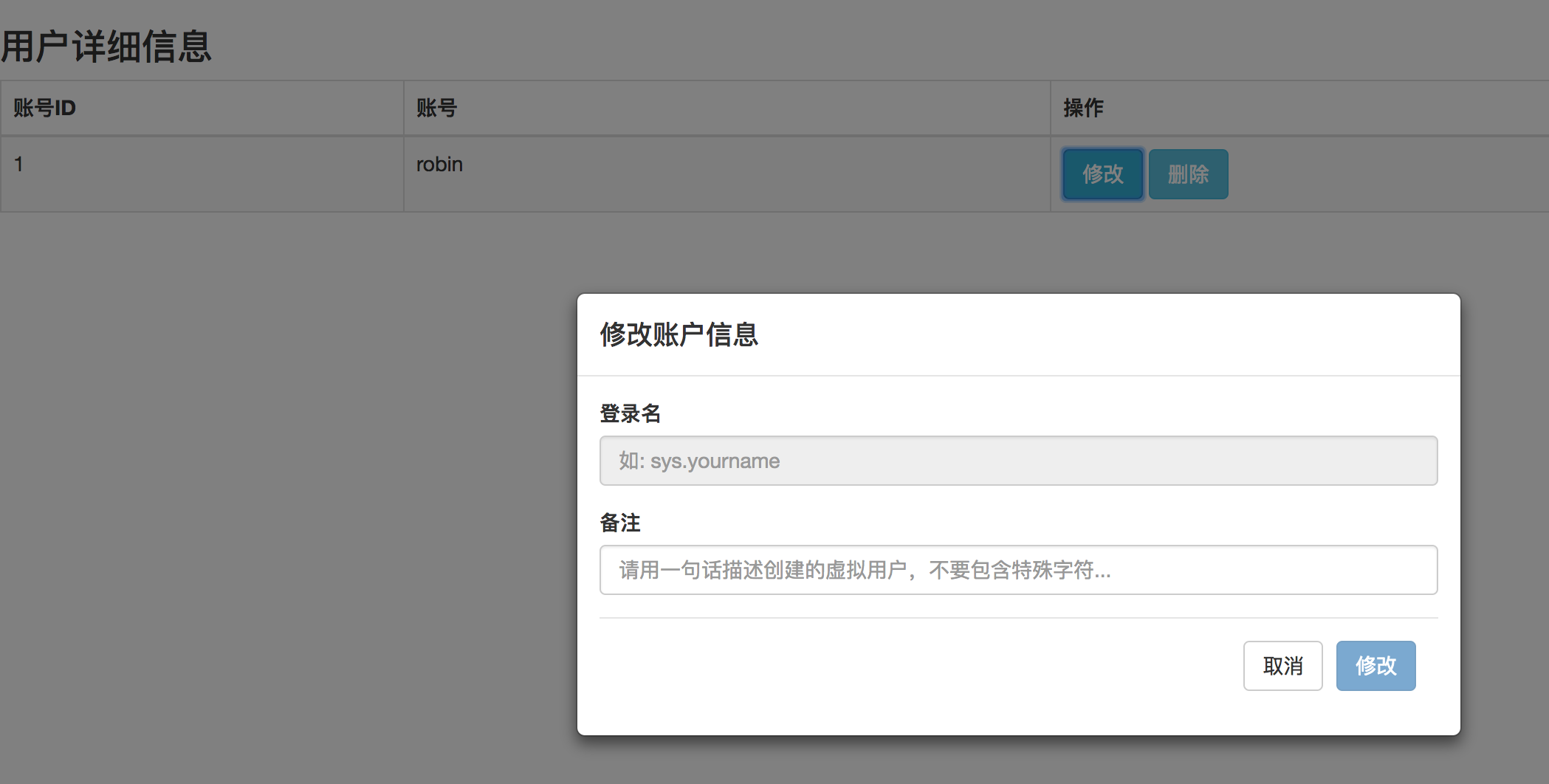
很显然数据显示的顺序是有问题的~~~~~
最后发现原因是 model的class 必须有fade样式
最后发现原因是 model的class 必须有fade样式
最后发现原因是 model的class 必须有fade样式
如下:
<!DOCTYPE html>
<html lang="en">
<head>
    <meta charset="UTF-8">
    <meta http-equiv="x-ua-compatible" content="IE=edge">
    <meta name="viewport" content="width=device-width, initial-scale=1">
    <title>Title</title>
    <link rel="stylesheet" href="bootstrap.css" %}">
</head>
<body>
    <!--表格展示-->
    <section class="content">
      <div class="row">
        <div class="col-xs-12">
           <div class="box">
              <div class="box-header">
                <h3 class="box-title">用户详细信息</h3>
              </div>
              <div class="box-body">
                <div id="example1_wrapper" class="dataTables_wrapper form-inline dt-bootstrap">
                </div>
              </div>
                  <!-- Table field -->
              <div class="row">
                    <div class="col-sm-12">
                      <table id="example1" class="table table-bordered table-striped dataTable" role="grid" aria-describedby="example1_info">
                        <!--thead-->
                        <thead>
                          <tr role="row">
                            <th class="sorting_asc" tabindex="0" aria-controls="example1" rowspan="1" colspan="1" aria-sort="ascending" aria-label="Rendering engine: activate to sort column descending" style=" 50px;">账号ID</th>
                            <th class="sorting" tabindex="0" aria-controls="example1" rowspan="1" colspan="1" aria-label="Browser: activate to sort column ascending" style=" 80px;">账号</th>
                            <th class="sorting" tabindex="0" aria-controls="example1" rowspan="1" colspan="1" aria-label="Engine version: activate to sort column ascending" style=" 90px;">操作</th>
                          </tr>
                        </thead>
                        <!--tbody-->
                        <tbody>
                              <tr role="row" class="odd">
                                  <td class="sorting_1" id="id">1</td>
                                  <td id="department_name">robin</td>
                                  <td>
                                      <!--<button type="button" class="btn btn-primary btn-lg" onclick="openModal();"></button>-->
                                      <button id="modify_user" data-toggle="modal" data-target="#modify_user_modal" class="btn btn-info" onclick="openModal();">修改</button>
                                      <button id="delete_user" data-toggle="modal" data-target="#delete_user_modal" class="btn btn-info">删除</button>
                                  </td>
                              </tr>

                        </tbody>
                        <!--tfoot-->
                      </table>
                    </div>
                  </div>
           </div>
        </div>
      </div>
    </section>


    <!--修改用户模态对话框-->
    <div id="myModal" class="modal fade"> <!--- fade fade fade ->
      <div class="modal-dialog" style="margin-top: 200px;">
        <div class="modal-content">
          <div class="modal-header">
            <h4 class="modal-title">修改账户信息</h4>
          </div>
          <div class="modal-body">
            <form id="modify_user_form" action="/page/userinfo/" role="form"  method="post">

              <div class="form-group">
                <label>登录名</label>
                <input type="text" class="form-control" id="modify_user_name" name='modify_user_name' placeholder="如: sys.yourname"  readonly autofocus >
              </div>


              <div class="form-group">
                <label>备注</label>
                <input type="textarea" class="form-control" id="add_user_description" name='add_user_description'
                       placeholder="请用一句话描述创建的虚拟用户,不要包含特殊字符...">
              </div>

              <div class="modal-footer">
                <input type="text" name="request-type" value="modify" class="hide">
                <button id="modify_user_cancel_btn" type="submit" class="btn btn-default" data-dismiss="modal">取消</button>
                <button id="modify_user_confirm_btn" type="submit" class="btn btn-primary disabled">修改</button>
              </div>
            </form>
          </div>
        </div>
      </div>
    </div>
  <!--  需引用jquery 和 bootstrap.js-->
    <script src="jquery-3.2.1.js"> </script>
    <script src="bootstrap.js"> </script>

    <script>
            function openModal() {
                console.log("before open action");
                $('#myModal').modal({
                    backdrop: true,
                    keyboard: false,
                    show: true,
                    remote: "template.html"
                });
                console.log("after open action");
            }

        $('#myModal').on('shown.bs.modal', function(e) {
            var btn =$(e.relatedTarget); // btn表示的是触发这个model的删除按钮,通过这个再去操作页面的其他元素
         alert('在模态框显示完毕后触发!');
        });
    </script>
</body>
</html>
效果:
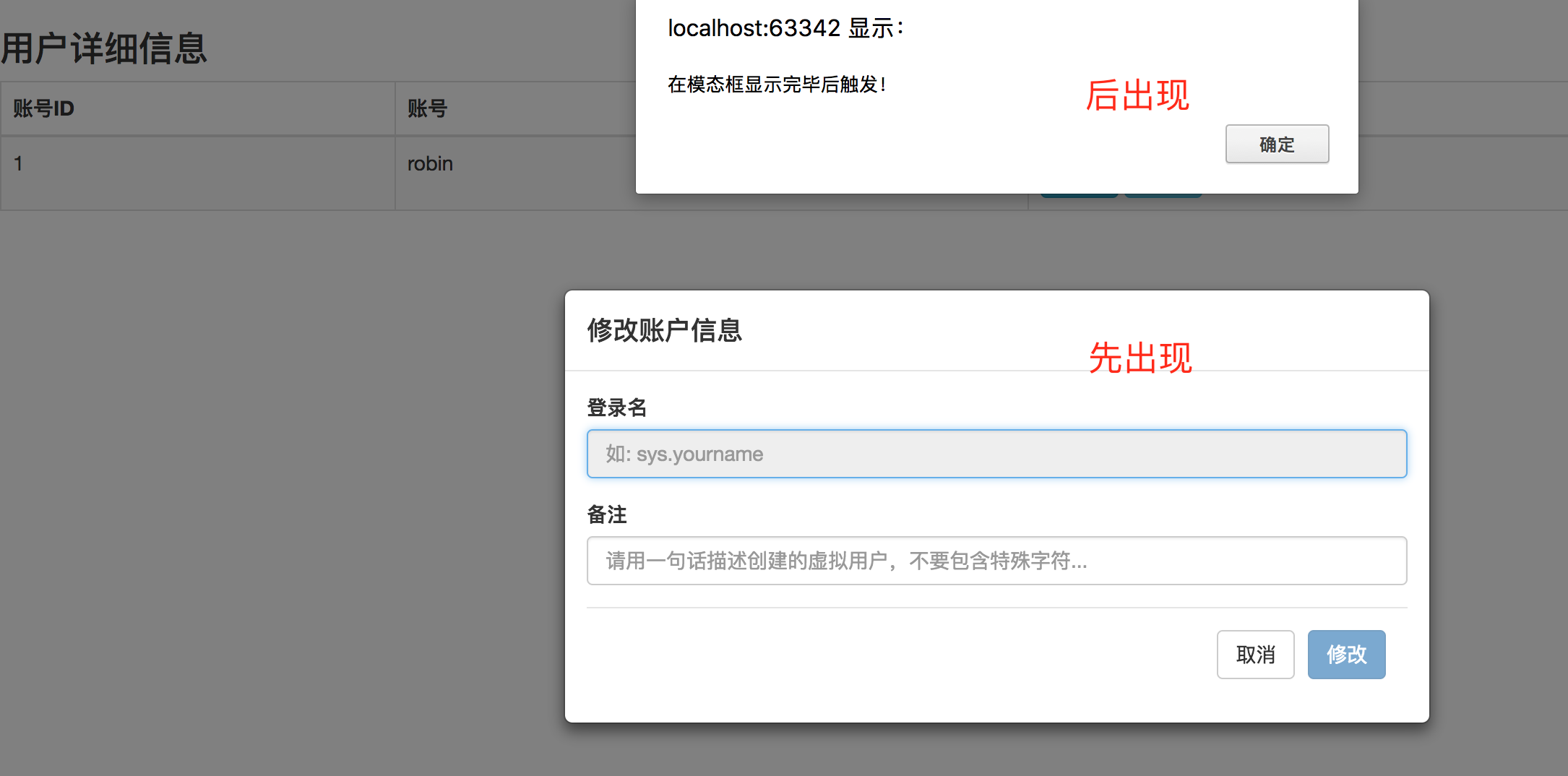
使用 data-target="#modify_user_modal" 这种方式触发模态对话框时, bootstrap按钮上绑定函数的执行顺序
onclick绑定自定义的函数-----> 模态对话框展示------->shown.bs.modal事件
参考文章:
http://v3.bootcss.com/javascript/#modals-events
https://github.com/zhbhun/bootstrap-study-demo/blob/master/modal/event-demo.html
http://www.runoob.com/bootstrap/bootstrap-modal-plugin.html
https://segmentfault.com/q/1010000005085719