哎,只能说现在是越来越不行了,已经近一年没写C#的代码了,我居然隐隐有看不懂自己代码的趋势了,真伤!
我突然想起当年寒假里面为了,准备微软创新杯大赛所做的一些小应用,哈哈,于是我就拿出来显摆一下喽!
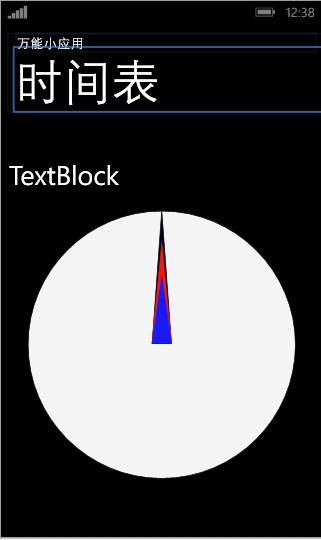
那个撒,模拟器我就不开了,直接有预览,textblock在文件启动时就会变为时间,默认的text属性我就没有去改它了(明明是自己懒!)
首先来看一下我们得MainPage.xaml文件:微软的开发工具绝对好啊,至少不用像安卓那样调试各种屏幕格式,,,,,
<phone:PhoneApplicationPage
    xmlns="http://schemas.microsoft.com/winfx/2006/xaml/presentation"
    xmlns:x="http://schemas.microsoft.com/winfx/2006/xaml"
    xmlns:phone="clr-namespace:Microsoft.Phone.Controls;assembly=Microsoft.Phone"
    xmlns:shell="clr-namespace:Microsoft.Phone.Shell;assembly=Microsoft.Phone"
    xmlns:d="http://schemas.microsoft.com/expression/blend/2008"
    xmlns:mc="http://schemas.openxmlformats.org/markup-compatibility/2006"
    xmlns:es="clr-namespace:Microsoft.Expression.Shapes;assembly=Microsoft.Expression.Drawing"
    x:Class="clock.MainPage"
    mc:Ignorable="d"
    FontFamily="{StaticResource PhoneFontFamilyNormal}"
    FontSize="{StaticResource PhoneFontSizeNormal}"
    Foreground="{StaticResource PhoneForegroundBrush}"
    SupportedOrientations="Portrait" Orientation="Portrait"
    shell:SystemTray.IsVisible="True">
    <phone:PhoneApplicationPage.Resources>
        <Storyboard x:Name="timer">
            <!--时钟的动画-->
            <DoubleAnimation x:Name="sed"  Storyboard.TargetProperty="Angle" Storyboard.TargetName="second"  RepeatBehavior="Forever"  Duration="0:1:0">

            </DoubleAnimation>


            <DoubleAnimation x:Name="min" Storyboard.TargetProperty="Angle" Storyboard.TargetName="minute"  RepeatBehavior="Forever" From="0" To="360" Duration="1:0:0" >

            </DoubleAnimation>


            <DoubleAnimation x:Name="hou" Storyboard.TargetProperty="Angle" Storyboard.TargetName="hour"   RepeatBehavior="Forever" From="0" To="360" Duration="23:59:59">

            </DoubleAnimation>
        </Storyboard>
    </phone:PhoneApplicationPage.Resources>
    <!--LayoutRoot 是包含所有页面内容的根网格-->
    <Grid x:Name="LayoutRoot" Background="Transparent">
        <Grid.RowDefinitions>
            <RowDefinition Height="Auto"/>
            <RowDefinition Height="*"/>
        </Grid.RowDefinitions>

        <!-- 本地化说明:
            若要本地化显示的字符串,请将其值复制到应用程序的非特定语言资源文件(AppResources.resx)
            中的适当命名的键,然后
            将属性的引号之间的硬编码文本值
            替换为其路径指向该字符串名称的绑定子句。

            例如:

                Text="{Binding Path=LocalizedResources.ApplicationTitle, Source={StaticResource LocalizedStrings}}"

            此绑定指向模板的名为“ApplicationTitle”的字符串资源。

            在“项目属性”选项卡中添加受支持的语言将会为
            每种语言创建一个新的 resx 文件,该文件可以包含 UI 字符串的翻译值
            。这些示例中的绑定将导致在运行时从
            与应用程序的 CurrentUICulture 匹配的 .resx 文件中
            提取属性的值。
         -->

        <!--取消注释,以显示对齐网格,从而帮助确保
            控件在公用边界上对齐。图像在系统栏中显示时的
            上边距为 -32px。如果隐藏了系统栏,则将此值设为 0
            (或完全删除边距)。

            在发送之前删除此 XAML 和图像本身。-->
        <!--<Image Source="/Assets/AlignmentGrid.png" VerticalAlignment="Top" Height="800" Width="480" Margin="0,-32,0,0" Grid.Row="0" Grid.RowSpan="2" IsHitTestVisible="False" />-->
        <!--TitlePanel 包含应用程序的名称和页标题-->
        <StackPanel x:Name="TitlePanel" Grid.Row="0" Margin="12,17,0,28">
            <TextBlock Text="万能小应用" Style="{StaticResource PhoneTextNormalStyle}" Margin="12,0"/>
            <TextBlock Text="时间表" Margin="9,-7,0,0" Style="{StaticResource PhoneTextTitle1Style}"/>
        </StackPanel>

        <!--ContentPanel - 在此处放置其他内容-->
        <Grid x:Name="ContentPanel" Grid.Row="1" Margin="12,0,12,0">
            <Grid Width="400" Height="400" Margin="28,120,28,87">
                <Ellipse Fill="#FFF4F4F5" HorizontalAlignment="Left" Height="400" Stroke="Black" VerticalAlignment="Top" Width="400"/>
                <es:RegularPolygon Fill="#FF010111" HorizontalAlignment="Left" Height="200" InnerRadius="1" Margin="185,-1,0,201" PointCount="3" Stretch="Fill" Stroke="#FF010111" UseLayoutRounding="False" VerticalAlignment="Bottom" Width="30" RenderTransformOrigin="0.5,1" >
                    <es:RegularPolygon.RenderTransform>
                        <TransformGroup>
                            <RotateTransform x:Name="second" CenterX="0" CenterY="0">

                            </RotateTransform>
                        </TransformGroup>
                    </es:RegularPolygon.RenderTransform>
                </es:RegularPolygon>
                <es:RegularPolygon Fill="#FFF11B11" HorizontalAlignment="Left" Height="150" InnerRadius="1" Margin="185,48,0,0" PointCount="3" Stretch="Fill" Stroke="#FFF11B11" UseLayoutRounding="False" VerticalAlignment="Top" Width="30" RenderTransformOrigin="0.5,1">
                    <es:RegularPolygon.RenderTransform>
                        <TransformGroup>
                            <RotateTransform x:Name="minute" CenterX="0" CenterY="0">

                            </RotateTransform>
                        </TransformGroup>
                    </es:RegularPolygon.RenderTransform>
                </es:RegularPolygon>
                <es:RegularPolygon Fill="#FF1A1AF9" HorizontalAlignment="Left" Height="100" InnerRadius="1" Margin="185,98,0,0" PointCount="3" Stretch="Fill" Stroke="#FF1A1AF9" UseLayoutRounding="False" VerticalAlignment="Top" Width="30" RenderTransformOrigin="0.5,1">
                    <es:RegularPolygon.RenderTransform>
                        <TransformGroup>
                            <RotateTransform x:Name="hour" CenterX="0" CenterY="0">

                            </RotateTransform>
                        </TransformGroup>
                    </es:RegularPolygon.RenderTransform>
                </es:RegularPolygon>
            </Grid>
            <TextBlock Name="clock" HorizontalAlignment="Left" Margin="0,38,0,0" TextWrapping="Wrap" Text="TextBlock" VerticalAlignment="Top" RenderTransformOrigin="0.22,0.674" Height="56" Width="446" FontSize="40"/>
        </Grid>

    </Grid>

</phone:PhoneApplicationPage>
完成布局之后呢,就是实现功能了!
定义一个var来获取当前时间,让秒钟,分钟,时钟指针都有自己相应的范围
using System;
using System.Collections.Generic;
using System.Linq;
using System.Net;
using System.Windows;
using System.Windows.Controls;
using System.Windows.Navigation;
using Microsoft.Phone.Controls;
using Microsoft.Phone.Shell;
using clock.Resources;
using System.Windows.Threading;

namespace clock
{
    public partial class MainPage : PhoneApplicationPage
    {
        // 构造函数
        public MainPage()
        {
            var time = DateTime.Now;
            double hourAngle = ((float)time.Hour) / 12 * 360 + time.Minute / 2;
            double minuteAngle = ((float)time.Minute) / 60 * 360 + time.Second / 10;
            double secondAngle = ((float)time.Second) / 60 * 360;
            InitializeComponent();
            sed.From = secondAngle;
            sed.To = secondAngle + 360;
            min.From = minuteAngle;
            min.To = minuteAngle + 360;
            hou.From = hourAngle;
            hou.To = hourAngle + 360;
            timer.Begin();
            Intitimer();
            // 用于本地化 ApplicationBar 的示例代码
            //BuildLocalizedApplicationBar();
        }
        private void Intitimer()
        {
            DispatcherTimer dt = new DispatcherTimer();
            dt.Interval = new TimeSpan(1);
            dt.Tick += dt_Tick;
            dt.Start();
        }

        private void dt_Tick(object sender, EventArgs e)
        {
            string second,str,minute,hour;
            DateTime time = DateTime.Now;
           int second1 = time.Second;
           if (second1 < 10)
               second = "0" + second1.ToString();
           else
               second = second1.ToString();
           int  minute1 = time.Minute;
           if (minute1 < 10)
               minute = "0" + minute1.ToString();
           else
               minute = minute1.ToString();
           int hour1 = time.Hour;
           if (hour1 < 10)
               hour = "0" + hour1.ToString();
           else
               hour= hour1.ToString();
            str ="时间:"+ hour + ":" + minute + ":" + second;
            clock.Text = str;
        }

        //private void sed_Completed(object sender, EventArgs e)
        //{   string second,str,minute,hour;
        //    DateTime time = DateTime.Now;
        //    sed1.
        //}


        // 用于生成本地化 ApplicationBar 的示例代码
        //private void BuildLocalizedApplicationBar()
        //{
        //    // 将页面的 ApplicationBar 设置为 ApplicationBar 的新实例。
        //    ApplicationBar = new ApplicationBar();

        //    // 创建新按钮并将文本值设置为 AppResources 中的本地化字符串。
        //    ApplicationBarIconButton appBarButton = new ApplicationBarIconButton(new Uri("/Assets/AppBar/appbar.add.rest.png", UriKind.Relative));
        //    appBarButton.Text = AppResources.AppBarButtonText;
        //    ApplicationBar.Buttons.Add(appBarButton);

        //    // 使用 AppResources 中的本地化字符串创建新菜单项。
        //    ApplicationBarMenuItem appBarMenuItem = new ApplicationBarMenuItem(AppResources.AppBarMenuItemText);
        //    ApplicationBar.MenuItems.Add(appBarMenuItem);
        //}
    }
}
//我个人还是比较喜欢C#的风格的,java写的其实有点累,为何提醒键是alt+/ 你要是直接用tab键多好啊!实现接口也只要: 而java 却要 implements(我小小地吐个嘈,大家不要介意嘛!)