1,注册案例的客户端页面
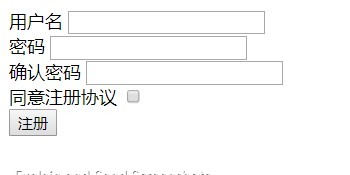
<!DOCTYPE html>
<html lang="en">
<head>
    <meta charset="UTF-8">
    <title>Title</title>
</head>
<body>
<form action="<?php echo $_SERVER['PHP_SELF'];?>" method="post">
    <label for="userName">用户名</label>
    <input type="text" name="userName" id="userName">
    <br>
    <label for="password">密码</label>
    <input type="password" name="password" id="password">
    <br>
    <label for="confirmPW">确认密码</label>
    <input type="password" name="confirmPW" id="confirmPW">
    <br>
    <label for="agree">同意注册协议</label>
    <input type="checkbox" name="agree" id="agree">
    <br>
    <button>注册</button>
</form>
</body>
</html>
2,注册案例服务端逻辑
表单处理三部曲:
①接收并校验
②持久化(将数据持久保存到磁盘)
③响应(服务端的反馈)
接收用户提交的数据,保存到文件 (这里是保存在 reqisterCase.txt 文件中)
register.php
<?php
if($_SERVER['REQUEST_METHOD']==='POST')
{
    if(empty($_POST['userName'])){  //没有提交用户名或用户名为空字符串
        $message="没有输入用户名";
    }
    else{
        if(empty($_POST['password'])){
            $message="请输入密码";
        }
        else{
            if(empty($_POST['confirmPW'])){
                $message="请输入确认密码";
            }
            else{
                if($_POST['password']!==$_POST['confirmPW']){
                    $message="两次输入的密码不一致";
                }
                else{
                    if(!(isset($_POST['agree'])&& $_POST['agree'] ==='on')){
                        $message="必须同意注册协议";
                    }
                    else{
                        //所有检验都完成,将数据保存在文件中
                        $userName=$_POST['userName'];
                        $password=$_POST['password'];
                        file_put_contents('registerCase' , $userName . '|' . $password ."
" ,FILE_APPEND);
                        $message="注册成功";
                    }
                }
            }
        }
    }

}
?>
<!DOCTYPE html>
<html lang="en">
<head>
    <meta charset="UTF-8">
    <title>Title</title>
</head>
<body>
<form action="<?php echo $_SERVER['PHP_SELF'];?>" method="post">
    <label for="userName">用户名</label>
    <input type="text" name="userName" id="userName">
    <br>
    <label for="password">密码</label>
    <input type="password" name="password" id="password">
    <br>
    <label for="confirmPW">确认密码</label>
    <input type="password" name="confirmPW" id="confirmPW">
    <br>
    <label for="agree">同意注册协议</label>
    <input type="checkbox" name="agree" id="agree">
    <br>

    <?php if(isset($message)): ?>
    <?php echo $message; ?>
    <?php endif ?>

    <button>注册</button>
</form>
</body>
</html>
3,注册表单状态保持(保存前一次填写的数据)
<?php
if($_SERVER['REQUEST_METHOD']==='POST')
{
    if(empty($_POST['userName'])){
        $message="没有输入用户名";
    }
    else{
        if(empty($_POST['password'])){
            $message="请输入密码";
        }
        else{
            if(empty($_POST['confirmPW'])){
                $message="请输入确认密码";
            }
            else{
                if($_POST['password']!==$_POST['confirmPW']){
                    $message="两次输入的密码不一致";
                }
                else{
                    if(!(isset($_POST['agree'])&& $_POST['agree'] ==='on')){
                        $message="必须同意注册协议";
                    }
                    else{
                        //所有检验都完成,将数据保存在文件中
                        $userName=$_POST['userName'];
                        $password=$_POST['password'];
                        file_put_contents('registerCase.txt' , $userName . '|' . $password ."
" ,FILE_APPEND);
                        $message="注册成功";
                    }
                }
            }
        }
    }

}
?>


<!DOCTYPE html>
<html lang="en">
<head>
    <meta charset="UTF-8">
    <title>Title</title>
</head>
<body>
<form action="<?php echo $_SERVER['PHP_SELF'];?>" method="post">
    <label for="userName">用户名</label>
    <input type="text" name="userName" id="userName" value="<?php echo isset($_POST['userName']) ? $_POST['userName'] : ' ' ;   ?>">  //把表单的默认值设置成前一次提交的数据
    <br>
    <label for="password">密码</label>
    <input type="password" name="password" id="password">
    <br>
    <label for="confirmPW">确认密码</label>
    <input type="password" name="confirmPW" id="confirmPW">
    <br>
    <label for="agree">同意注册协议</label>
    <input type="checkbox" name="agree" id="agree">
    <br>

    <?php if(isset($message)):  ?>
    <?php echo $message; ?>
    <?php endif ?>

    <button>注册</button>
</form>
</body>
</html>
4,解决代码 else 逻辑嵌套过深
<?php
if($_SERVER['REQUEST_METHOD']==='POST')
{
    postback();
}


function postback(){
//申明 $message 是全局
global $message;
if(empty($_POST['userName'])){
        $message="没有输入用户名";
        return;
    }
if(empty($_POST['password'])){
            $message="请输入密码";
            return;
        }
if(empty($_POST['confirmPW'])){
                $message="请输入确认密码";
                return;
            }
if($_POST['password']!==$_POST['confirmPW']){
                       $message="两次输入的密码不一致";
                       return;
                   }
if(!(isset($_POST['agree'])&& $_POST['agree'] ==='on')){
                        $message="必须同意注册协议";
                        return;
                    }

//所有检验都完成,将数据保存在文件中
                        $userName=$_POST['userName'];
                        $password=$_POST['password'];
                        file_put_contents('registerCase.txt' , $userName . '|' . $password ."
" ,FILE_APPEND);
                        $message="注册成功";
}

?>


<!DOCTYPE html>
<html lang="en">
<head>
    <meta charset="UTF-8">
    <title>Title</title>
</head>
<body>
<form action="<?php echo $_SERVER['PHP_SELF'];?>" method="post">
    <label for="userName">用户名</label>
    <input type="text" name="userName" id="userName" value="<?php echo isset($_POST['userName']) ? $_POST['userName'] : ' ' ;   ?>">
    <br>
    <label for="password">密码</label>
    <input type="password" name="password" id="password">
    <br>
    <label for="confirmPW">确认密码</label>
    <input type="password" name="confirmPW" id="confirmPW">
    <br>
    <label for="agree">同意注册协议</label>
    <input type="checkbox" name="agree" id="agree">
    <br>

    <?php if(isset($message)):  ?>
    <?php echo $message; ?>
    <?php endif ?>

    <button>注册</button>
</form>
</body>
</html>
return 只能在函数中使用来中断代码继续执行,所以将 服务端表单处理逻辑 封装在 postback( ) 函数中 ,解决else 嵌套过深的问题