接入微信公众平台开发,开发者需要按照如下步骤完成:
1、填写服务器配置
2、验证服务器地址的有效性
3、依据接口文档实现业务逻辑
通讯过程

第一步:填写服务器配置
登录微信公众平台官网后,在公众平台官网的开发-基本设置页面,勾选协议成为开发者,点击“修改配置”按钮,填写服务器地址(URL)、Token和EncodingAESKey,其中URL是开发者用来接收微信消息和事件的接口URL。Token可由开发者可以任意填写,用作生成签名(该Token会和接口URL中包含的Token进行比对,从而验证安全性)。EncodingAESKey由开发者手动填写或随机生成,将用作消息体加解密密钥。
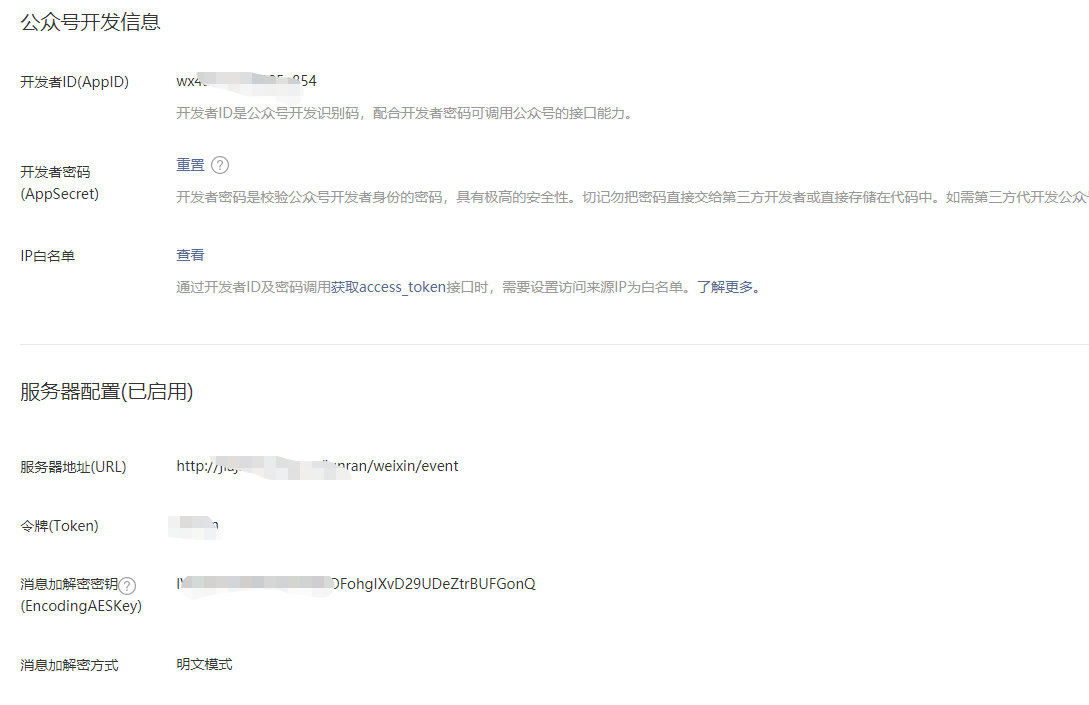
第二步:验证消息的确来自微信服务器
开发者提交信息后,微信服务器将发送GET请求到填写的服务器地址URL上,GET请求携带参数如下表所示:
| 参数 | 描述 |
|---|---|
| signature | 微信加密签名,signature结合了开发者填写的token参数和请求中的timestamp参数、nonce参数。 |
| timestamp | 时间戳 |
| nonce | 随机数 |
| echostr | 随机字符串 |
开发者通过检验signature对请求进行校验(下面有校验方式)。若确认此次GET请求来自微信服务器,请原样返回echostr参数内容,则接入生效,成为开发者成功,否则接入失败。加密/校验流程如下:
1)将token、timestamp、nonce三个参数进行字典序排序 2)将三个参数字符串拼接成一个字符串进行sha1加密 3)开发者获得加密后的字符串可与signature对比,标识该请求来源于微信
第三步 代码验证
验证代码 验证完后注释
package com.china.junran.apipublic;

import com.china.junran.configure.properties.WeiXinProperties;
import com.china.junran.third.weixin.encrypt.WxEncrypt;
import com.china.junran.third.weixin.encrypt.WxEncryptException;
import com.china.junran.third.weixin.event.ComponentEventHandler;
import lombok.extern.slf4j.Slf4j;
import org.springframework.beans.factory.annotation.Autowired;
import org.springframework.http.ResponseEntity;
import org.springframework.stereotype.Controller;
import org.springframework.web.bind.annotation.RequestBody;
import org.springframework.web.bind.annotation.RequestMapping;
import org.springframework.web.bind.annotation.RequestMethod;
import org.springframework.web.bind.annotation.RequestParam;
import springfox.documentation.annotations.ApiIgnore;

import javax.servlet.ServletException;
import javax.servlet.http.HttpServletRequest;
import javax.servlet.http.HttpServletResponse;
import java.io.IOException;
import java.io.PrintWriter;
import java.nio.charset.Charset;
import java.security.MessageDigest;
import java.security.NoSuchAlgorithmException;
import java.util.Arrays;

/**
 * 接收微信推送消息
 *
 * @author hmj
 */
@Slf4j
@Controller
@RequestMapping("/weixin")
public class WeiXinController {

    @Autowired
    private ComponentEventHandler<String> componentEventHandler;
    private WeiXinProperties properties;
    private WxEncrypt crypt;

    @Autowired
    public void setWeixinProperties(WeiXinProperties properties) {
        this.properties = properties;
        this.crypt = new WxEncrypt(properties.getToken(), properties.getEncodingAesKey(), properties.getAppid());
    }

    private String decryptBody(String msgSignature, String timestamp, String nonce, String body) {
        try {
            String decBody = crypt.decryptMsg(msgSignature, timestamp, nonce, body);
            log.debug("Wx event body is {}", decBody);
            return decBody;
        } catch (WxEncryptException e) {
            log.debug("Receive message is fail, error is {}", e.getMessage());
            return null;
        }
    }

   @ApiIgnore
   @RequestMapping(value = "event", method = RequestMethod.POST)
   public ResponseEntity<?> event(
           @RequestParam String signature,
           @RequestParam String timestamp,
           @RequestParam String nonce,
   @RequestBody byte[] bytes) {
       log.info("Timestamp is {}, nonce is {}, signature is {}", timestamp, nonce, signature);
       String body = new String(bytes, Charset.forName("UTF-8"));
       log.info("Body is {}", body);
       //todo 加密解密
       return componentEventHandler.handler(body);
    }


    /*
    *
    * 微信服务器验证
    *
    * */

   /* @ApiIgnore
    @RequestMapping(
            value = {"/event"},
            method = {RequestMethod.GET}
    )
    public static void doGet(HttpServletRequest request, HttpServletResponse response) throws ServletException, IOException {
        String signature = request.getParameter("signature");
        String timestamp = request.getParameter("timestamp");
        String nonce = request.getParameter("nonce");
        String echostr = request.getParameter("echostr");
        if (check(timestamp, nonce, signature)) {
            System.out.println("接入成功");
            PrintWriter out = response.getWriter();
            out.print(echostr);
            out.flush();
            out.close();
        } else {
            System.out.println("接入失败");
        }

        System.out.println(signature);
        System.out.println(timestamp);
        System.out.println(nonce);
        System.out.println(echostr);
        System.out.println("get");
    }

    public static boolean check(String timestamp, String nonce, String signature) {
        String[] strs = new String[]{"junran", timestamp, nonce};//junran
        Arrays.sort(strs);
        String str = strs[0] + strs[1] + strs[2];
        String mysig = sha1(str);
        System.out.println("mysig: " + mysig);
        System.out.println("signature: " + signature);
        return mysig.equalsIgnoreCase(signature);
    }

    private static String sha1(String src) {
        try {
            MessageDigest md = MessageDigest.getInstance("sha1");
            byte[] digest = md.digest(src.getBytes());
            char[] chars = new char[]{'0', '1', '2', '3', '4', '5', '6', '7', '8', '9', 'a', 'b', 'c', 'd', 'e', 'f'};
            StringBuilder sb = new StringBuilder();
            byte[] var5 = digest;
            int var6 = digest.length;

            for(int var7 = 0; var7 < var6; ++var7) {
                byte b = var5[var7];
                sb.append(chars[b >> 4 & 15]);
                sb.append(chars[b & 15]);
            }

            return sb.toString();
        } catch (NoSuchAlgorithmException var9) {
            var9.printStackTrace();
            return null;
        }
    }*/
}
点击提交 请求验证代码 提交成功后 验证完毕 之后微信所有信息都发送到这个接口中
如果帮助到你,给点鼓励点个推荐吧亲