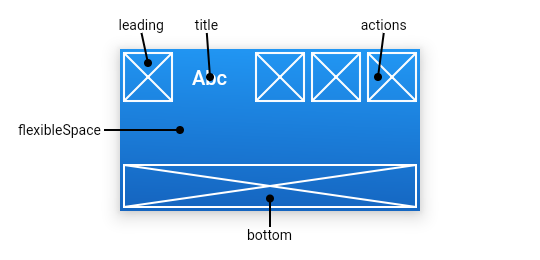
return Scaffold(
  appBar:AppBar(
    title:Text('Abc'),
    leading:Icon(Icons.home),
    elevation:4.0,//最下方阴影部分辐射范围
    actions:<widget>[],//如图区域
    iconTheme: IconThemeData(//设置图标样式
      color:,
      opacity:0.1,
      size:10.2
    ),
    brightness: Brightness.light,//应用栏材质的亮度
    backgroundColor: Colors.blueAccent,//背景颜色
    titleSpacing: 0.0,// 横轴上围绕title内容的间距  0.0即占据所有有用空间
    primary:true,appbar是否显示在任务栏顶部,true代表不被任务栏遮盖
    centerTitle:true/false,//是否居中title
    flexibleSpace:Container(
      color:colors.red,
    ),
    automaticallyImplyLeading: true, //配合leading使用,取决于automaticallyImplyLeading == true && leading ==null ,此时会自动做出一些哈事情
    bottom://接收一个widget
    textTheme: TextTheme(),
    toolbarOpacity: 1,//appBar上部分透明度
    bottomOpacity: 1,
  )
)
设置flutter AppBar的高度
Scaffold(
  appBar:PreferredSize(
    child:AppBar()
  ),
  preferredSize:size.fromHeight(screenSixe.height * 0.07)
)
设置flutter bottom的高度
bottom: PreferredSize(
  child: Container(
    height: 50,
     double.infinity,
    color: Colors.grey,
    child: Text('bottom'),
  ),
  preferredSize: Size(30, 100),
),