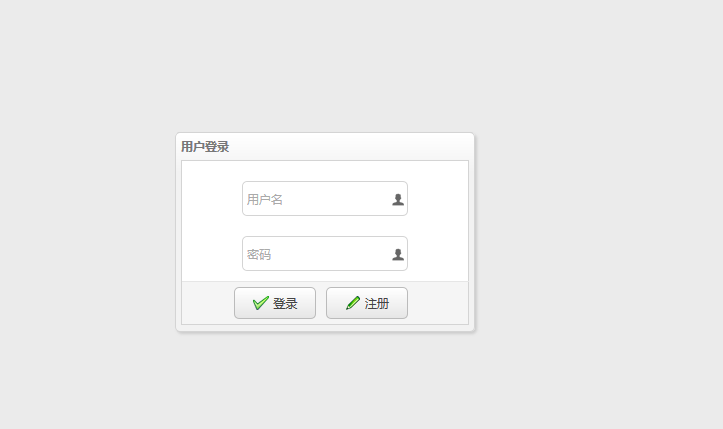
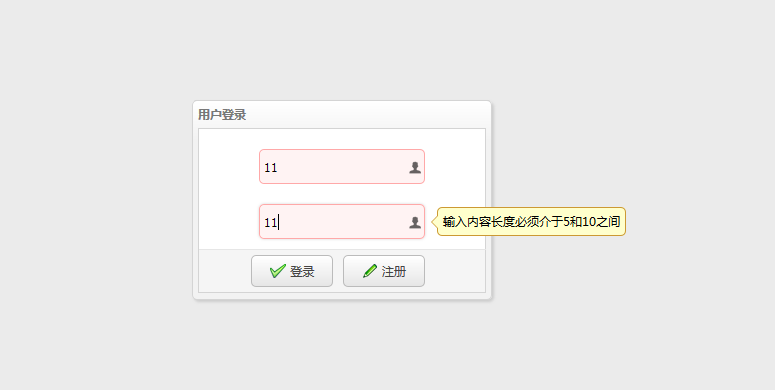
<%@ page language="java" contentType="text/html; charset=UTF-8"
    pageEncoding="UTF-8"%>
<!DOCTYPE html>
<%
    String path = request.getContextPath();
%>
<html>
<head>
<link rel="stylesheet" type="text/css"
    href="<%=path%>/script/easyUI-1.4/themes/bootstrap/easyui.css">
<link rel="stylesheet" type="text/css"
    href="<%=path%>/script/easyUI-1.4/themes/icon.css">
<script type="text/javascript"
    src="<%=path%>/script/easyUI-1.4/jquery-1.8.3.min.js"></script>
<script type="text/javascript"
    src="<%=path%>/script/easyUI-1.4/jquery.easyui.min.js"></script>
<script type="text/javascript"
    src="<%=path%>/script/easyUI-1.4/locale/easyui-lang-zh_CN.js"></script>
</head>
<script type="text/javascript">
    jQuery(function() {
        $('#loginAndRegDialog').dialog({
            title : '用户登录',
            width : 300,
            height : 200,
            closable : false,
            cache : false,
            modal : true,
            buttons : "#btn"
        });

        $("#login").bind('click', function() {

            console.info("login");
        });

        $('#form1').form({
            url :"<%=path%>/userAction/save",

            onSubmit : function() {
                //在提交之前触发,返回false可以终止提交。
                console.info("onsubmit方法")
            },
            success : function(data) {
                //在表单提交成功以后触发
                console.info("返回值")
            }
        });

        $("#login").bind('click',function(){
                $('#form1').submit();
        });

    });


</script>
<body>

    <div id="loginAndRegDialog">
        <form id="form1" method="post" class="easyui-form">
            <div style="margin-top: 20px; margin-left: 60px; margin-right: 60px;">
                <input class="easyui-textbox" name="username"
                    data-options="iconCls:'icon-man',validType:'length[5,10]',prompt:'用户名'"
                    style=" 100%; height: 35px">
            </div>
            <div style="margin-top: 20px; margin-left: 60px; margin-right: 60px;">
                <input class="easyui-textbox" name="password"
                    data-options="iconCls:'icon-man',validType:'length[5,10]',prompt:'密码'"
                    style=" 100%; height: 35px">
            </div>
            <div id="btn">
                <a id="login" class="easyui-linkbutton"
                    data-options="iconCls:'icon-ok'" style=" 30%; height: 32px">登录</a>
                <a id="reg" class="easyui-linkbutton"
                    data-options="iconCls:'icon-edit'"
                    style=" 30%; height: 32px; margin-right: 55px;">注册</a>
            </div>
        </form>

    </div>
</body>
</html>