*红色字体为固定命名,蓝色为一般命名规则,黄色为ASP.NET CORE 默认查找文件名
概要:1.简单ViewComponent的用法
2.ViewComponent控制器返回值
3.注意事项
1.简单ViewComponent的用法
第一步:创建ASP.NET CORE Web应用程序,并在网站根目录创建 ViewComponents 文件夹
第二部:在ViewComponents文件夹中新建视图组件的控制器, 这儿我命名为 OnePartViewComponent 。 然后编辑该类,继承ViewComponent,实现InvokeAsync()或Invoke()方法
 1 using Microsoft.AspNetCore.Mvc;
 2
 3 namespace AspCoreTest.ViewComponents
 4 {
 5     public class OnePartViewComponent : ViewComponent
 6     {
 7         //public async Task<IViewComponentResult> InvokeAsync()
 8         public IViewComponentResult Invoke()
 9         {
10             ViewData["Msg"] = "别看了,我就是分布视图";
11
12             return View();
13         }
14     }
15 }
第三步:创建视图
在Views文件夹下新建 Components 文件夹,在该Components文件夹下建 OnePart 文件夹, 接着在该OnePart文件夹下建视图页 Default.cshtml。暂且一行代码
1 <h1>@ViewData["Msg"]</h1>
到此一个简单的视图组件也就创建完了
第四部:在其他页面插入我们创建的这个视图组件,这儿我选择VS自动创建的 About 页面作为演示
 1 @{
 2     ViewData["Title"] = "About";
 3 }
 4 <h2>@ViewData["Title"].</h2>
 5
 6 @await Component.InvokeAsync("OnePart")
 7
 8 <h3>@ViewData["Message"]</h3>
 9
10 <p>Use this area to provide additional information.</p>
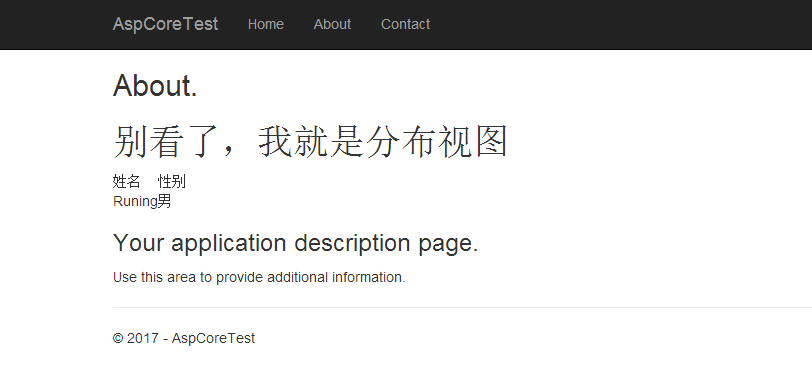
F5运行,点击About,转到About页面:

2.视图组件的控制器返回值
对于正式使用,可能会还会用到Model,在ViewComponent控制器中返回一个model。model文件夹并无明确要求,对视图组件来说,一般放在 ViewModels 文件夹下,在ViewModels 文件夹下新建 OnePart.class
 1 namespace AspCoreTest.ViewModels
 2 {
 3     public class OnePart
 4     {
 5         /// <summary>
 6         /// 姓名
 7         /// </summary>
 8         public string name { get; set; }
 9
10         /// <summary>
11         /// 性别
12         /// </summary>
13         public string sex { get; set; }
14     }
15 }
在控制器中使用该Model处理数据,并返回给视图
 1 using Microsoft.AspNetCore.Mvc;
 2 using AspCoreTest.ViewModels;
 3
 4 namespace AspCoreTest.ViewComponents
 5 {
 6     public class OnePartViewComponent : ViewComponent
 7     {
 8         //public async Task<IViewComponentResult> InvokeAsync()
 9         public IViewComponentResult Invoke()
10         {
11             ViewData["Msg"] = "别看了,我就是分布视图";
12
13             OnePart onePart = new OnePart();//声明model
14             //数据处理
15             onePart.name = "Runing";
16             onePart.sex = "男";
17
18             //返回model
19             return View(onePart);
20         }
21     }
22 }
在视图中使用model的数据
@using AspCoreTest.ViewModels
@model OnePart

<h1>@ViewData["Msg"]</h1>

<table>
    <tr>
        <td>姓名</td>
        <td>性别</td>
    </tr>
    <tr>
        <td>@Model.name</td>
        <td>@Model.sex</td>
    </tr>
</table>
OK,视图组件中使用Model大致流程就是这样,是不是感觉很简单
3.注意事项总结
a.固定命名规则:
文件夹:控制器文件夹 ViewComponents,
视图文件夹有两种选择:1.某个控制器(如:Home)专用的视图组件 {Home}/Components/{ViewComponent}/
2.全局的视图组件 Shared/Components/{ViewComponent}/
控制器:名 + ViewComponent
视图:Default.cshtml为默认查找的视图,若自定义视图名,在需要在ViewComponent控制器中返回时指定该视图即可
return View("MyView");
b.视图组件控制器中 Invoke()、InvokeAsunc()两个方法必须有且仅能有一个