解决了什么问题?
快速ci cd ;
团队协作效率更高,更快的集成,更快的交付;走gitops模式;

主流的CICD过程:

teamcity的架构:

安装方式
docker的方式安装快速
安装server端
mkdir -p /data/teamcity_server/datadir  /data/teamcity/logs


docker run -it --name teamcity-server \
-v /data/teamcity_server/datadir:/data/teamcity_server/datadir \
-v /data/teamcity_server/logs:/opt/teamcity/logs \
-p 8111:8111 \
jetbrains/teamcity-server:EAP
然后得到访问的url,后面安装客户端的时候需要用到。
比如这里是: http://172.31.12.168:8111
数据库选择选用默认的hsqldb,这里只要挂载的目录不丢,重新安装之后数据也是存在的;
安装client端
mkdir -p /data/teamcity_agent/conf
chmod -R 777 /data/teamcity_agent/conf

docker run -it -e SERVER_URL="http://172.31.12.168:8111"  \
    -v /data/teamcity_agent/conf:/data/teamcity_agent/conf  \
    jetbrains/teamcity-agent:EAP
可以安装多个;
但是专业版本的限定了3个,所以为了后期的遍历,最多不超过3个客户端吧!
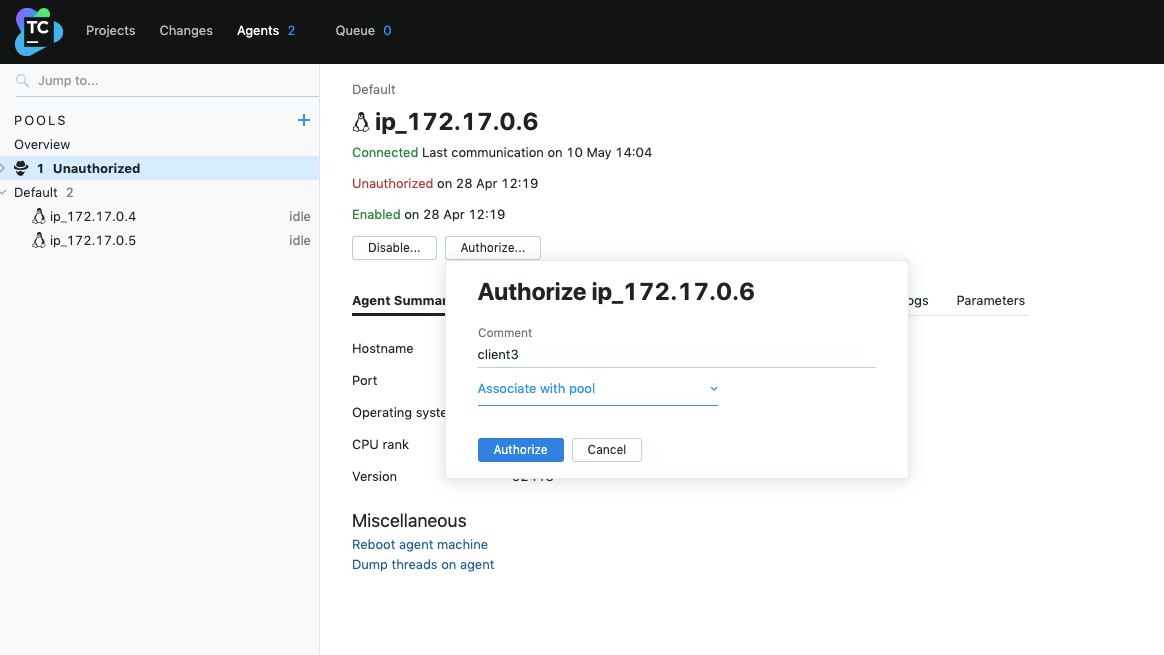
安装完毕之后需要在server端对agent进行授权才能使用。

直接备注即可加入到客户端池。

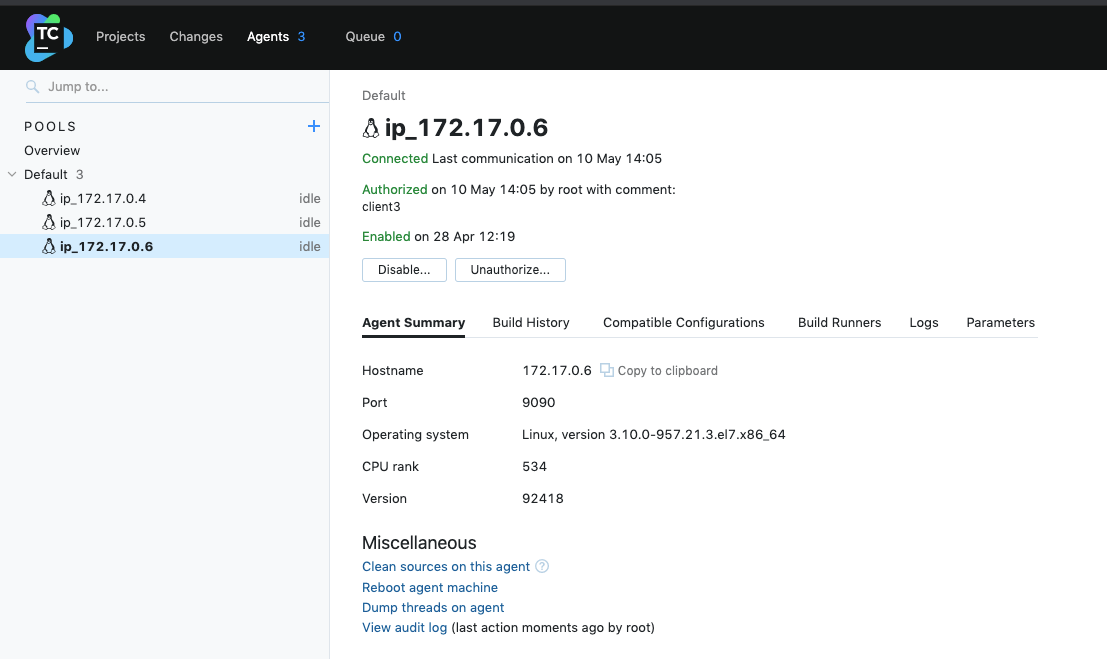
然后即可加入到服务端的客户端池子。构建的任务的执行即可按照并行度为3进行执行。
也可以物理化部署,不会有docker内核的问题。

这个位置可以下载物理版本的客户端安装包。结合文档修改配置参数即可;
主要修改的是服务端server的地址和客户端的应用名称;
位置:/data/team_agent4/conf/buildAgent.properties

启动指令: ./bin/agent.sh start
然后在服务端授权即可使用。
使用初体验
一个后端工程的CI和CD过程:
下面是实践过程:

创建工程

然后贴入你的 gitlab或者github仓库地址;
填写一个有只读权限的账号和密码。

配置CICD构成脚本
1 后端打jar包

2 打后端docker镜像

3 前端npm打包

4 前端镜像制作

5 推送前端和后端镜像到镜像仓库

6 发布到k8s环境

7 发动钉钉通知到项目群

整体的kotlin代码
package _Self.buildTypes

import jetbrains.buildServer.configs.kotlin.v2019_2.*
import jetbrains.buildServer.configs.kotlin.v2019_2.buildSteps.MavenBuildStep
import jetbrains.buildServer.configs.kotlin.v2019_2.buildSteps.dockerCommand
import jetbrains.buildServer.configs.kotlin.v2019_2.buildSteps.maven
import jetbrains.buildServer.configs.kotlin.v2019_2.buildSteps.nodeJS
import jetbrains.buildServer.configs.kotlin.v2019_2.buildSteps.script
import jetbrains.buildServer.configs.kotlin.v2019_2.triggers.vcs

object Build : BuildType({
    name = "appBuild"
    description = "构建"

    allowExternalStatus = true
    artifactRules = "app-tp/start/target/app-tp.jar => app-tp.jar"
    publishArtifacts = PublishMode.SUCCESSFUL

    vcs {
        root(HttpGitlabH3yunComHermesSystemAppTpGitRefsHeadsMaster)

        showDependenciesChanges = true
    }

    steps {
        maven {
            name = "打jar包"
            goals = "clean install -Dmaven.test.skip=true -U"
            pomLocation = "app-tp/pom.xml"
            runnerArgs = "-Dmaven.test.failure.ignore=true"
            workingDir = "app-tp"
            userSettingsSelection = "我的nexus配置"
            localRepoScope = MavenBuildStep.RepositoryScope.MAVEN_DEFAULT
            isIncremental = true
            jdkHome = "%env.JDK_18%"
            dockerImagePlatform = MavenBuildStep.ImagePlatform.Linux
            dockerPull = true
        }
        dockerCommand {
            name = "制作后端docker镜像"
            commandType = build {
                source = file {
                    path = "app-tp/app.Dockerfile"
                }
                namesAndTags = "registry.cn-shenzhen.aliyuncs.com/cloudpivot/app-tp:tptest"
                commandArgs = "--pull"
            }
        }
        nodeJS {
            name = "前端npm打包"
            shellScript = """
                cd front-tp
                npm install
                npm run build
            """.trimIndent()
            dockerPull = true
        }
        dockerCommand {
            name = "制作前端docker镜像"
            commandType = build {
                source = file {
                    path = "front-tp/front.Dockerfile"
                }
                namesAndTags = "registry.cn-shenzhen.aliyuncs.com/cloudpivot/front-tp:tptest"
                commandArgs = "--pull"
            }
        }
        script {
            name = "登录推送到远程镜像仓库"
            scriptContent = """
                docker login -u="aaaa" -p xxxxyun registry.cn-shenzhen.aliyuncs.com

                echo "推送到远程仓库"
                docker push registry.cn-shenzhen.aliyuncs.com/cloudpivot/app-tp:tptest
                docker push registry.cn-shenzhen.aliyuncs.com/cloudpivot/front-tp:tptest

                echo "删除本地镜像===节约磁盘空间===="
                docker images | grep app-tp | awk '{print ${'$'}3 }' | xargs docker rmi
                docker images | grep front-tp | awk '{print ${'$'}3 }' | xargs docker rmi
            """.trimIndent()
        }
        script {
            name = "更新k8s环境"
            scriptContent = """
                cd %system.teamcity.build.checkoutDir%
                cd deploy
                sh app_tp_deploy.sh
                sh front_tp_deploy.sh
            """.trimIndent()
        }
        script {
            name = "推送钉钉通知到项目群"
            scriptContent = """
                url='https://oapi.dingtalk.com/robot/send?access_token=b0dc2aee487a842dd5648566ade86xxxxxxx'
                programe=技术管理平台
                server=tptest.cloudpivot.cn
                content=%teamcity.build.branch%
                buildInfo=%vcsroot.useAlternates%

                function sendDingtalk(){
                    curl ${'$'}{1} \
                       -H 'Content-Type: application/json' \
                       -d "
                      {\"msgtype\": \"text\",
                        \"text\": {
                            \"content\": \"消息内容:项目-${'$'}{2},域名-${'$'}{3},分支-${'$'}{4} 更新内容-${'$'}{5}\"
                         },
                         \"isAtAll\": true,
                      }"
                }

                sendDingtalk ${'$'}{url} ${'$'}{programe} ${'$'}{server} ${'$'}{content} ${'$'}{content} ${'$'}{buildInfo}
            """.trimIndent()
        }
    }

    triggers {
        vcs {
            branchFilter = "+:refs/heads/test"
        }
    }
})
小结
teamcity专业版本限制3个执行客户端,100个构建配置,适合小型团队;
用户体验比较好,界面比较好看。
自动检测代码变化,进行构建;(可以大大提高CI效率)

比如推送了一个修改到某个分支,直接就发布到了集成测试环境了。

pk
(开发完毕一个功能,然后合并到集成测试分支,再到CICD系统点发布,碰到问题再惊起一滩鸥鹭)
更优雅。
钉钉消息通知
拉一个钉钉群,增加一个机器人:


完整之后,即可拿到通知token:
https://oapi.dingtalk.com/robot/send?access_token=c30f5008258474da14e65d3141536953b79df3bf3ab64f33a583e83165b19665
准备的shell脚本:
url='https://oapi.dingtalk.com/robot/send?access_token=c30f5008258474da14e65d3141536953b79df3bf3ab64f33a583e83165b19665'
programe=技术管理平台
server=tptest.cloudpivot.cn
content='程序中断'

function sendDingtalk(){
    curl ${1} \
       -H 'Content-Type: application/json' \
       -d "
      {\"msgtype\": \"text\",
        \"text\": {
            \"content\": \"消息内容:项目-${2},服务地址-${3},更新内容-${4}\"
         },
         \"isAtAll\": true,
      }"
}

sendDingtalk ${url} ${programe} ${server} ${content}
实际例子:
url='https://oapi.dingtalk.com/robot/send?access_token=b0dc2aee487a842dd5648566ade86e2217dac868c0ffdcab5138cb7eab163978'
programe=技术管理平台
server=tptest.cloudpivot.cn
content=%teamcity.build.branch%
buildInfo=%vcsroot.useAlternates%

function sendDingtalk(){
    curl ${1} \
       -H 'Content-Type: application/json' \
       -d "
      {\"msgtype\": \"text\",
        \"text\": {
            \"content\": \"消息内容:项目-${2},域名-${3},分支-${4} 更新内容-${5}\"
         },
         \"isAtAll\": true,
      }"
}

sendDingtalk ${url} ${programe} ${server} ${content} ${content} ${buildInfo}
通知效果截图:

材料
使用手册: (必看英文材料)
https://www.jetbrains.com/help/teamcity/2021.1/configure-and-run-your-first-build.html
teamcity之旅 (必看中文材料)
https://developer.aliyun.com/article/738443
腾讯云搭建teamcity过程:(特权容器解决docker agent无法打镜像的问题)
https://blog.csdn.net/sD7O95O/article/details/88264986
钉钉机器人通知文档:
https://ding-doc.dingtalk.com/doc#/serverapi2/qf2nxq
程序启动之后通过shell通知到钉钉群:
https://blog.csdn.net/weixin_37836950/article/details/107924910
原创不易,关注诚可贵,转发价更高!转载请注明出处,让我们互通有无,共同进步,欢迎沟通交流。