1:web.xml中添加监听器。
    <listener>
        <listener-class>org.springframework.web.context.ContextLoaderListener</listener-class>
    </listener>
监听器作用为spring上下文在web容器初始化的时候加载spring相关配置。
查看源码可以看到依赖关系:
public class ContextLoaderListener extends ContextLoader implements ServletContextListener
父类ContextLoader中,有如下全局变量参数,为监听器获取初始化对象的引用值:
    /**
     * Name of servlet context parameter (i.e., {@value}) that can specify the
     * config location for the root context, falling back to the implementation's
     * default otherwise.
     * @see org.springframework.web.context.support.XmlWebApplicationContext#DEFAULT_CONFIG_LOCATION
     */
    public static final String CONFIG_LOCATION_PARAM = "contextConfigLocation";
注释中描述了这是指定了根上下文的位置,CONFIG_LOCATION_PARAM是上下文参数名称,如果没有,那默认位置为:XmlWebApplicationContext,我们详细看下这个类,DEFAULT_CONFIG_LOCATION默认/WEB-INF/applicationContext.xml这个文件为spring的context配置文件。其余参数指定文件夹位置,后缀名称。
public class XmlWebApplicationContext extends AbstractRefreshableWebApplicationContext {

    /** Default config location for the root context */
    public static final String DEFAULT_CONFIG_LOCATION = "/WEB-INF/applicationContext.xml";

    /** Default prefix for building a config location for a namespace */
    public static final String DEFAULT_CONFIG_LOCATION_PREFIX = "/WEB-INF/";

    /** Default suffix for building a config location for a namespace */
    public static final String DEFAULT_CONFIG_LOCATION_SUFFIX = ".xml";
所以,web.xml中我们可以添加如下配置:
    <context-param>
        <param-name>contextConfigLocation</param-name>
        <param-value>
            classpath*:/config/spring/spring*.xml
        </param-value>
    </context-param>
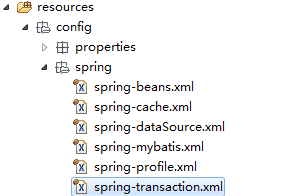
这样即实现了,config/spring/目录下,所有以spring字符串开头的xml配置文件。
效果图: