写在前面
不要让干净的灵魂染上尘埃,永远年轻、永远热泪盈眶
一、再谈编码
- 文件的概念
'文件' 是一个抽象的概念,是操作系统提供的外部存储设备的抽象,对应底层的硬盘;它是程序和数据的最终存放地点。
操作系统把硬盘存储的具体操作封装起来,提供一些简单易用的API,让用户不用去关心底层复杂的实现方法;
即:让用户的数据存放变得容易、方便和可靠。
另外,磁盘没有 '修改' 一说,全部都是覆盖;
- Unicode 和 utf-8
> 备注:这段精辟的解释来自于 林海峰老师的博客 , 解释的清晰明了,向老师致敬!
Unicode:简单粗暴,所有字符都用2Bytes表示,优点是 字符->数字(二进制) 的转换速度快,缺点是占用空间大;
utf-8:精准,对不同的字符采用不同的长度表示,优点是节省空间,缺点是:字符->数字(二进制) 的转换速度慢,因为每次都需要计算出字符需要多长的Bytes才能够准确表示;
内存中使用的编码是unicode,硬盘中或者网络传输用utf-8(这也就涉及到了大端序和小端序的问题)
为什么呢?
所有程序,最终都要加载到内存,程序保存到硬盘(不同的国家用不同的编码格式),但是到内存中我们为了兼容万国(计算机可以运行任何国家的程序原因在于此),统一且固定使用unicode,这就是为何内存固定用unicode的原因;你可能会说兼容万国我可以用utf-8啊,可以,完全可以正常工作,之所以不用肯定是unicode比utf-8更高效啊(uicode固定用2个字节编码,utf-8则需要计算),但是unicode更浪费空间,没错,这就是用空间换时间的一种做法;
而存放到硬盘(考虑节省空间),或者网络传输(考虑速度快),都需要把unicode转成utf-8;因为数据的传输,追求的是稳定,高效,数据量越小数据传输就越靠谱,于是都转成utf-8格式的,而不是unicode。
所以:
内存中使用的编码是unicode,用空间换时间(程序都需要加载到内存才能运行,因而内存应该是尽可能的保证快)。
硬盘中或者网络传输用utf-8,网络I/O延迟或磁盘I/O延迟要远大与utf-8的转换延迟,而且I/O应该是尽可能地节省带宽,保证数据传输的稳定性。
- 内存和磁盘之间的转换
内存 -> 磁盘:用户创建一个新文件,写入一些数据,然后 [ctrl+s/esc+:+wq] 存储到磁盘上,关闭文件;
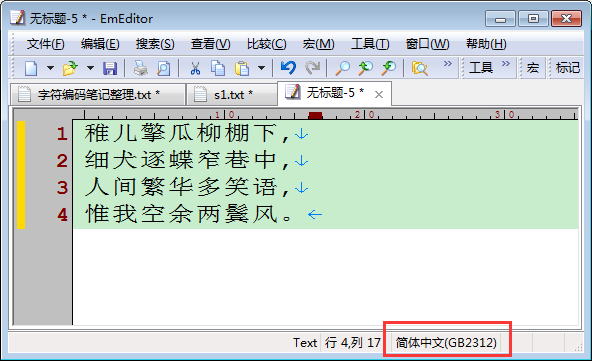
- 新建一个文件,写入数据 --> 这个操作是在内存中进行的,跟磁盘无关;此时,写的这些数据都在内存中以Unicode编码格式存储;
- ctrl+s 保存 --> 这个操作是把这些数据写到了本地硬盘上;既然存储到硬盘,就必定按照某种编码格式存储,即右下角显示的 GB2312;
这就存在一个数据从内存到硬盘的编码转换问题:本例中即从内存的Unicode格式的二进制 转换成 硬盘中的GB2312的二进制格式进行存储;
磁盘 -> 内存:用户打开文件,在界面上显示数据;
- 再次打开这个文件,原来的数据显示在页面上 --> 这个操作就是把数据从硬盘上读到了内存中;同样也是存在一个编码转换的问题:
从硬盘的GB2312格式的二进制 转换成 内存的Unicode格式的二进制进行存储并显示到EmEditor上;
为什么显示的时候没有出现乱码呢?
这就要看EmEditor是按照什么编码进行打开的了:

很明显,是按照系统默认编码进行打开文件的,那么问题又来了,系统默认编码是什么呢?
打开cmd,输入chcp,回车:

附上几个常用国家的活动代码页对照表:
 1 代码页       国家(地区)或语言
 2 437          美国
 3 866          俄语 - 西里尔文(DOS)
 4 932          日文(Shift-JIS)
 5 936          中国 - 简体中文(GB2312)
 6 950          繁体中文(Big5)
 7 1200         Unicode
 8 1201         Unicode (Big-Endian)
 9 50000        用户定义的
10 50001        自动选择
11 52936        简体中文(HZ)
12 65000        Unicode (UTF-7)
13 65001        Unicode (UTF-8)
很明显:EmEditor按照系统默认编码打开文件,而默认编码是936,即 '中国 - 简体中文(GB2312)'
所以这个文件存储的时候和读取的时候都是按照 GB2312编码格式进行操作的,所以必然不会出现乱码!
现在做个测试,改一下EmEditor打开文件时候的默认编码为日语(Shift-JIS),

然后再用EmEditor打开这个文件看看是否会乱码:

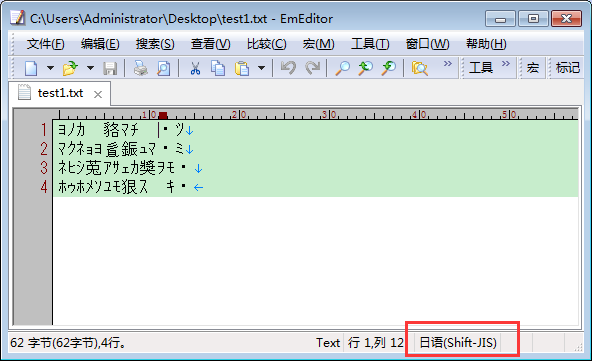
所以,只要保证写入磁盘时候用的编码和读取文件显示的时候用的编码是一样的,就不会出现乱码!
附上磁盘和内存之间转换编码的示意图:

- 扩展
- python3 解释器是怎么识别自己的数据类型的?
- 它必须知道他们存储的编码类型,Python3中,所有的字符串在内存中都被识别成 Unicode编码进行存储;
- 数据在硬盘存储的时候是一种编码格式,在执行的时候也可能会产生其他编码格式;
举个小例子:
 1 #!/usr/bin/python
 2 # -*- coding:utf-8 -*-
 3
 4 string ='中国'
 5 print(string)
 6
 7 str2 = string.encode('utf-8')   # python 3.5
 8 # str2 = string.decode('utf-8') # python 2.7
 9 print(str2)
10
11 str3 = str2.decode('utf-8')
12 print(str3)
13
14 ---
15 中国
16 b'xe4xb8xadxe5x9bxbd'
17 中国
- 在Python3.5中,字符串都是以Unicode编码存储,Unicode是万国码,可以encode成任意编码格式;
- string ='中国' # 这一步在执行的时候,需要开辟一个内存空间用来存储string编码之后的结果,是按照Unicode编码;打印的时候不论在什么终端都可以正确显示 '中国' , 不会乱码;
- str2 = string.encode('utf-8') # 把 string对应的字符串内容从Unicode编码转换成utf-8编码,并把转换后的结果赋值给 str2; 所以打印的时候显示的是 二进制形式的数据,即bytes; (Unicode 类型只有encode方法)
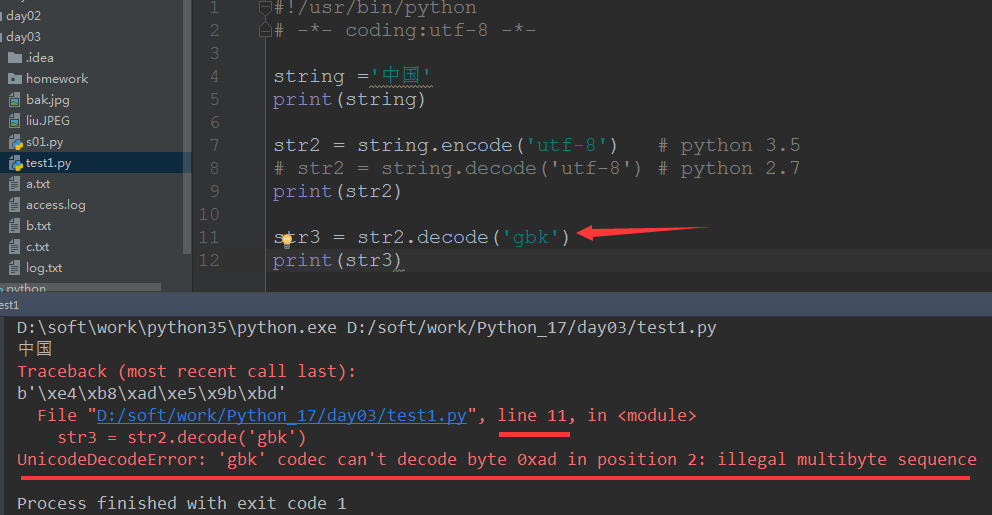
- str3 = str2.decode('utf-8') # 把str2对应的bytes类型的数据转换成Unicode类型,并把转换后的结果赋值给str3;由于解码时候也是按照 utf-8 进行解码,所以肯定不会出现乱码; (bytes 类型只有decode方法)
- 但是如果按照gbk或其他类型进行解码就会报错:
- 程序执行前和执行后
以下面这端程序为例进行说明:
1 #!/usr/bin/python
2 # -*- coding:utf-8 -*-
3
4 string ='林'
5 print(string)
- 首先在pycharm里写入这几行代码的时候,所有的字符都没有任何意义,从计算机角度看,他们都是一些单纯的字符堆砌起来的并以Unicode编码存储在内种中某块区域;或者说:在文件未执行之前都是Unicode编码存在在内存中;
- 但是,在执行的时候可以人为的改变其编码形式;(例如:str2 = string.encode('utf-8') #Python 3中,这一行指定了按照utf-8进行编码格式存储,打印出来就是bytes类型)
- 在用Python解释器执行的时候,代码里的字符串才会有其特殊的意义(对象):
- string ='林' # 执行到这一行,才会把string识别成一个字符串对象,并在内存中开辟一块空间用来存储 '林' 这个字符在编码之后的结果,然后让string对象指向这个内存地址;即:Python程序在执行过程中才有 字符串 的概念;
- print(string) # 执行到这一行,Python解释器会把string这个对象对应的内存中间里存储的数据打印出来,会根据显示终端的不同、Python解释器版本不同而显示出不同的样子(乱码 / 不乱码);
- 上面这个例子在Python3和Python2中打印的结果如下:
- pycharm中都能正常显示 '林' 这个汉字:

- cmd中则会不同:

- 同样一个字符串赋值语句:string ='林' ,为什么会这样呢?
- Pycharm中,不管是 Python2 还是Python3 都不乱码,是因为 Pycharm会自动识别页首的 '# -*- coding:utf-8 -*-' 从而自动改变文件的存储编码格式,保证存储编码和读取显示的编码一致,从而不乱码;
- 根据上面的测试已经知道本机Windows默认是GB2312编码,但是Windows的cmd为什么会出现乱码? 这就涉及到 Python2 和 Python3 关于字符串的定义了,见下面;
- Python2 和 Python3中字符串概念
- 页首的 # -*- coding:utf-8 -*- 这个是告诉Python解释器以 utf-8 的编码去读取这个文件;
- Python3解释器默认编码是utf-8,如果页首不指定上面那一行就会按照默认的编码读取文件内容,否则就会按照页首指定的编码去读取文件内容;
- 但是,很重要的一点是:
- 默认的Python编码utf-8跟程序在执行过程中识别字符串编码是没有关系的,识别字符串是Python解释器自己数据类型的问题;
-------------------------------
- 首先明确一点:Python程序,只有在执行的过程中才有字符串的概念!
------------------------------------
- Python 3 字符串的概念
- 2种字符串类型
- str 类型,即 Unicode,所有的字符串都是以Unicode格式;(只有encode方法)
- bytes类型,即 str.encode('xxx') 之后的结果;可以通过 decode('xxx') 转换成 str类型;(只有decode方法)
 1 #!/usr/bin/python
 2 # -*- coding:utf-8 -*-
 3
 4 string ='林'
 5 print(type(string),string)
 6
 7 str1 = string.encode('utf-8')
 8 print(type(str1),str1)
 9
10 ---
11 <class 'str'> 林
12 <class 'bytes'> b'xe6x9ex97'
- Python 2 字符串的概念
- 2种字符串类型
- str 类型,Python2 中,bytes 和 str 是一样:

 1 #!/usr/bin/python
 2 # -*- coding:utf-8 -*-
 3
 4 string ='林'
 5 print type(string),repr(string)
 6 str2 = string.decode('utf-8')
 7 print type(str2),repr(str2)
 8
 9 ---
10 <type 'str'> 'xe6x9ex97'
11 <type 'unicode'> u'u6797'
- 可以利用 repr() 函数打印出string的内容,很显然是 str类型,但内容却是 'xe6x9ex97' 即bytes类型;并且string只有decode方法,encode的时候会报错;
- 也就是说,Python2执行过程中,只要碰到字符串,就会自动把字符串进行一个encode操作,得到一个字节码 bytes类型;
- 所以Python2 中的 str对象只有 decode方法;(decode成Unicode编码)
- Unicode类型,就是在赋值时候在前面加上一个 'u' : string =u'林' ,这样就指定了是Unicode类型的字符串;
- 这样实际上就和Python3一样了,字符串都是Unicode;string 只有encode方法,decode会报错;
 1 #!/usr/bin/python
 2 # -*- coding:utf-8 -*-
 3
 4 string =u'林'
 5 print type(string),repr(string)
 6 str2 = string.encode('utf-8')
 7 print type(str2),repr(str2)
 8
 9 ---
10 <type 'unicode'> u'u6797'
11 <type 'str'> 'xe6x9ex97'
- 解释在cmd上Python2中输出 string ='林' 出现乱码的问题
- 首先却明确一点:Python2 解释器默认编码是 ascii,Python3 解释器默认编码是 utf-8;
- 这个文件的存储编码是 utf-8;
- string ='林' 执行的时候 Python2 解释器 会首先读取页首的 # -*- coding:utf-8 -*- ,所以从这一行就改变了Python2默认的 ascii编码格式;
- string ='林' # Python2 解释器执行这一行的时候,已经按照Python2中 str数据类型自动encode成bytes类型了,所以string存储的是encode之后的字节码(bytes);是按照页首的utf-8进行encode操作的;
- print string # Python2 解释器在Pycharm终端上执行打印操作的时候,会按照Pycharm终端的编码去解码,由于Pycharm作为一个终端,有自动识别页首 # -*- coding:utf-8 -*- 的优点,所以在Pycharm终端解码的时候也是按照utf-8格式,故不会乱码;
- print string # Python2 解释器在cmd终端上执行打印操作的时候,会按照cmd终端的编码去解码,然而由于cmd作为另一个终端,没有自动识别页首的 # -*- coding:utf-8 -*- ,所以就会按照cmd所在平台(Windows)默认的编码去解码string,由于本机Windows默认编码是 GB2312; string 是按照utf-8编码成bytes,cmd按照GB2312去解码,所以肯定会乱码;
- 解决Python2在cmd终端打印出现中文乱的方法: 在字符串赋值的时候按照 Unicode格式赋值;
- 扩展
- 对于unicode格式的数据来说,无论怎么打印,都不会乱码;
- 不管在什么终端打印,Python解释器都会按照终端的编码执行x.decode('终端编码'),变成unicode后,再打印;此时终端编码若与文件开头指定的编码不一致,乱码就产生了;
- 因为程序执行是在内存中执行的,而内存编码是 Unicode, 所以一定要先转成 Unicode,再打印出来;
- 用户态和内核态初探
- CPU的两种运行状态:内核态和用户态
- OS对机器硬件有完全操作权限,但是应用程序是没有权限的,所以应用程序需要通过系统调用,即从用户态切换到内核态,从而间接操作机器硬件;
- 最常见的就是文件读写,Python写的程序运行在用户态,而只有内核态才可以操作机器的底层硬件磁盘,所以操作系统把操作方法封装成API,提供给应用程序;
- 应用程序通过系统调用(使用API),间接操作硬件;
二、文件处理
- 文件处理流程
- 打开文件,得到文件句柄并赋值给一个变量
- 通过句柄对文件进行操作
- 关闭文件
- 文件基本操作
- 打开文件读取文件内容小例子:
- 用EmEditor编译一个新文件,写入如下内容,保存到本地;

- 用Python程序读取文件内容并打印出来,代码如下:


 1 #!/usr/bin/python
 2 # -*- coding:utf-8 -*-
 3
 4 f = open('demo.txt',mode='r',encoding='utf-8')
 5 # f = open('demo.txt',mode='r',encoding='GB2312')
 6 print(type(f),f)
 7 data = f.read()
 8 print(type(data),data)
 9
10 ---
11 <class '_io.TextIOWrapper'> <_io.TextIOWrapper name='demo.txt' mode='r' encoding='utf-8'>
12 Traceback (most recent call last):
13   File "D:/soft/work/Python_17/day03/file_test.py", line 7, in <module>
14     data = f.read()
15   File "D:softworkpython35libcodecs.py", line 321, in decode
16     (result, consumed) = self._buffer_decode(data, self.errors, final)
17 UnicodeDecodeError: 'utf-8' codec can't decode byte 0xb5 in position 0: invalid start byte
 1 #!/usr/bin/python
 2 # -*- coding:utf-8 -*-
 3
 4 # f = open('demo.txt',mode='r',encoding='utf-8')
 5 f = open('demo.txt',mode='r',encoding='GB2312')
 6 print(type(f),f)
 7 data = f.read()
 8 print(type(data),data)
 9
10 ---
11 <class '_io.TextIOWrapper'> <_io.TextIOWrapper name='demo.txt' mode='r' encoding='GB2312'>
12 <class 'str'> 当快乐到来时,我就不再思考人生;
13 当寂寞来临时,我就低头努力读书。
- 关于 open() 函数
- 函数原型:open(file, mode='r', buffering=None, encoding=None, errors=None, newline=None, closefd=True)
- 常用的三个参数: file mode='x' encoding='xxxx'; f=open('1.txt') 不指定打开编码,默认使用操作系统的编码,windows为gbk,linux为utf-8,与解释器编码无关;
- 返回值:f = open(file),返回的 f 是一个 'file object',即 _io.TextIOWrapper 类型;要想获取文件内容,则需要使用read()方法,其返回值是str的一个实例化对象;代表文件内容;
 1 #!/usr/bin/python
 2 # -*- coding:utf-8 -*-
 3
 4 f = open('demo.txt')
 5 print(type(f),f)
 6 print('--------->>>')
 7 data = f.read()
 8 print(type(data))
 9 print(data)
10
11 ---
12 <class '_io.TextIOWrapper'> <_io.TextIOWrapper name='demo.txt' mode='r' encoding='cp936'>
13 --------->>>
14 <class 'str'>
15 当快乐到来时,我就不再思考人生;
16 当寂寞来临时,我就低头努力读书。
- f = open('log.txt',encoding='utf-8') f 的操作如下:
 1 属性:
 2 f.name
 3 f.closed
 4 f.encoding
 5 f.buffer
 6 f.errors
 7
 8 方法:
 9 f.close()
10 f.write()
11 f.read()
12 f.readlines()
13 f.readline()
14 f.seek()
15 f.writable()
16 f.detach()
17 f.fileno()
18 f.flush()
19 f.isatty()
20 f.seekable()
21 f.tell()
22 f.truncate()
23 f.writelines()
- 关于 open() 打开文件的模式如下:
 1     ========= ===============================================================
 2     Character Meaning
 3     --------- ---------------------------------------------------------------
 4     'r'       open for reading (default)
 5     'w'       open for writing, truncating the file first
 6     'x'       create a new file and open it for writing
 7     'a'       open for writing, appending to the end of the file if it exists
 8     'b'       binary mode
 9     't'       text mode (default)
10     '+'       open a disk file for updating (reading and writing)
11     'U'       universal newline mode (deprecated)
12     ========= ===============================================================
1 f1 = open('1.txt',mode='r+',encoding='utf-8')   #读写
2 f2 = open('2.txt',mode='w+',encoding='utf-8')   #写读
3 f3 = open('3.txt',mode='a+',encoding='utf-8')   #追加并可读写
- read() # 一次读完全部内容
 1 f = open('1.txt',encoding='utf-8')
 2 print(f)
 3 print(f.read())
 4 print("----->>>")
 5 print(f.read())        # 上一次read操作读完了文件的全部内容,光标已经移动到文件末尾,所以这次read是读不到内容的;
 6 f.close()
 7
 8 ---
 9 <_io.TextIOWrapper name='1.txt' mode='r' encoding='utf-8'>
10 www.standby.me
11 www.google.com
12 www.ibm.com
13 ----->>>
- read(args) # 指定读取几个字符,read是按照字符来计数,其余的文件内光标移动都是以字节为单位如 seek 和 truncate...
 1 文件内容:
 2 世界和平
 3
 4 代码:
 5 with open('3.txt',mode='r',encoding='utf-8') as f1:
 6     data = f1.read(1)
 7     print(type(data),data)
 8     print(data.encode('utf-8'))
 9     print(data.encode('gbk'))
10
11 ---
12 <class 'str'> 世
13 b'xe4xb8x96'
14 b'xcaxc0'
- readline()
 1 f = open('1.txt',encoding='utf-8')
 2 line = f.readline()      # 每次读一行,返回的是 str 对象
 3 print(type(line))
 4 print(line,end='')
 5 line2 = f.readline()
 6 print(line2,end='')
 7 f.close()
 8
 9 ---
10 <class 'str'>
11 www.standby.me
12 www.google.com
- readlines()
1 f = open('1.txt',encoding='utf-8')
2 line = f.readlines()      # 一次读完内容,每行一个元素,返回一个 list 对象
3 print(type(line))
4 print(line)
5 f.close()
6
7 ---
8 <class 'list'>
9 ['www.standby.me
', 'www.google.com
', 'www.ibm.com']
- seek() # 光标的移动,单位是字节
- 原型:file.seek(off, whence=0);从文件中移动off个操作标记(文件指针),正往结束方向移动,负往开始方向移动。【这里值得商榷】
- 如果设定了whence参数,就以whence设定的起始位为准;0代表从头开始,1代表当前位置,2代表文件最末尾位置
 1 f = open('b.txt',mode='w',encoding='utf-8')
 2 desc = "1223334444"
 3 tmp = "###"
 4 f.write(desc)     # 第一次写入
 5 print(f.tell())    # 打印出光标位置
 6 f.seek(4)            # 把光标移动到从文件开头算起的4个字节后的位置,即第一个3的后面
 7 print(f.tell())      # 打印出光标位置
 8 f.write(tmp)         # 写入三个 # 字符
 9 f.close()
10
11 ---
12 10
13 4
-例子1:模拟实现 Linux下 .swp 文件实现过程
 1 文件:1.txt; 更改home开头的行为www.google.com
 2 www.standby.me
 3 home.google.com
 4 www.ibm.com
 5
 6 代码:
 7 import os
 8 rf = open('1.txt',mode='r',encoding='utf-8')
 9 wf = open('.1.txt.swp',mode='w',encoding='utf-8')
10 for line in rf.readlines():
11     if line.startswith('home'):
12         line = "www.google.com
"
13     wf.write(line)
14 rf.close()
15 wf.close()
16 os.remove('1.txt')
17 os.rename('.1.txt.swp','1.txt')
-文件上下文管理;Python 提供了 with 语法用于简化资源操作的后续清除操作,是 try/finally 的替代方法,实现原理建立在上下文管理器之上。
1 with open('1.txt',mode='r',encoding='utf-8') as rf,
2         open('2.txt',mode='w',encoding='utf-8') as wf:
3     data = rf.read()
4     wf.write(data)
> 好处是不用自己写 f.close(),即不用显示的调用close方法,只要退出with下缩进的代码块,with就自动帮助关闭了文件;
- truncate() # 用于截断文件,如果指定了可选参数 size,则表示截断文件为 size 个字节;指定为0则会清空文件;
 1 文件内容(utf-8):
 2 世界和平
 3
 4 代码:
 5 with open('3.txt',mode='r+',encoding='utf-8') as f1:
 6     f1.truncate(9)
 7     data = f1.read()
 8     print(data)
 9
10 ---
11 世界和
> 如果指定要截取的字节数与该文件存储编码不符合,就会导致文件乱码!!!
- 以二进制的方式读取文件内容
 1 文件内容:
 2 I love 中国
 3 代码:
 4 # 以二进制形式读取文件并输出   decode
 5 with open('a.txt','rb') as rf:
 6     print(rf)
 7     data = rf.read()
 8     print(data)
 9     print(data.decode('utf-8'))
10
11 ---
12 <_io.BufferedReader name='a.txt'>
13 b'I love xe4xb8xadxe5x9bxbd'
14 I love 中国
- 例子2:模拟实现Linux下的 tail -f access.log 操作
 1 import time
 2 with open('access.log','r',encoding='utf-8') as f:
 3     f.seek(0,2)
 4     while True:
 5         new_log = f.readline().strip()
 6         if new_log:
 7             print("新增日志:{}".format(new_log))
 8         time.sleep(0.3)
 9
10 ---
11 新增日志:ATS 10.10.0.9
12 新增日志:HCDN liveshow
13 新增日志:vcdn apple www.iqiyi.com
14 新增日志:www.google.com
15 ...
- 例子3:实现图片的复制,即二进制文件的读写操作
 1 # rb + wb 读写二进制文件
 2 with open('liu.JPEG','rb') as rf, open('bak.jpg','wb') as wf:
 3     print(type(rf),rf)
 4     print(type(wf),wf)
 5     data = rf.read()
 6     wf.write(data)
 7
 8 ---
 9 <class '_io.BufferedReader'> <_io.BufferedReader name='liu.JPEG'>
10 <class '_io.BufferedWriter'> <_io.BufferedWriter name='bak.jpg'>
- 扩展
 1 # for + else;   while + else 也可以
 2 for i in range(3):
 3     print(i)
 4     if 5 == i:
 5         break
 6 else:            # 只要for循环顺利执行完了,就会取执行与for平级的else里面的语句
 7     print("---->>>")
 8
 9 ---
10 0
11 1
12 2
13 ---->>>
三、练习
要求:
有以下员工信息表
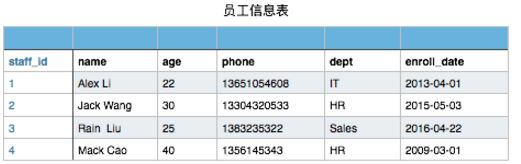
当然此表你在文件存储时可以这样表示
1 1,Alex Li,22,13651054608,IT,2013-04-01
现需要对这个员工信息文件,实现增删改查操作
- 可进行模糊查询,语法至少支持下面3种:
- select name,age from staff_table where age > 22
- select * from staff_table where dept = "IT"
- select * from staff_table where enroll_date like "2013"
- 查到的信息,打印后,最后面还要显示查到的条数
- 可创建新员工纪录,以phone做唯一键,staff_id需自增
- 可删除指定员工信息纪录,输入员工id,即可删除
- 可修改员工信息,语法如下:
- UPDATE staff_table SET dept="Market" WHERE where dept = "IT"
代码实现:
  1 #!/usr/bin/python
  2 # -*- coding:utf-8 -*-
  3 import time
  4
  5 WARNING = "Invalid input!"
  6 START = "Welcome, 1 to select, 2 to insert, 3 to update, 4 to delete,
  7     q/Q to exit
>>> "
  8 user_property = ['id','name','age','phone','job','date']
  9
 10 # Get current time, xxxx-xx-xx
 11 def get_date():
 12     date = time.strftime('%Y-%m-%d', time.localtime(time.time()))
 13     return date
 14
 15 # Get all user_info list
 16 def get_all_info():
 17     user_list = []
 18     with open('user_info.txt', mode='r', encoding='utf-8') as rf:
 19         data = rf.readlines()
 20         if data:
 21             for item in data:
 22                 user_dict = {
 23                     'id':item.split('|')[0],
 24                     'name':item.split('|')[1],
 25                     'age':item.split('|')[2],
 26                     'phone':item.split('|')[3],
 27                     'job':item.split('|')[4],
 28                     'date':item.split('|')[5],
 29                 }
 30                 user_list.append(user_dict)
 31     return user_list
 32
 33 # Print all user info
 34 def show_all_user_info():
 35     user_list = get_all_info()
 36     for user in user_list:
 37         print("{}	{}	{}	{}	{}	{}".format(user.get('id'),user.get('name'),user.get('age'),
 38                                               user.get('phone'),user.get('job'),user.get('date')).expandtabs(20))
 39
 40 # Insert a new record
 41 def insert():
 42     user_info_str = input("Input user_info: name|age|phone|job >>> ")
 43     user_info_list = user_info_str.split('|')
 44     phone = user_info_list[2]
 45     phone_list = []
 46     id_list = []
 47     if 4 == len(user_info_list):
 48         user_list = get_all_info()
 49         for i in range(0,len(user_list)):
 50             phone_list.append(user_list[i].get('phone'))
 51             id_list.append(int(user_list[i].get('id')))
 52         user_info = ""
 53         if len(user_list):
 54             if phone not in phone_list:
 55                 user_info = "{}|".format(max(id_list)+1) + user_info_str + "|" + get_date() + "
"
 56             else:
 57                 print("The phone num has already used.")
 58         else:
 59             print("Init myDB ...")
 60             user_info = "1|" + user_info_str + "|" + get_date() + "
"
 61         with open('user_info.txt', mode='a+', encoding='utf-8') as wf:
 62             wf.write(user_info)
 63     else:
 64         print(WARNING)
 65
 66 # Delete a record
 67 def delete():
 68     show_all_user_info()
 69     user_list = get_all_info()
 70     user_id_list = []
 71     for user in user_list:
 72         user_id_list.append(user.get('id'))
 73     del_id = input("Input the user_id you wanna delete >>> ")
 74     if del_id not in user_id_list:
 75         print("No have the user id: {}".format(del_id))
 76     else:
 77         isOK = input("Are you sure to Delete user: {} ? (y/Y to del, other to exit) >>> ".format(del_id))
 78         if 'Y' == isOK.upper():
 79             with open('user_info.txt', mode='w', encoding='utf-8') as wf:
 80                 user_info_str = ""
 81                 for user in user_list:
 82                     if del_id != user.get('id'):
 83                         user_info_str += user.get('id') + "|" + user.get('name') + "|" + user.get('age') +
 84                             "|" + user.get('phone') + "|" + user.get('job') + "|" + user.get('date')
 85                 wf.write(user_info_str)
 86
 87 # Update a record
 88 def update():
 89     show_all_user_info()
 90     user_list = get_all_info()
 91     update_cmd = input("Input update cmd >>> ")
 92     cmd_list = update_cmd.split()
 93     # print(cmd_list)
 94     if 10 == len(cmd_list):
 95         if 'update' == cmd_list[0] and 'set' == cmd_list[2] and '=' == cmd_list[4] and 'where' == cmd_list[6]:
 96             if cmd_list[3] in user_property and cmd_list[7] in user_property:
 97                 if 'like' == cmd_list[8]:
 98                     for user in user_list:
 99                         if cmd_list[-1].replace('"', '') in user.get(cmd_list[-3]):
100                             user[cmd_list[3]] = cmd_list[5].replace('"', '')
101                 elif '>' == cmd_list[8]:
102                     if 'id' != cmd_list[-3] and 'age' != cmd_list[-3]:
103                         print("SELECT SYNTAX INVALID.4")
104                     else:
105                         for user in user_list:
106                             if user[cmd_list[-3]] > cmd_list[-1]:
107                                 user[cmd_list[3]] = cmd_list[5].replace('"', '')
108                 elif '<' == cmd_list[8]:
109                     if 'id' != cmd_list[-3] and 'age' != cmd_list[-3]:
110                         print("SELECT SYNTAX INVALID.4")
111                     else:
112                         for user in user_list:
113                             if user[cmd_list[-3]] < cmd_list[-1]:
114                                 user[cmd_list[3]] = cmd_list[5].replace('"', '')
115                 elif '=' == cmd_list[8]:
116                     for user in user_list:
117                         if cmd_list[-1].replace('"', '') == user.get(cmd_list[-3]):
118                             user[cmd_list[3]] = cmd_list[5].replace('"', '')
119                 else:
120                     print("Sorry, not support the identifier: {}".format(cmd_list[8]))
121                 with open('user_info.txt', mode='w', encoding='utf-8') as wf:
122                     user_info_str = ""
123                     for user in user_list:
124                         user_info_str += user.get('id') + "|" + user.get('name') + "|" + user.get('age') +
125                                   "|" + user.get('phone') + "|" + user.get('job') + "|" + user.get('date')
126                     wf.write(user_info_str)
127             else:
128                 print("User Property not in ['id','name','age','phone','job','date']")
129         else:
130             print("UPDATE SYNTAX INVALID.1")
131     else:
132         print("UPDATE SYNTAX INVALID.0
Like this: update table set dept = "Market" where dept = "IT"")
133
134 # Select records by keyword
135 def select():
136     while True:
137         select_cmd = input("Input select cmd, q/Q to exit >>> ")
138         cmd_list = select_cmd.split()
139         if cmd_list:
140             # print(cmd_list)
141             if 'select' == cmd_list[0] and 'from' == cmd_list[2]
142                     and 'where' == cmd_list[4]:
143                 if '*' != cmd_list[1]:
144                     select_property_list = cmd_list[1].split(',')
145                     res_list = list(set(select_property_list).difference(set(user_property)))
146                     if res_list:
147                         print("SELECT SYNTAX INVALID.1")
148                         continue
149                 elif '*' == cmd_list[1]:
150                     select_property_list = user_property.copy()
151                 else:
152                     print("SELECT SYNTAX INVALID.2")
153                     continue
154                 if cmd_list[5] not in user_property:
155                     print("SELECT SYNTAX INVALID.3")
156                 else:
157                     user_list = get_all_info()
158                     count = 0
159                     if 'like' == cmd_list[6]:
160                         for user in user_list:
161                             if cmd_list[-1].replace('"','') in user.get(cmd_list[5]):
162                                 output = ""
163                                 for pro in select_property_list:
164                                     output += user.get(pro) + "	"
165                                 print(output.expandtabs(20))
166                                 count += 1
167                         print("Matched {} record.".format(count))
168                     elif '>' == cmd_list[6]:
169                         if 'id' != cmd_list[5] and 'age' != cmd_list[5]:
170                             print("SELECT SYNTAX INVALID.4")
171                             continue
172                         for user in user_list:
173                             if int(user.get(cmd_list[5])) > int(cmd_list[-1]):
174                                 output = ""
175                                 for pro in select_property_list:
176                                     output += user.get(pro) + "	"
177                                 print(output.expandtabs(20))
178                                 count += 1
179                         print("Matched {} record.".format(count))
180                     elif '<' == cmd_list[6]:
181                         if 'id' != cmd_list[5] and 'age' != cmd_list[5]:
182                             print("SELECT SYNTAX INVALID.5")
183                             continue
184                         for user in user_list:
185                             if int(user.get(cmd_list[5])) < int(cmd_list[-1]):
186                                 output = ""
187                                 for pro in select_property_list:
188                                     output += user.get(pro) + "	"
189                                 print(output.expandtabs(20))
190                                 count += 1
191                         print("Matched {} record.".format(count))
192                     elif '=' == cmd_list[6]:
193                         for user in user_list:
194                             if cmd_list[-1].replace('"','') == user.get(cmd_list[5]):
195                                 output = ""
196                                 for pro in select_property_list:
197                                     output += user.get(pro) + "	"
198                                 print(output.expandtabs(20))
199                                 count += 1
200                         print("Matched {} record.".format(count))
201                     else:
202                         print("Sorry, not support the identifier: {}".format(cmd_list[6]))
203                         continue
204             elif 'Q' == select_cmd.upper():
205                 break
206             else:
207                 print("SELECT SYNTAX INVALID.6")
208         else:
209             print("Please input the SELECT CMD.")
210
211 def main():
212     user_info = "Alex Li|22|13651054608|IT"
213     with open('user_info.txt',mode='a+',encoding='utf-8') as wf:
214         wf.write(user_info)
215
216 if __name__ == '__main__':
217     while True:
218         option = input(START)
219         if option.isdigit():
220             if 1 == int(option):
221                 select()
222             elif 2 == int(option):
223                 insert()
224             elif 3 == int(option):
225                 update()
226             elif 4 == int(option):
227                 delete()
228             else:
229                 print(WARNING)
230         elif 'Q' == option.upper():
231             print("Bye...")
232             break
233         else:
234             print(WARNING)
235
相关文件:
1 1|Alex Li|22|13651054608|IT|2017-05-17
2 2|Tim liu|24|15011505206|HR|2017-05-17
3 3|wang|18|15011505207|Editor|2017-05-17
4 5|jerry|27|18369183560|full-stack|2017-05-17
5 6|frank|35|18369189898|dnsadmin|2017-05-17