要设置dpi 意识,一般是使用SetProcessDpiAwareness(PROCESS_PER_MONITOR_DPI_AWARE)来设置
具体可参考:Setting the default DPI awareness for a process
不过官方更建议使用清单文件来设置dpi意识,我介绍一下方法:
新建一个后缀为.manifest的文件,然后在其中添加如下代码
<?xml version="1.0" encoding="UTF-8" standalone="yes"?>
<assembly xmlns="urn:schemas-microsoft-com:asm.v1" manifestVersion="1.0">
  <trustInfo xmlns="urn:schemas-microsoft-com:asm.v3">
    <security>
      <requestedPrivileges>
        <requestedExecutionLevel level="asInvoker" uiAccess="false"></requestedExecutionLevel>
      </requestedPrivileges>
    </security>
  </trustInfo>
  <application>
    <windowsSettings>
      <dpiAware xmlns="http://schemas.microsoft.com/SMI/2005/WindowsSettings">true/pm</dpiAware>
      <!-- legacy -->
      <dpiAwareness xmlns="http://schemas.microsoft.com/SMI/2016/WindowsSettings">permonitorv2,permonitor</dpiAwareness>
      <!-- falls back to pm if pmv2 is not available -->
    </windowsSettings>
  </application>
</assembly>
保存后,在项目中添加这个文件,最后debug就可以了
请注意:也有其他方法可以设置dpi意识,看下图
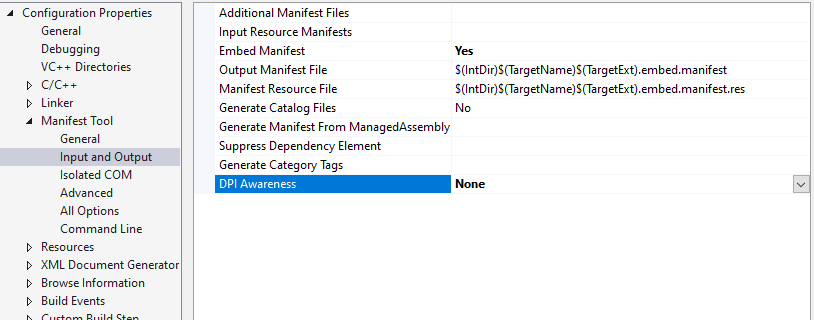
直接改选项就可以了