启动apache遇到提示:
[root@bqh-119 conf]# ../bin/apachectl -t
httpd: apr_sockaddr_info_get() failed for bqh-119
httpd: Could not reliably determine the server's fully qualified domain name, using 127.0.0.1 for ServerName
Syntax OK
[root@bqh-119 conf]# ../bin/apachectl graceful
httpd: apr_sockaddr_info_get() failed for bqh-119
httpd: Could not reliably determine the server's fully qualified domain name, using 127.0.0.1 for ServerName
上面httpd:行内容的提示意思是不能确定服务器的FQDN,使用127.0.0.1代替
去掉上面提示的方法为:
输入命令vim ./conf/httpd.conf +99 回车,进入99行左右增加如下配置,然后从启apache即可
ServerName 127.0.0.1:80

快速解决方法:
[root@bqh-119 apache]# sed -i 's##ServerName www.example.com:80#ServerName 127.0.0.1:80#g' ./conf/httpd.conf
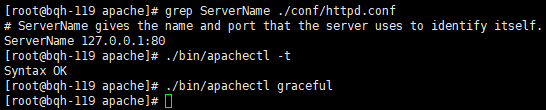
[root@bqh-119 apache]# grep ServerName ./conf/httpd.conf
# ServerName gives the name and port that the server uses to identify itself.
ServerName 127.0.0.1:80
再次重启就不报提示信息了: