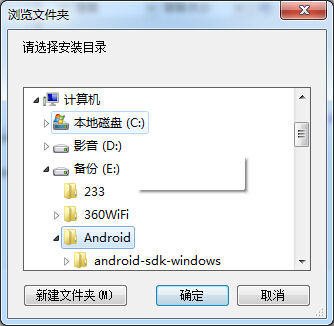
以下示例代码展示如何调用系统的文件夹选择对话框:
1     Private Function SelectFolder(ByVal Describe As String, Optional ByVal ShowNewFolder As Boolean = True) As String
2         Using nOpen As New System.Windows.Forms.FolderBrowserDialog()
3             nOpen.Description = Describe
4             nOpen.ShowNewFolderButton = ShowNewFolder
5             nOpen.ShowDialog()
6             Return nOpen.SelectedPath
7         End Using
8     End Function
调用方式:
 1     Private Sub Button2_Click(ByVal sender As System.Object, ByVal e As System.EventArgs) Handles Button2.Click
 2         Dim _selectedFolder As String = SelectFolder("请选择安装目录", True) '显示选择安装目录界面,同时允许创建新文件夹
 3         MsgBox(_selectedFolder)
 4     End Sub
 5
 6     Private Function SelectFolder(ByVal Describe As String, Optional ByVal ShowNewFolder As Boolean = True) As String
 7         Using nOpen As New System.Windows.Forms.FolderBrowserDialog()
 8             nOpen.Description = Describe
 9             nOpen.ShowNewFolderButton = ShowNewFolder
10             nOpen.ShowDialog()
11             Return nOpen.SelectedPath
12         End Using
13     End Function
效果图: