微信小程序地图获取地点信息(打卡签到功能为例)
解决方案:利用微信小程序的地图组件获取到用户的地理位置信息(经纬度),再通过腾讯地图 SDK 获取到对应的地理位置(即地名)
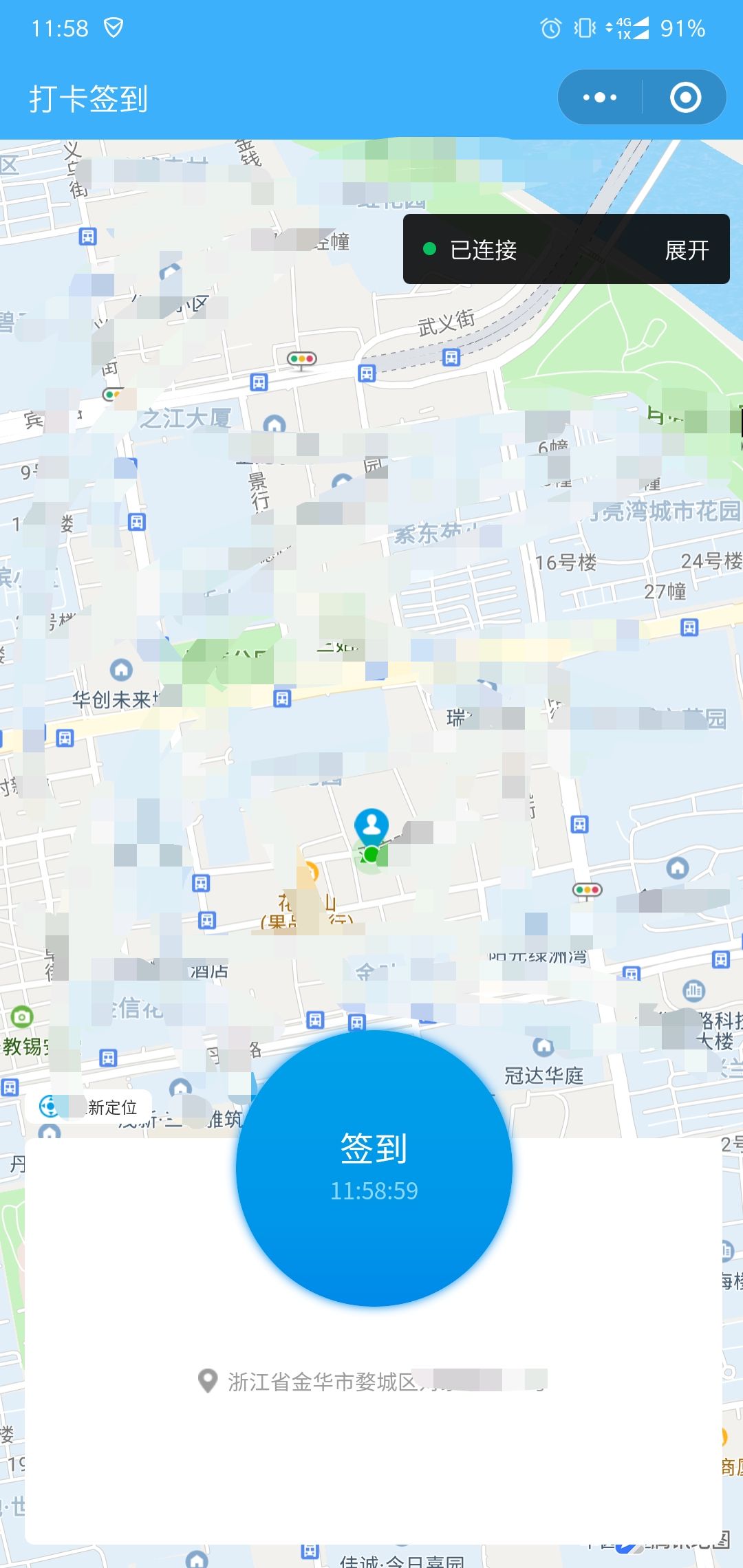
效果图
- 地图已打马赛克
前提步骤
首先需要了解的
-
- (需要小程序负责人去申请,不要用自己账号)跟着教程把 key 申请下来,后文要用
- 并且要在微信开放平台设置合法域名
- 我们需要下载 sdk,放在对应文件夹中,去引用它(即
qqmap-wx-jssdk.min.js文件)
- (需要小程序负责人去申请,不要用自己账号)跟着教程把 key 申请下来,后文要用
代码部分
配置性代码
app.js 部分关键代码
- key 需要换成你自己申请的
//app.js
// 引入SDK核心类
var QQMapWX = require('/utils/qqmap-wx-jssdk.min.js')

App({
  globalData: {
    // ..其他全局变量..
    patrolForm: null,

    // 实例化API核心类
    qqmapsdk: new QQMapWX({
      key: '这个key是你申请下来的key' // 必填
    }),

    // ..其他全局变量..
  },
  // 其他代码
})
app.json 部分关键代码(permission那个对象)
{
  "pages":[
    "pages/location_check_in/location_check_in"
  ],
  "window":{
    "backgroundTextStyle": "light",
    "navigationBarBackgroundColor": "#3db0fc",
    "navigationBarTitleText": "WeChat",
    "navigationBarTextStyle": "white"
  },
  "style": "v2",
  "sitemapLocation": "sitemap.json",
  "permission": {
    "scope.userLocation": {
      "desc": "您的位置信息将用于小程序签到功能"
    }
  }
}
将 https://apis.map.qq.com 添加到小程序后台-开发-开发设置-服务器域名中
- 这个操作需要小程序管理员进到后台去配置
- 我们只需要在开发工具右上角 详情-本地设置 勾上 不校验合法域名........ 即可继续开发
功能性代码
页面代码:location_check_in.wxml
<!--location_check_in/location_check_in.wxml-->
<view class="wholeContinaer">
	<map id="myMap" markers="{{markers}}" style="100%;height:100vh;" longitude="{{poi.longitude}}" latitude="{{poi.latitude}}" scale='16' show-location>
	</map>

	<view class="checkInPanel">
		<!-- <view class="checkInBtn" bindtap="checkIn" style="background:url('../../images/zcxj/checkInBj.png') center / contain no-repeat"> -->
		<view class="checkInBtn {{canClick ? '' : 'disableClick'}}" bindtap="checkIn">
			<view class="checkInTitle">签到</view>
			<view class="checkInTime">{{time}}</view>
		</view>
		<!-- <view class="whitePositionPanel" style="background:url('../../images/zcxj/jxk.png') center / contain no-repeat"> -->
		<view class="whitePositionPanel">
			<view class="positonTextRow">
				<image class="positionIcon" src="../../images/zcxj/positionIcon.png"></image>
				<view class="positionFont">{{addressName}}</view>
			</view>
		</view>
		<view class="rePosition" bindtap="rePosition">
			<image class="positionIcon" src="../../images/zcxj/rePosition.png"></image>
			<view class="positionFont">重新定位</view>
		</view>
	</view>
</view>
样式代码:location_check_in.wxss
/* location_check_in/location_check_in.wxss */
Page{
  background-color: #f2f2f2;
}
.wholeContinaer{
  position: relative;
  height: 100vh;
}

.mapContianer{
  background-color: turquoise;
   100vw;
  height: 100vh;
}

.checkInPanel{
  position: absolute;
   705rpx;
  height: 520rpx;
  bottom: 25rpx;
  left: 25rpx;
  /* background-color: #ffffff; */
}
.checkInBtn{
   280rpx;
  height: 280rpx;
  display: flex;
  align-items: center;
  justify-content: center;
  flex-direction: column;
  position: absolute;
  left: calc(50% - 140rpx);
  z-index: 12;

  border-radius: 50%;
  background-image: linear-gradient(180deg,
      #00a0e9 0%,
      #0095e9 73%,
      #0089e9 100%);
  box-shadow: 0 0 10rpx 0rpx #0089e9;
  /* margin: 0 auto; */
}
.disableClick{
  pointer-events: none;
}
.checkInTitle{
  font-size: 36rpx;
  line-height: 34rpx;
  color: #ffffff;
}
.checkInTime{
  font-size: 24rpx;
  line-height: 34rpx;
  color: #8cd7fe;
  margin-top: 10rpx;
}

.whitePositionPanel{
   100%;
  height: 412rpx;
  position: absolute;
  bottom: 0rpx;

  background-color: #ffffff;
  border-radius: 10rpx;

  display: flex;
  align-items: center;
  justify-content: center;
}

.positonTextRow{
  display: flex;
  align-items: center;
  justify-content: center;
  margin-top: 80rpx;
}
.positonTextRow .positionIcon{
   20rpx;
  height: 26rpx;
  margin-right: 10rpx;
}
.positonTextRow .positionFont{
  font-size: 22rpx;
  line-height: 29rpx;
  color: #9c9c9c;
}

.rePosition{
   130rpx;
  height: 35rpx;
  background-color: #ffffff;
  border-radius: 10rpx;
  display: flex;
  align-items: center;
  justify-content: center;
  position: absolute;
  top: 60rpx;
}
.rePosition .positionIcon{
   24rpx;
  height: 24rpx;
  margin-right: 10rpx;
}
.rePosition .positionFont{
  font-size: 18rpx;
  color: #333333;
  line-height: 35rpx;
}
逻辑代码:location_check_in.js
- 逆地址解析(坐标位置描述)函数官方文档:reverseGeocoder(options:Object)
- realyCheckIn 函数为业务逻辑代码,此前已经获取到了地理位置,缺少了部分前置业务代码,会导致代码报错,改成你自己的就好
// location_check_in/location_check_in.js
const util = require('../../utils/util')
const app = getApp()
const urlList = require("../../utils/api.js")  // 根据实际项目自己配置

// 实例化API核心类
const qqmapsdk = app.globalData.qqmapsdk

Page({

  /**
   * 页面的初始数据
   */
  data: {
    markers: '',
    poi: {
      latitude: '',
      longitude: ''
    },
    addressName: '',
    time: '',
    timer: '',
    timer2: '',  // 用来每个一段时间自动刷新一次定位
    canClick: true
  },

  getAddress(e) {
    var that = this;
    qqmapsdk.reverseGeocoder({
      //位置坐标,默认获取当前位置,非必须参数
      /**
       *
        location: {
          latitude: 39.984060,
          longitude: 116.307520
        },
      */
      // 成功后的回调
      success: function(res) {
        // console.log(res);
        that.setData({
          addressName: res.result.address
        })
        var res = res.result;
        var mks = [];
        //当get_poi为0时或者为不填默认值时,检索目标位置,按需使用
        mks.push({ // 获取返回结果,放到mks数组中
          title: res.address,
          id: 0,
          latitude: res.location.lat,
          longitude: res.location.lng,
          iconPath: '../../images/zcxj/myPosition.png', // 图标路径
           21,
          height: 28,
          // callout: { //在markers上展示地址名称,根据需求是否需要
          //   content: res.address,
          //   color: '#000',
          //   display: 'ALWAYS'
          // }
        });
        that.setData({ // 设置markers属性和地图位置poi,将结果在地图展示
          markers: mks,
          poi: {
            latitude: res.location.lat,
            longitude: res.location.lng
          }
        });
      },
      fail: function(error) {
        console.error(error);
      },
      complete: function(res) {
        console.log(res);
      }
    })
  },
  getTime: function () {
    let that = this
    let time = that.data.time
    that.setData({
      timer: setInterval(function () {
        time = util.formatTime(new Date())
        that.setData({
          time: time.substr(-8)
        });
        if (time == 0) {
          // 页面跳转后,要把定时器清空掉,免得浪费性能
          clearInterval(that.data.timer)
        }
      }, 1000)
    })
  },
  rePosition: function () {
    console.log('用户点了重新定位')
    this.getAddress()
  },
  checkIn: function () {
    this.setData({
      canClick: false
    })
    console.log('用户点击了签到')


    var that = this
    var nowTime = util.formatTime(new Date())
    wx.showModal({
      title: '请确认打卡信息',
      // content: '请确认待整改项已整改完毕!',
      content: `地点:${this.data.addressName}
时间:${nowTime}`,  // 开发者工具上没有换行,真机调试时会有的
      confirmText: '确认',
      success (res) {
        if (res.confirm) {
          console.log('用户点击确定')
          // 调起签到接口
          that.realyCheckIn()

        } else if (res.cancel) {
          console.log('用户点击取消')
          that.setData({
            canClick: true
          })
        }
      }
    })
  },
  realyCheckIn: function() {
    var that = this
    var patrolForm = app.globalData.patrolForm  // 其他需要一并提交过去的业务数据

    console.log(app.globalData)
    // debugger
    // 要在这里给 patrolForm 补充其他的参数
    patrolForm.checkaddress = this.data.addressName
    patrolForm.searchtime = util.formatTime(new Date())
    // 应该先判断用户有没有登录,没登录就授权登录
    patrolForm.searchuser = app.globalData.user ? app.globalData.user.UserName : app.globalData.userInfo.nickName
    console.log("传给后台的 searchuser:", patrolForm.searchuser)
    // 拼接:"经度,纬度"
    patrolForm.latandlon = this.data.poi.longitude + "," + this.data.poi.latitude


    console.log(patrolForm)
    console.log("↑ 签到提交的post参数")

    var tmpNumber = 0
    wx.request({
      url: urlList.submitCheckInInfo,
      data: patrolForm,
      method: "POST",
      header: {
        'content-type': 'application/x-www-form-urlencoded'
      },
      success: function (res) {
        console.log(res)
        if(res.data.IsSuccess) {
          console.log(res.data.IsSuccess, typeof(res.data.IsSuccess))
          console.log("请求成功")
          var patrolId = res.data.ReturnData[0].id
          // // 看怎么取到返回的id
          // debugger

          if (patrolForm.img_arr1.length > 0) {
            for (var i = 0; i < patrolForm.img_arr1.length; i++){
              tmpNumber = i
              wx.uploadFile({
                // 图片上传的接口地址
                url: urlList.submitCheckInPhoto + "?patrolid=" + patrolId,
                filePath: patrolForm.img_arr1[i],
                name: 'content',
                // formData: {
                //   // 这里面可以携带一些参数一并传过去
                //   patrolId: patrolId
                // },
                // header: {
                //   Authorization: token
                // },
                success: function (res) {
                  console.log(res)
                },
                fail: function (res) {
                  that.setData({
                    canClick: true
                  })
                },
                complete: function () {
                  // 因为上传图片是异步操作,所以会导致这里的 i 会取不到,故需要用个作用域更大点的变量来标识,否则 if 里面的代码不会执行
                  if(tmpNumber === patrolForm.img_arr1.length - 1) {
                    // 有图片就等图片上传完了再返回首页
                    wx.showToast({
                      title: '巡查签到成功!',
                      icon: 'success',
                      duration: 2000,
                      complete: function(){
                        wx.navigateBack({
                          delta: 2  // 回退两层页面
                        })
                      }
                    })
                  }
                }
              })
            }
          } else{
            wx.showToast({
              title: '巡查签到成功!',
              icon: 'success',
              duration: 2000,
              complete: function(){
                wx.navigateBack({
                  delta: 2
                })
              }
            })
          }
        }
      },
      fail: function(res) {
        that.setData({
          canClick: true
        })
      }
    })

  },

  /**
   * 生命周期函数--监听页面加载
   */
  onLoad: function (options) {
    var that = this
    that.getTime()
    that.getAddress()

    that.setData({
      canClick: true, // 允许用户点击,防止多次提交
      timer2: setInterval(function () {
        that.getAddress()
      }, 20000)  // 每20秒刷新一次定位
    })
  },

  /**
   * 生命周期函数--监听页面卸载
   */
  onUnload: function () {
    clearInterval(this.data.timer)
    clearInterval(this.data.timer2)
    console.log("定时器已被清除")
  },

  /**
   * 生命周期函数--监听页面初次渲染完成
   */
  onReady: function () {

  },

  /**
   * 生命周期函数--监听页面显示
   */
  onShow: function () {

  },

  /**
   * 生命周期函数--监听页面隐藏
   */
  onHide: function () {

  },

  /**
   * 页面相关事件处理函数--监听用户下拉动作
   */
  onPullDownRefresh: function () {

  },

  /**
   * 页面上拉触底事件的处理函数
   */
  onReachBottom: function () {

  },

  /**
   * 用户点击右上角分享
   */
  onShareAppMessage: function () {

  }
})
demo 下载
gitee地址:https://gitee.com/Suwanbin/positionCheckIn
如果对你有帮助,还请帮忙点个 star!