回顾Tuple
1.创建元组
默认支持1到7个元素,如果8个或更多,需要使用嵌套和Rest属性。Tuple类提供创造元组对象的静态方法。
- 构造函数创建:
       var testTuple6 = new Tuple<int, int, int, int, int, int>(1, 2, 3, 4, 5, 6);

        Console.WriteLine(testTuple6);
        Console.WriteLine($"Item 1: {testTuple6.Item1}, Item 6: {testTuple6.Item6}");
        //(1, 2, 3, 4, 5, 6)
        //Item 1: 1, Item 6: 6

        var testTuple10 = new Tuple<int, int, int, int, int, int, int, Tuple<int, int, int>>
            (
             1, 2, 3, 4, 5, 6, 7,
             new Tuple<int, int, int>(8, 9, 10)
            );

        Console.WriteLine(testTuple10);
        Console.WriteLine($"Item 1: {testTuple10.Item1}, Item 10: {testTuple10.Rest.Item3}");

        //(1, 2, 3, 4, 5, 6, 7, 8, 9, 10)
        //Item 1: 1, Item 10: 10
- 静态方法创建,最多支持8个元素:
                var testTuple6 = Tuple.Create<int, int, int, int, int, int>(1, 2, 3, 4, 5, 6);
                Console.WriteLine(testTuple6);
                Console.WriteLine($"Item 1: {testTuple6.Item1}, Item 6: {testTuple6.Item6}");
                //(1, 2, 3, 4, 5, 6)
                //Item 1: 1, Item 6: 6

                var testTuple8 = Tuple.Create<int, int, int, int, int, int, int, int>(1, 2, 3, 4, 5, 6, 7, 8);
                Console.WriteLine(testTuple8);
                Console.WriteLine($"Item 1: {testTuple8.Item1}, Item 8: {testTuple8.Rest.Item1}");
                //(1, 2, 3, 4, 5, 6, 7, 8)
                //Item 1: 1, Item 8: 8

                //注意  Item 8 取值: {testTuple8.Rest.Item1}
                onsole.WriteLine(testTuple8.Rest);         //(8)
                Console.WriteLine(testTuple8.Rest.Item1);   //8
这里构建出来的Tuple类型其实是Tuple<int, int, int, int, int, int, int, Tuple<int>>,因此testTuple8.Rest取到的数据类型是Tuple<int>,因此要想获取准确值需要取Item1属性。
2.表示一组数据
如下创建一个元组表示一个学生的三个信息:名字、年龄和身高,而不用单独额外创建一个类。
 var studentInfo = Tuple.Create<string, int, uint>("Bob", 28, 175);
 Console.WriteLine($"Student Information: Name [{studentInfo.Item1}], Age [{studentInfo.Item2}], Height [{studentInfo.Item3}]");
 //Student Information: Name [Bob], Age [28], Height [175]
3.从方法返回多个值
当一个函数需要返回多个值的时候,一般情况下可以使用out参数,这里可以用元组代替out实现返回多个值。
static Tuple<string, int, uint> GetStudentInfo(string name)
{
    return new Tuple<string, int, uint>("Bob", 28, 175);
}

static void RunTest()
{
    var studentInfo = GetStudentInfo("Bob");
    Console.WriteLine($"Student Information: Name [{studentInfo.Item1}], Age [{studentInfo.Item2}], Height [{studentInfo.Item3}]");
}
4.用于单参数方法的多值传递
当函数参数仅是一个Object类型时,可以使用元组实现传递多个参数值。
这个感觉用处不大。
尽管元组有上述方便使用的方法,但是它也有明显的不足:
- 访问元素的时候只能通过ItemX去访问,使用前需要明确元素顺序,属性名字没有实际意义,不方便记忆;
- 最多有八个元素,要想更多只能通过最后一个元素进行嵌套扩展;
- Tuple是一个引用类型,不像其它的简单类型一样是值类型,它在堆上分配空间,在CPU密集操作时可能有太多的创建和分配工作。
因此在C# 7.0中引入了一个新的ValueTuple类型。
ValueTuple详解
ValueTuple是C# 7.0的新特性之一,.Net Framework 4.7以上版本可用。
值元组也是一种数据结构,用于表示特定数量和元素序列,但是是和元组类不一样的,主要区别如下:
- 值元组是结构,是值类型,不是类,而元组(Tuple)是类,引用类型;
- 值元组元素是可变的,不是只读的,也就是说可以改变值元组中的元素值;
- 值元组的数据成员是字段不是属性。
值元组的具体使用如下:
1.如何创建值元组
和元组类一样,.Net Framework值元组也只支持1到7个元组元素,如果有8个元素或者更多,需要使用值元组的嵌套和Rest属性去实现。另外ValueTuple类可以提供创造值元组对象的静态方法。
- 利用构造函数创建元组:
var testTuple6 = new ValueTuple<int, int, int, int, int, int>(1, 2, 3, 4, 5, 6);
Console.WriteLine($"Item 1: {testTuple6.Item1}, Item 6: {testTuple6.Item6}");
            //Item 1: 1, Item 6: 6

var testTuple10 = new ValueTuple<int, int, int, int, int, int, int, ValueTuple<int, int, int>>(1, 2, 3, 4, 5, 6, 7, new ValueTuple<int, int, int>(8, 9, 10));
Console.WriteLine($"Item 1: {testTuple10.Item1}, Item 10(old): {testTuple10.Rest.Item3}, Item 10(new): {testTuple10.Item10}");
            //Item 1: 1, Item 10(old): 10, Item 10(new): 10
- 利用Tuple静态方法构建元组,最多支持八个元素:
var testTuple6 = ValueTuple.Create<int, int, int, int, int, int>(1, 2, 3, 4, 5, 6);
Console.WriteLine($"Item 1: {testTuple6.Item1}, Item 6: {testTuple6.Item6}");
//Item 1: 1, Item 6: 6

var testTuple8 = ValueTuple.Create<int, int, int, int, int, int, int, int>(1, 2, 3, 4, 5, 6, 7, 8);
Console.WriteLine($"Item 1: {testTuple8.Item1}, Item 8(old): {testTuple8.Rest.Item1}, Item 8 (new): {testTuple8.Item8}");
//Item 1: 1, Item 8(old): 8, Item 8 (new): 8
注意这里构建出来的Tuple类型其实是Tuple<int, int, int, int, int, int, int, Tuple<int>>,因此testTuple8.Rest取到的数据类型是Tuple<int>,因此要想获取准确值需要取Item1属性。
优化区别:当构造出超过7个元素以上的值元组后,可以使用接下来的ItemX进行访问嵌套元组中的值,对于上面的例子,要访问第十个元素,既可以通过
testTuple10.Rest.Item3访问,也可以通过testTuple10.Item10来访问。
2.表示一组数据
如下创建一个元组表示一个学生的三个信息:名字、年龄和身高,而不用单独额外创建一个类。
 var studentInfo = ValueTuple.Create<string, int, uint>("Bob", 28, 175);
 Console.WriteLine($"Student Information: Name [{studentInfo.Item1}], Age [{studentInfo.Item2}], Height [{studentInfo.Item3}]");
 //Student Information: Name [Bob], Age [28], Height [175]
3.从方法返回多个值
值元组也可以在函数定义中代替out参数返回多个值。
static ValueTuple<string, int, uint> GetStudentInfo(string name)
{
    return new ValueTuple<string, int, uint>("Bob", 28, 175);
}

static void RunTest()
{
    var studentInfo = GetStudentInfo("Bob");
    Console.WriteLine($"Student Information: Name [{studentInfo.Item1}], Age [{studentInfo.Item2}], Height [{studentInfo.Item3}]");
}
优化区别:返回值可以不明显指定
ValueTuple,使用新语法(,,)代替,如(string, int, uint):
static (string, int, uint) GetStudentInfo1(string name)
{
    return ("Bob", 28, 175);
}
static void RunTest1()
{
    var studentInfo = GetStudentInfo1("Bob");
    Console.WriteLine($"Student Information: Name [{studentInfo.Item1}], Age [{studentInfo.Item2}], Height [{studentInfo.Item3}]");
}
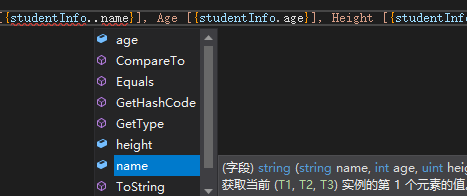
优化区别:返回值可以指定元素名字,方便理解记忆赋值和访问:
static (string name, int age, uint height) GetStudentInfo1(string name)
{
    return ("Bob", 28, 175);
}

static void RunTest1()
{
    var studentInfo = GetStudentInfo1("Bob");
    Console.WriteLine($"Student Information: Name [{studentInfo.name}], Age [{studentInfo.age}], Height [{studentInfo.height}]");
}
4.用于单参数方法的多值传递
当函数参数仅是一个Object类型时,可以使用值元组实现传递多个值。
5.解构ValueTuple
可以通过var (x, y)或者(var x, var y)来解析值元组元素构造局部变量,同时可以使用符号”_”来忽略不需要的元素。
static (string name, int age, uint height) GetStudentInfo1(string name)
{
    return ("Bob", 28, 175);
}

static void RunTest1()
{
    var (name, age, height) = GetStudentInfo1("Bob");
    Console.WriteLine($"Student Information: Name [{name}], Age [{age}], Height [{height}]");

    (var name1, var age1, var height1) = GetStudentInfo1("Bob");
    Console.WriteLine($"Student Information: Name [{name1}], Age [{age1}], Height [{height1}]");

    //用'_'忽略name和height
    var (_, age2, _) = GetStudentInfo1("Bob");
    Console.WriteLine($"Student Information: Age [{age2}]");
}
由上所述,ValueTuple使C#变得更简单易用。较Tuple相比主要好处如下:
- ValueTuple支持函数返回值新语法”(,,)”,使代码更简单;
- 能够给元素命名,方便使用和记忆,这里需要注意虽然命名了,但是实际上value tuple没有定义这样名字的属性或者字段,真正的名字仍然是ItemX,所有的元素名字都只是设计和编译时用的,不是运行时用的(因此注意对该类型的序列化和反序列化操作);
- 可以使用解构方法更方便地使用部分或全部元组的元素;
- 值元组是值类型,使用起来比引用类型的元组效率高,并且值元组是有比较方法的,可以用于比较是否相等,详见:https://msdn.microsoft.com/en-us/library/system.valuetuple。