【Webpack】
1、Split app and vendor code
To split your app into 2 files, say app.js and vendor.js, you can require the vendor files in vendor.js. Then pass this name to theCommonsChunkPlugin as shown below.
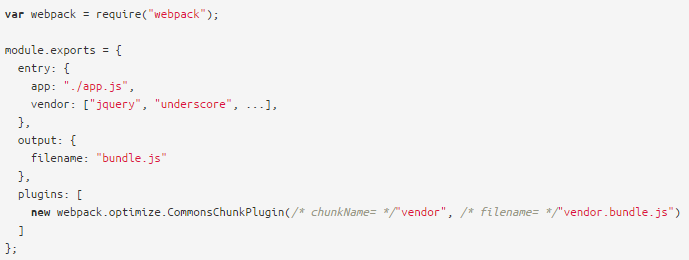
This will remove all modules in the vendor chunk from the app chunk. The bundle.js will now contain just your app code, without any of its dependencies. These are in vendor.bundle.js.
In your HTML page load vendor.bundle.js before bundle.js.

参考:http://webpack.github.io/docs/code-splitting.html#split-app-and-vendor-code
2、Multiple Entry Point
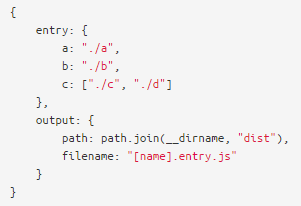
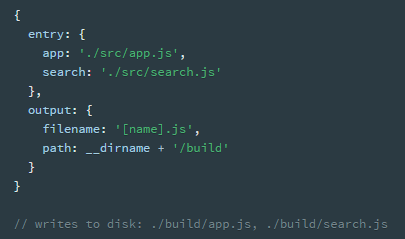
To use multiple entry points you can pass an object to the entry option. Each value is treated as an entry point and the key represents the name of the entry point.
When using multiple entry points you must override the default output.filename option. Otherwise each entry point would write to the same output file. Use [name] to get the name of the entry point.
另一个例子

配置文件中定义了两个打包资源“a”和“b”,在输出文件中使用方括号来获得输出文件名。而在插件设置中使用了CommonsChunkPlugin,Webpack中将打包后的文件都称之为“Chunk”。这个插件可以将多个打包后的资源中的公共部分打包成单独的文件,这里指定公共文件输出为“init.js”。这样我们就获得了三个打包后的文件,在html页面中可以这样引用:

3、CommonsChunkPlugin
options.minChunks(number|Infinity|function(module, count) -> boolean): The minimum number of chunks which need to contain a module before it’s moved into the commons chunk. The number must be greater than or equal 2 and lower than or equal to the number of chunks. PassingInfinityjust creates the commons chunk, but moves no modules into it. By providing afunctionyou can add custom logic. (Defaults to the number of chunks)
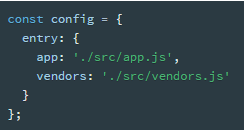
4、object syntax of entry
entry: {[entryChunkName: string]: string|Array<string>}
5、Output
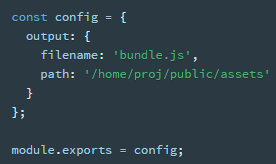
only one output configuration is specified.
Your preferred filename of the compiled file: // main.js || bundle.js || index.js
An output.path as an absolute path for what directory you prefer it to go in once bundled.
multiple entries
If your configuration creates more than a single "chunk" (as with multiple entry points or when using plugins like CommonsChunkPlugin), you should use substitutions to ensure that each file has a unique name.
[name] is replaced by the name of the chunk.
[hash] is replaced by the hash of the compilation.
[chunkhash] is replaced by the hash of the chunk.
output.library
If set, export the bundle as library. output.library is the name.
Use this if you are writing a library and want to publish it as single file.
output.path
The output directory as an absolute path (required).
[hash] is replaced by the hash of the compilation.