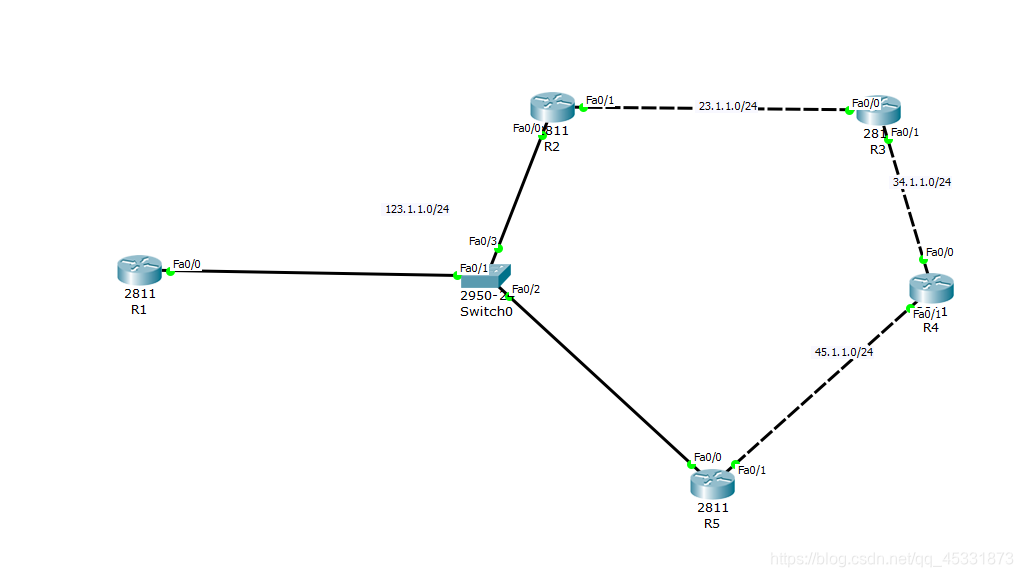
要求:1.全网可达。
2.R4的环回不能被宣告。
3.R2 R3 R5 各有两个环回,且做被动接口。
4.加快收敛速度。
合理规划:
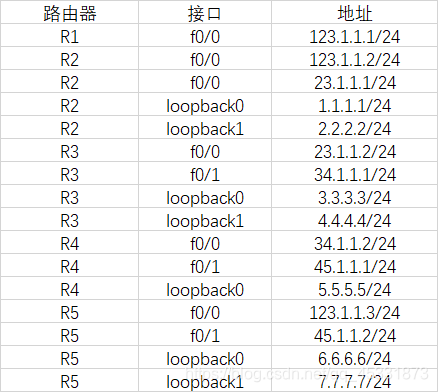
1.对所有路由器的IP进行配置并且让所有直连路由器相互ping通。
对R1进行配置:
Router>en
Router#conf
Configuring from terminal, memory, or network [terminal]?
Enter configuration commands, one per line. End with CNTL/Z.
Router(config)#int
Router(config)#interface f0/0
Router(config-if)#ip ad
Router(config-if)#ip address 123.1.1.1 255.255.255.0
Router(config-if)#no sh
Router(config-if)#no shutdown
Router(config-if)#
%LINK-5-CHANGED: Interface FastEthernet0/0, changed state to up
%LINEPROTO-5-UPDOWN: Line protocol on Interface FastEthernet0/0, changed state to up
Router(config-if)#exit
Router(config)#
对R2进行配置
Router>en
Router#
Router#conf
Configuring from terminal, memory, or network [terminal]?
Enter configuration commands, one per line. End with CNTL/Z.
Router(config)#int
Router(config)#interface f0/0
Router(config-if)#ip ad
Router(config-if)#ip address 123.1.1.2 255.255.255.0
Router(config-if)#no sh
Router(config-if)#no shutdown
Router(config-if)#
%LINK-5-CHANGED: Interface FastEthernet0/0, changed state to up
%LINEPROTO-5-UPDOWN: Line protocol on Interface FastEthernet0/0, changed state to up
Router(config-if)#ex
Router(config)#Router(config)#int
Router(config)#interface f0/1
Router(config-if)#ip ad
Router(config-if)#ip address 23.1.1.1 255.255.255.0
Router(config-if)#no sh
Router(config-if)#no shutdown
Router(config-if)#
%LINK-5-CHANGED: Interface FastEthernet0/1, changed state to up
Router(config-if)#exit
Router(config)#
对R3进行配置:
Router>en
Router#conf
Configuring from terminal, memory, or network [terminal]?
Enter configuration commands, one per line. End with CNTL/Z.
Router(config)#int
Router(config)#interface f0/0
Router(config-if)#ip ad
Router(config-if)#ip address 23.1.1.2 255.255.255.0
Router(config-if)#no sh
Router(config-if)#no shutdown
Router(config-if)#
%LINK-5-CHANGED: Interface FastEthernet0/0, changed state to up
%LINEPROTO-5-UPDOWN: Line protocol on Interface FastEthernet0/0, changed state to up
Router(config-if)#ex
Router(config-if)#
Router(config)#Router(config)#int
Router(config)#interface f0/1
Router(config-if)#ip ad
Router(config-if)#ip address 34.1.1.1 255.255.255.0
Router(config-if)#no sh
Router(config-if)#no shutdown
Router(config-if)#
%LINK-5-CHANGED: Interface FastEthernet0/1, changed state to up
Router(config-if)#ex
Router(config)#
对R4进行配置:
Router>en
Router#conf
Configuring from terminal, memory, or network [terminal]?
Enter configuration commands, one per line. End with CNTL/Z.
Router(config)#int
Router(config)#interface f0/0
Router(config-if)#ip ad
Router(config-if)#ip address 34.1.1.2 255.255.255.0
Router(config-if)#no sh
Router(config-if)#no shutdown
Router(config-if)#
%LINK-5-CHANGED: Interface FastEthernet0/0, changed state to up
%LINEPROTO-5-UPDOWN: Line protocol on Interface FastEthernet0/0, changed state to up
Router(config-if)#ex
Router(config)#int
Router(config)#interface f0/1
Router(config-if)#ip ad
Router(config-if)#ip address 45.1.1.1 255.255.255.0
Router(config-if)#no sh
Router(config-if)#no shutdown
Router(config-if)#
%LINK-5-CHANGED: Interface FastEthernet0/1, changed state to up
Router(config-if)#ex
Router(config)#
对R5进行配置:
Router>
Router>en
Router#conf
Configuring from terminal, memory, or network [terminal]?
Enter configuration commands, one per line. End with CNTL/Z.
Router(config)#int
Router(config)#interface f0/1
Router(config-if)#ip ad
Router(config-if)#ip address 45.1.1.2 255.255.255.0
Router(config-if)#no sh
Router(config-if)#no shutdown
Router(config-if)#
%LINK-5-CHANGED: Interface FastEthernet0/1, changed state to up
%LINEPROTO-5-UPDOWN: Line protocol on Interface FastEthernet0/1, changed state to up
Router(config-if)#ex
Router(config)#int
Router(config)#interface f0/0
Router(config-if)#ip ad
Router(config-if)#ip address 123.1.1.3 255.255.255.0
Router(config-if)#no sh
Router(config-if)#no shutdown
Router(config-if)#
%LINK-5-CHANGED: Interface FastEthernet0/0, changed state to up
%LINEPROTO-5-UPDOWN: Line protocol on Interface FastEthernet0/0, changed state to up
Router(config-if)#ex
Router(config)#
以上所有IP配通,可以全部ping通。
检验两两ping通:
R1:
Router#ping 123.1.1.2
Type escape sequence to abort.
Sending 5, 100-byte ICMP Echos to 123.1.1.2, timeout is 2 seconds:
.!!!
Success rate is 80 percent (4/5), round-trip min/avg/max = 0/0/2 ms
Router#ping 123.1.1.3
Type escape sequence to abort.
Sending 5, 100-byte ICMP Echos to 123.1.1.3, timeout is 2 seconds:
.!!!
Success rate is 80 percent (4/5), round-trip min/avg/max = 0/0/1 ms
Router#
R2:
Router#ping 123.1.1.1
Type escape sequence to abort.
Sending 5, 100-byte ICMP Echos to 123.1.1.1, timeout is 2 seconds:
!!!
Success rate is 100 percent (5/5), round-trip min/avg/max = 0/0/3 ms
Router#ping 23.1.1.2
Type escape sequence to abort.
Sending 5, 100-byte ICMP Echos to 23.1.1.2, timeout is 2 seconds:
.!!!
Success rate is 80 percent (4/5), round-trip min/avg/max = 0/0/0 ms
Router#ping 123.1.1.3
Type escape sequence to abort.
Sending 5, 100-byte ICMP Echos to 123.1.1.3, timeout is 2 seconds:
.!!!
Success rate is 80 percent (4/5), round-trip min/avg/max = 0/1/3 ms
Router#
R3:
Router#ping 23.1.1.1
Type escape sequence to abort.
Sending 5, 100-byte ICMP Echos to 23.1.1.1, timeout is 2 seconds:
!!!
Success rate is 100 percent (5/5), round-trip min/avg/max = 0/0/0 ms
Router#ping 34.1.1.2
Type escape sequence to abort.
Sending 5, 100-byte ICMP Echos to 34.1.1.2, timeout is 2 seconds:
.!!!
Success rate is 80 percent (4/5), round-trip min/avg/max = 0/0/0 ms
Router#
R4:
Router#ping 34.1.1.1
Type escape sequence to abort.
Sending 5, 100-byte ICMP Echos to 34.1.1.1, timeout is 2 seconds:
!!!
Success rate is 100 percent (5/5), round-trip min/avg/max = 0/0/0 ms
Router#ping 45.1.1.2
Type escape sequence to abort.
Sending 5, 100-byte ICMP Echos to 45.1.1.2, timeout is 2 seconds:
.!!!
Success rate is 80 percent (4/5), round-trip min/avg/max = 0/0/0 ms
Router#
R5:
Router#ping 45.1.1.1
Type escape sequence to abort.
Sending 5, 100-byte ICMP Echos to 45.1.1.1, timeout is 2 seconds:
!!!
Success rate is 100 percent (5/5), round-trip min/avg/max = 0/0/1 ms
Router#ping 123.1.1.2
Type escape sequence to abort.
Sending 5, 100-byte ICMP Echos to 123.1.1.2, timeout is 2 seconds:
!!!
Success rate is 100 percent (5/5), round-trip min/avg/max = 1/1/3 ms
Router#ping 123.1.1.1
Type escape sequence to abort.
Sending 5, 100-byte ICMP Echos to 123.1.1.1, timeout is 2 seconds:
!!!
Success rate is 100 percent (5/5), round-trip min/avg/max = 0/0/0 ms
Router#
2.环回 被动接口 收敛速度以及R4的设置
以R2为例:
Router(config)#router rip
Router(config-router)#ver
Router(config-router)#version 2
Router(config-router)#net
Router(config-router)#network 1.0.0.0
Router(config-router)#network 2.0.0.0
Router(config-router)#network 123.0.0.0
Router(config-router)#network 23.0.0.0
Router(config-router)#ex
Router(config)#router rip
Router(config-router)#pass
Router(config-router)#passive-interface l
Router(config-router)#passive-interface loopback 0
%Invalid interface type and number
Router(config-router)#ex
Router(config)#router r
Router(config)#router rip
Router(config-router)#tim
Router(config-router)#timers ba
Router(config-router)#timers basic 15 90 90 120
Router(config-router)#ex
Router(config)#
其他的与R2的设置相同,但必须严格配置。确保全网可达。
R4不能被宣告的相关设置:
Router(config)#router rip
Router(config-router)#ver
Router(config-router)#version 2
Router(config-router)#net
Router(config-router)#network 34.0.0.0
Router(config-router)#network 45.0.0.0
Router(config-router)#ex
Router(config)#router rip
Router(config-router)#pass
Router(config-router)#passive-interface l
Router(config-router)#passive-interface loopback 0
%Invalid interface type and number
Router(config-router)#ex
Router(config)#router r
Router(config)#router rip
Router(config-router)#tim
Router(config-router)#timers ba
Router(config-router)#timers basic 15 90 90 120
Router(config-router)#ex
Router(config)#
R4的环回不被宣意味着在指令network中不写R4的环回即可。
以上就全部配通了。
同时在练习中可以加入多台PC以作练习。