Python Lib Requests,BS4,HTML parser, Data Base, Login
Requests + Beatifulsoup
bs4, Beatifulsoup: https://www.crummy.com/software/BeautifulSoup/bs4/doc/#
 1 import requests
 2 from bs4 import BeautifulSoup
 3 from lxml import etree
 4
 5 # get target contents
 6 headers = {'User-Agent':'Mozilla/5.0 (Windows NT 6.1; Win64; x64) AppleWebKit/537.36 (KHTML, like Gecko) Chrome/63.0.3239.132 Safari/537.36'}
 7 cookies = {'Cookie': 'csrftoken=D5Vm2O0Ftf0K5b9zice10y3ZntK67YxM; sessionid=7390f8f82b756e834a101028c3398173; django_language=zh-CN; bb_language=zh-CN'}
 8 url = 'https://www.yianyouxuan.com/mall'
 9 try:
10     res = requests.get(url,cookies=cookies,headers=headers)
11     res.raise_for_status()
12     res.encoding = res.apparent_encoding
13     html_content=res.content
14 except:
15     print('request failure')
16
17
18
19 #### BeautifulSoup ####
20 soup = BeautifulSoup(html_content,'html.parser')
21 #print(soup.prettify)
22 prod_list = soup.select('#mall-list > li > div > a')    # original copy "#mall-list > li:nth-child(1) > div > a"
23 creadit_list = soup.select('#mall-list > li > p > em')  # original copy "#mall-list > li:nth-child(1) > p:nth-child(3) > em"
24 prod_list_title = []
25 creadits = []
26 for item in prod_list:
27     #print(item.attrs)
28     prod_list_title.append(item.attrs['title'])
29 for item in creadit_list:
30     creadits.append(int(item.string))    # or item.text to get text.
31 print(prod_list_title)
32 print(creadits)
33
34
35 ##### Xpath ####
36 root = etree.HTML(html_content)
37 items = root.xpath('//*[@id="mall-list"]/li')    #original copy //*[@id="mall-list"]/li[1]. need to remove [1], li is a list.
38 #print(len(items))
39 prod_name = []
40 creadit = []
41 for item in items:
42     prod_name.append(str(item.xpath('./h4/a/text()')[0]))    #original copy //*[@id="mall-list"]/li[1]/h4/a
43     creadit.append(int(item.xpath('./p/em[@class="c_tx1"]/text()')[0])) # original copy //*[@id="mall-list"]/li[1]/p[1]/em
44 print(prod_name)
45 print(creadit)
#Outcomes:

一、Requests

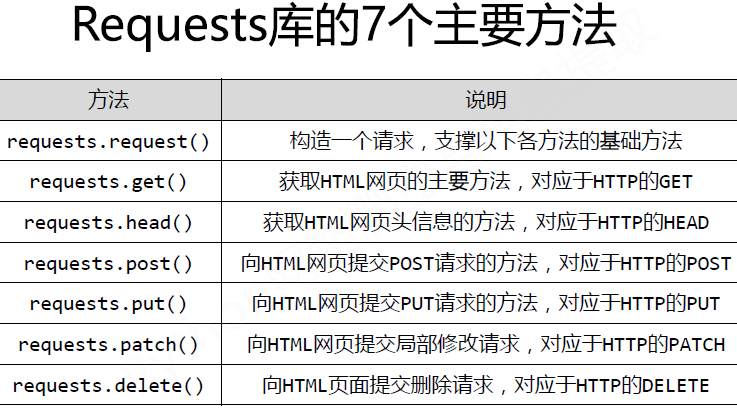

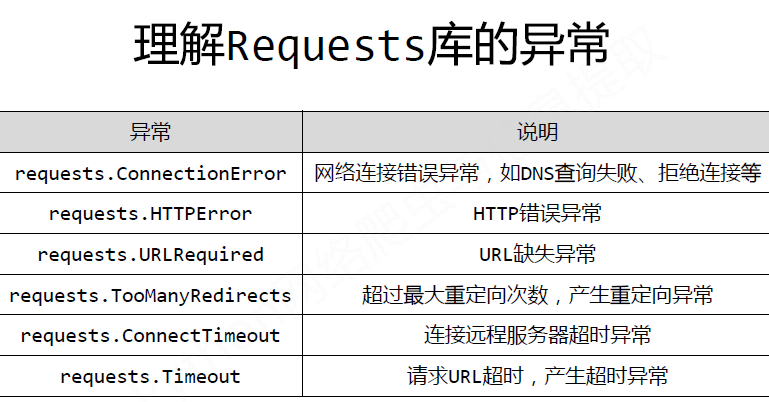

Examples:
request.get()
 1 import requests
 2
 3 URL = 'http://www.baidu.com'
 4 try:
 5     Res = requests.get(URL)
 6     Res.raise_for_status()        #tell if it's true or false. true -> continue; false -> except.
 7     print(Res.status_code)
 8     print(Res。raise_for_status)
 9     print(Res.encoding)
10     print(Res.apparent_encoding)
11     Res.encoding = Res.apparent_encoding    #让显示编码赋值给编码,确保显示正常。
12 except:
13     print('request failure')
#Outcome:
200 <bound method Response.raise_for_status of <Response [200]>> ISO-8859-1 utf-8 <!DOCTYPE html> <!--STATUS OK--><html> <head><meta http-equiv=content-type content=text/html;charset=utf-8>
<meta http-equiv=X-UA-Compatible content=IE=Edge><meta content=always name=referrer>
<link rel=stylesheet type=text/css href=http://s1.bdstatic.com/r/www/cache/bdorz/baidu.min.css>
<title>ç¾åº¦ä¸ä¸ï¼ä½ å°±ç¥é</title></head>
After assign the value of Res.apparent_encoding to Res.encoding
>>> Res.text[0:1000]
'<!DOCTYPE html>
<!--STATUS OK--><html> <head><meta http-equiv=content-type content=text/html;charset=utf-8>
<meta http-equiv=X-UA-Compatible content=IE=Edge><meta content=always name=referrer>
<link rel=stylesheet type=text/css href=http://s1.bdstatic.com/r/www/cache/bdorz/baidu.min.css>
<title>百度一下,你就知道</title></head>
Requests.heard()方法
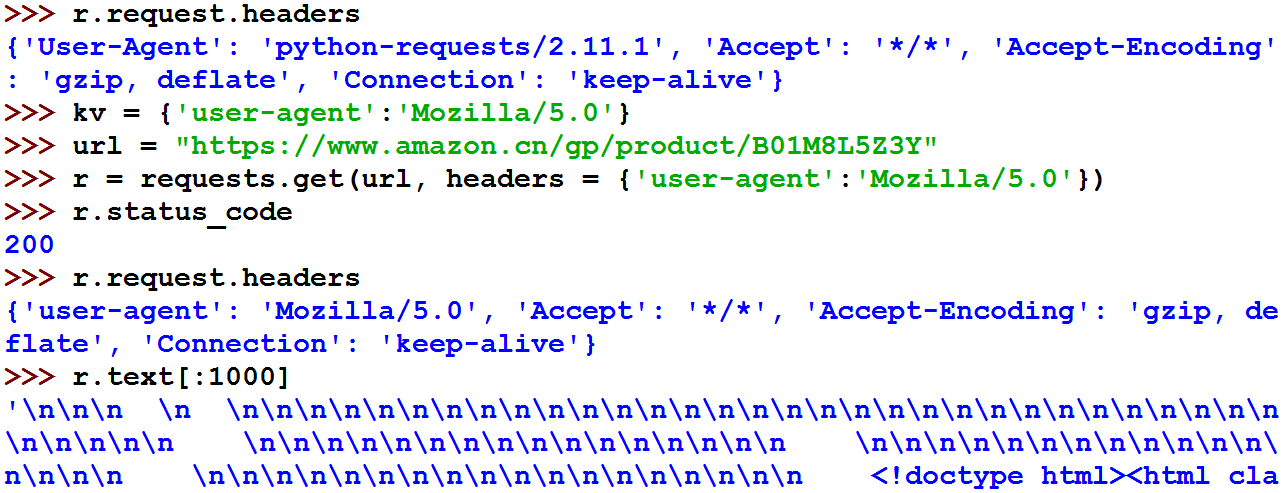
Requests.post() 方法
1 >>> payload = {'key1': 'value1', 'key2': 'value2'}
2 >>> r = requests.post('http://httpbin.org/post', data = payload)  #传递参数:比如http://xxx?k1=v1&k2=v2
3 >>> print(r.text)
4 { ...            #向URL POST一个字典,自动编码为form(表单)
5 "form": {
6 "key2": "value2",
7 "key1": "value1"
8 },
9 }
10 >>> r = requests.post('http://httpbin.org/post', data = 'ABC')
11 >>> print(r.text)
12 { ...
13 "data": "ABC"
14 "form": {},
15 }
Requests.put() 方法
1 >>> payload = {'key1': 'value1', 'key2': 'value2'}
2 >>> r = requests.put('http://httpbin.org/put', data = payload)
3 >>> print(r.text)
4 { ...
5 "form": {
6 "key2": "value2",
7 "key1": "value1"
8 },
9 }
#传递参数,比如http://aaa.com?pageId=1&type=content
 1   import requests
 2
 3   URL = 'https://www.amazon.cn/dp/B01JG4J5PQ/ref=lp_2134663051_1_1?'
 4   Params = {'s':'grocery','ie':'UTF8','qid':'1517822277','sr':'1-1'}
 5   try:
 6       Res = requests.get(URL,Params)
 7       Res.raise_for_status
 8       Res.encoding = Res.apparent_encoding
 9       print(Res.text[0:1000])
10  except:
11      print('failure')
#二进制处理数据
 1 import requests
 2 from PIL import Image
 3 from io import BytesIO
 4
 5 URL = 'https://images-cn.ssl-images-amazon.com/images/I/71GGUs7JSXL._SL1000_.jpg'
 6
 7 try:
 8     Res = requests.get(URL)
 9     Image01 = Image.open(BytesIO(Res.content))
10     Image01.save('nuts.jpg')
11 except:
12     print('failure')
#json处理
1 import requests
2 import json
3
4 res = requests.get('https://github.com/timeline.json')
5 print(type(res.json))
6 print(res.text)
#原始数据处理
1 URL = 'https://images-cn.ssl-images-amazon.com/images/I/71GGUs7JSXL._SL1000_.jpg'
2
3 Res = requests.get(URL)
4
5 with open('nuts2.jpg','wb+') as f:
6     for chunk in Res.iter_content(1024):
7         f.write(chunk)
#提交表单
import json
import requests

form = {'username':'user','password':'pass'}
r01 = requests.post('http://httpbin.org/post',data=form)
print(r01.text)
r02 = requests.post('http://httpbin.org/post',data=json.dumps(form))
print(r02.text)
#Outcome:
{
  "args": {},
  "data": "",
  "files": {},
  "form": {
    "password": "pass",
    "username": "user"
  },
  "headers": {
    "Accept": "*/*",
    "Accept-Encoding": "gzip, deflate",
    "Connection": "close",
    "Content-Length": "27",
    "Content-Type": "application/x-www-form-urlencoded",
    "Host": "httpbin.org",
    "User-Agent": "python-requests/2.9.1"
  },
  "json": null,
  "origin": "60.247.94.218",
  "url": "http://httpbin.org/post"
}
{
  "args": {},
  "data": "{"password": "pass", "username": "user"}",
  "files": {},
  "form": {},
  "headers": {
    "Accept": "*/*",
    "Accept-Encoding": "gzip, deflate",
    "Connection": "close",
    "Content-Length": "40",
    "Host": "httpbin.org",
    "User-Agent": "python-requests/2.9.1"
  },
  "json": {
    "password": "pass",
    "username": "user"
  },
  "origin": "60.247.94.218",
  "url": "http://httpbin.org/post"
}
# Cookie
 1 import requests
 2
 3 url = 'http://www.baidu.com'
 4 r = requests.get (url)
 5 cookie = r.cookies
 6 for k,v in cookie.get_dict().items():
 7     print(k,v)
 8
 9 cookies = {'c1':'v1','c2':'v2'}
10 r = requests.get('http://httpbin.org/cookies',cookies=cookies)
11 print(r.text)
#outcome:
BDORZ 27315
{
"cookies": {
"c1": "v1",
"c2": "v2"
}
}
#Redirect and Redirect history
1 import requests
2
3 res = requests.head('http://github.com', allow_redirects = True)
4 print(res.url)
5 print(res.status_code)
6 print(res.history)
#outcome
https://github.com/
200
[<Response [301]>]
#代理
1 proxies = {'http':' ','https':' '}
2 r = requests.get('...',proxies = proxies)
二、BS4 (Beautiful Soup)
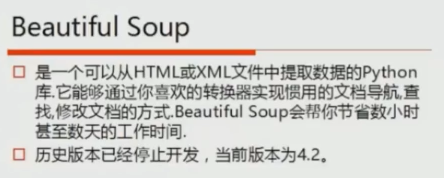

1. Beautiful Soup 解析器
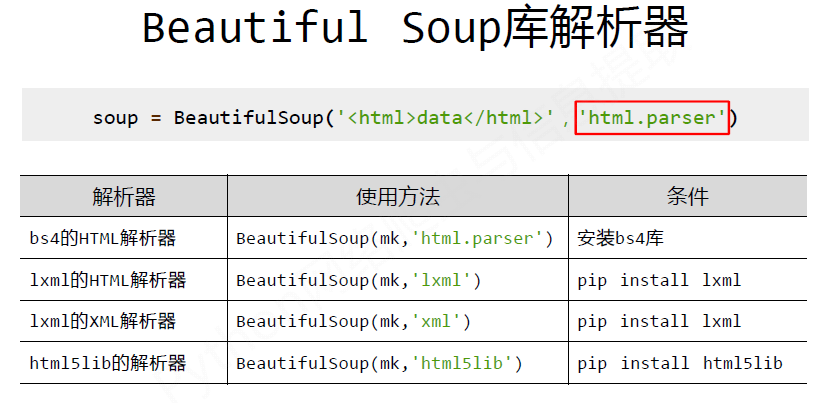


使用和没有使用解析器:


1 from bs4 import BeautifulSoup
2
3 soup = BeautifulSoup(open('test.html'))
4 print(soup.prettify())
#outcome:
/usr/lib/python3/dist-packages/bs4/__init__.py:166: UserWarning: No parser was explicitly specified, so I'm using the best available HTML parser for this system ("lxml"). This usually isn't a problem, but if you run this code on another system, or in a different virtual environment, it may use a different parser and behave differently.

To get rid of this warning, change this:

 BeautifulSoup([your markup])

to this:

 BeautifulSoup([your markup], "lxml")

  markup_type=markup_type))
<html>
...
</html>
1 from bs4 import BeautifulSoup
2
3 soup = BeautifulSoup(open('test.html'),'html.parser')  #指定了使用html解析器。
4 print(soup.prettify())
#outcome:
<html>
 <head>
  <title>
   The Dormouse's story
  </title>
 </head>
 <body>
  <p class="title" name="dromouse">
   <b>
    The Dormouse's story
   </b>
  </p>
  <p class="story">
   Once upon a time there were three little sisters; and their names were
   <a class="sister" href="http:/example.com/elsie" id="link1">
    <!-- Elsie -->
   </a>
   ,
   <a class="sister" href="http:/example.com/elsie" id="link2">
    Lacie
   </a>
   and
   <a class="sister" href="http:/example.com/elsie" id="link3">
    Tillie
   </a>
   ;
and they lived at the bottom of a well.
  </p>
  <p class="story">
   ...
  </p>
 </body>
</html>
2. Beautiful Soup类的基本元素
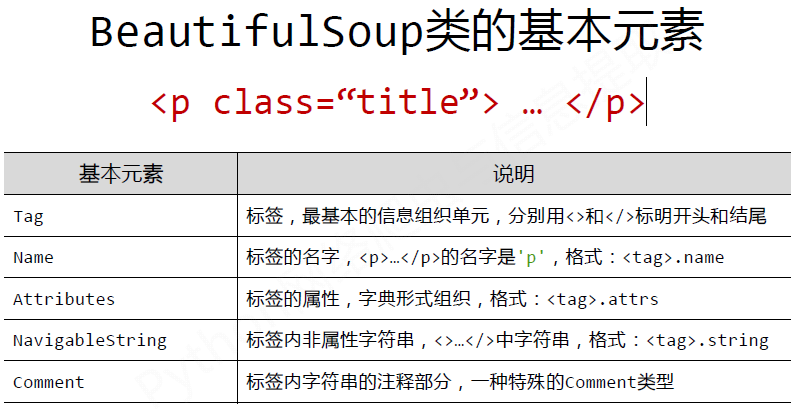
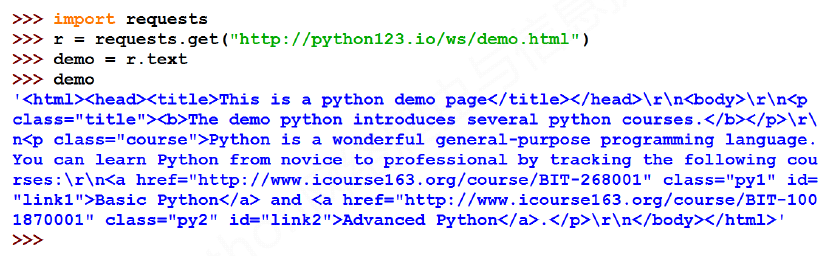
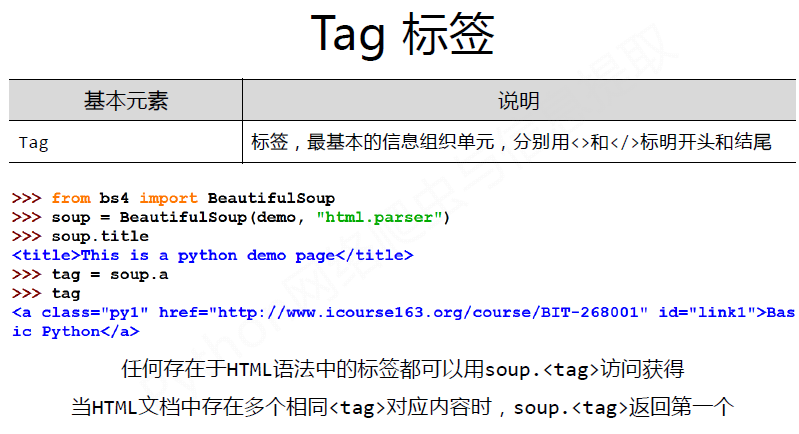
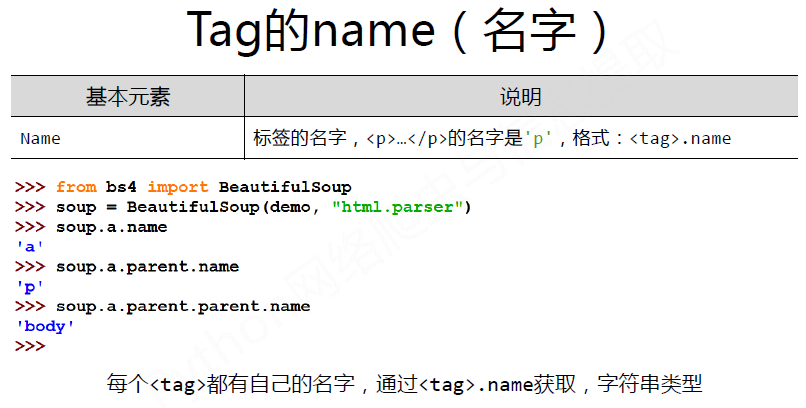
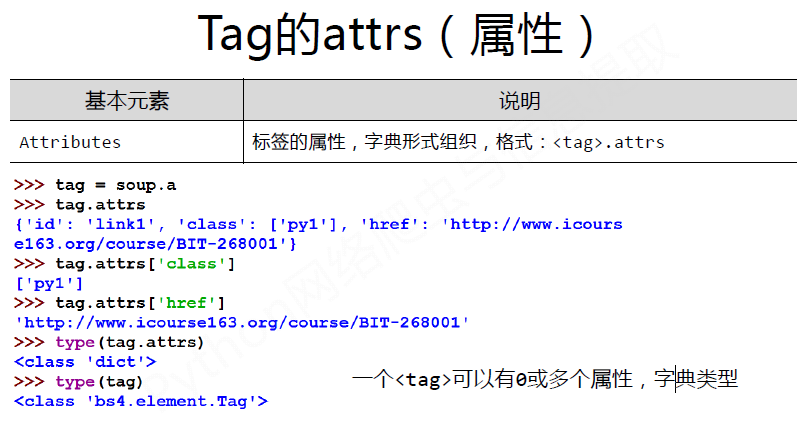
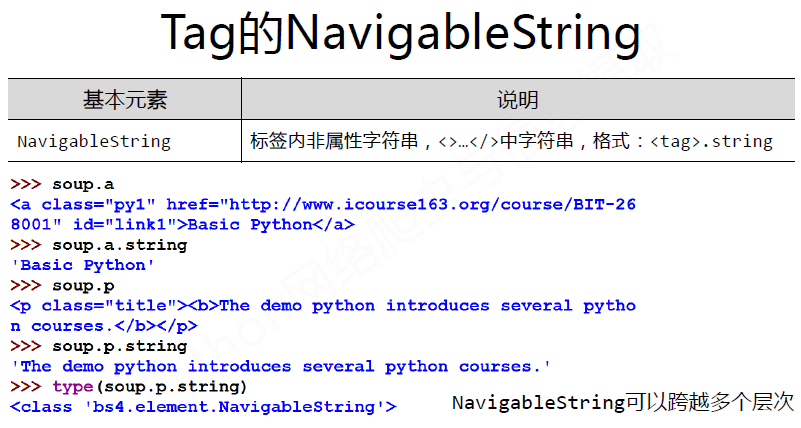

Examples:
 1 from bs4 import BeautifulSoup
 2
 3 soup = BeautifulSoup(open('test.html'),'html.parser')
 4 #print(soup.prettify())
 5
 6 #Tag
 7 print(type(soup.title))
 8 print(soup.title.name)
 9 print(soup.title)
10
11 #String
12 print(type(soup.title.string))
13 print(soup.title.string)
14
15 #comment
16 print(type(soup.a.string))
17 print(soup.a.string)
18
19 #Traverse
20 for items in soup.body.contents:         #body的子元素是3P
21     print(items.name)
22    print(items)          # To show all contents of the HTML document.
#outcomes:
<class 'bs4.element.Tag'>
title
<title>The Dormouse's story</title>
<class 'bs4.element.NavigableString'>        #虽然打印显示都是字符串,但注意string和comment类型的不同。
The Dormouse's story
<class 'bs4.element.Comment'>
 Elsie
None
p
None
p
None
p
Example2:
 1 from bs4 import BeautifulSoup
 2 import requests
 3
 4 def getHTML(req_url):
 5     req_header = {'user-agent':'Mozilla/5.0'}   # pretend to open with Mozila
 6     try:
 7         req_result= requests.get(req_url,req_header)
 8         req_result.raise_for_status()           # to check the status of the request
 9         req_result.encoding = req_result.apparent_encoding  # using apparent encoding.
10         return (req_result.text)
11     except:
12         print("HTML ERROR")
13
14 def HTMLParser(req_url):
15     req_text = getHTML(url)
16     soup = BeautifulSoup(req_text, 'html.parser')   #use html.parser to avoid some warnings.
17     return(soup)
18
19 def HTMLOPS(req_url):
20     soup = HTMLParser(url)
21 # title tag
22     title = soup.title
23     print(type(title))
24     print(title)
25 # body tag
26 # To show the all contents of an HTML document
27     print(soup.body.contents)
28     print(soup.title.string)
29 #OR
30     for item in soup.body.contents:
31         print(item)
32 # a tag
33     print(type(soup.a.string))      #To show the first a tag
34     print(soup.a.string)
35 # tag name
36     print(soup.a.name)
37     print(soup.a.parent.name)
38
39 #tag attrs
40     print(soup.a.attrs)
41     print(soup.a.attrs['name'])
42     #print(soup.div)
43
44 if __name__ == '__main__':
45     url = input('please input the url you want to parser: ')
46     HTMLOPS(url)
47     #print(soup.prettify())
#Outcome:
1 please input the url you want to parser: http://www.baidu.com 2 <--title--> 3 <class 'bs4.element.Tag'> 4 <title>百度一下 你就知道</title> 5 6 <--body contents--> 7 [' ', <div id="wrapper"> <div id="head"> <div class="head_wrapper"> <div class="s_form"> <div class="s_form_wrapper"> <div id="lg"> <img height="129" hidefocus="true" src="//www.baidu.com/img/bd_logo1.png" width="270"> </img></div> <form action="//www.baidu.com/s" class="fm" id="form" name="f"> <input name="bdorz_come" type="hidden" value="1"> <input name="ie" type="hidden" value="utf-8"> <input name="f" type="hidden" value="8"> <input name="rsv_bp" type="hidden" value="1"> <input name="rsv_idx" type="hidden" value="1"> <input name="tn" type="hidden" value="baidu"><span class="bg s_ipt_wr"><input autocomplete="off" autofocus="" class="s_ipt" id="kw" maxlength="255" name="wd" value=""/></span><span class="bg s_btn_wr"><input class="bg s_btn" id="su" type="submit" value="百度一下"/></span> </input></input></input></input></input></input></form> </div> </div> <div id="u1"> <a class="mnav" href="http://news.baidu.com" name="tj_trnews">æ–°é—»</a> <a class="mnav" href="http://www.hao123.com" name="tj_trhao123">hao123</a> <a class="mnav" href="http://map.baidu.com" name="tj_trmap">地图</a> <a class="mnav" href="http://v.baidu.com" name="tj_trvideo">视频</a> <a class="mnav" href="http://tieba.baidu.com" name="tj_trtieba">è´´å§</a> <noscript> <a class="lb" href="http://www.baidu.com/bdorz/login.gif?login&tpl=mn&u=http%3A%2F%2Fwww.baidu.com%2f%3fbdorz_come%3d1" name="tj_login">登录</a> </noscript> <script>document.write('<a href="http://www.baidu.com/bdorz/login.gif?login&tpl=mn&u='+ encodeURIComponent(window.location.href+ (window.location.search === "" ? "?" : "&")+ "bdorz_come=1")+ '" name="tj_login" class="lb">登录</a>');</script> <a class="bri" href="//www.baidu.com/more/" name="tj_briicon" style="display: block;">更多产å“</a> </div> </div> </div> <div id="ftCon"> <div id="ftConw"> <p id="lh"> <a href="http://home.baidu.com">关于百度</a> <a href="http://ir.baidu.com">About Baidu</a> </p> <p id="cp">©2017 Baidu <a href="http://www.baidu.com/duty/">使用百度å‰å¿…读</a> <a class="cp-feedback" href="http://jianyi.baidu.com/">意见反馈</a>京ICP证030173 <img src="//www.baidu.com/img/gs.gif"> </img></p> </div> </div> </div>, ' '] 8 百度一下,你就知道 9 10 <div id="wrapper"> <div id="head"> <div class="head_wrapper"> <div class="s_form"> <div class="s_form_wrapper"> <div id="lg"> <img height="129" hidefocus="true" src="//www.baidu.com/img/bd_logo1.png" width="270"> </img></div> <form action="//www.baidu.com/s" class="fm" id="form" name="f"> <input name="bdorz_come" type="hidden" value="1"> <input name="ie" type="hidden" value="utf-8"> <input name="f" type="hidden" value="8"> <input name="rsv_bp" type="hidden" value="1"> <input name="rsv_idx" type="hidden" value="1"> <input name="tn" type="hidden" value="baidu"><span class="bg s_ipt_wr"><input autocomplete="off" autofocus="" class="s_ipt" id="kw" maxlength="255" name="wd" value=""/></span><span class="bg s_btn_wr"><input class="bg s_btn" id="su" type="submit" value="百度一下"/></span> </input></input></input></input></input></input></form> </div> </div> <div id="u1"> <a class="mnav" href="http://news.baidu.com" name="tj_trnews">æ–°é—»</a> <a class="mnav" href="http://www.hao123.com" name="tj_trhao123">hao123</a> <a class="mnav" href="http://map.baidu.com" name="tj_trmap">地图</a> <a class="mnav" href="http://v.baidu.com" name="tj_trvideo">视频</a> <a class="mnav" href="http://tieba.baidu.com" name="tj_trtieba">è´´å§</a> <noscript> <a class="lb" href="http://www.baidu.com/bdorz/login.gif?login&tpl=mn&u=http%3A%2F%2Fwww.baidu.com%2f%3fbdorz_come%3d1" name="tj_login">登录</a> </noscript> <script>document.write('<a href="http://www.baidu.com/bdorz/login.gif?login&tpl=mn&u='+ encodeURIComponent(window.location.href+ (window.location.search === "" ? "?" : "&")+ "bdorz_come=1")+ '" name="tj_login" class="lb">登录</a>');</script> <a class="bri" href="//www.baidu.com/more/" name="tj_briicon" style="display: block;">更多产å“</a> </div> </div> </div> <div id="ftCon"> <div id="ftConw"> <p id="lh"> <a href="http://home.baidu.com">关于百度</a> <a href="http://ir.baidu.com">About Baidu</a> </p> <p id="cp">©2017 Baidu <a href="http://www.baidu.com/duty/">使用百度å‰å¿…读</a> <a class="cp-feedback" href="http://jianyi.baidu.com/">意见反馈</a>京ICP证030173 <img src="//www.baidu.com/img/gs.gif"> </img></p> </div> </div> </div> 11 12 <--tag a--> 13 <class 'bs4.element.NavigableString'> 14 新闻 15 16 <--tag name--> 17 a 18 div 19 20 <--tag attributes--> 21 {'name': 'tj_trnews', 'class': ['mnav'], 'href': 'http://news.baidu.com'} 22 tj_trnews
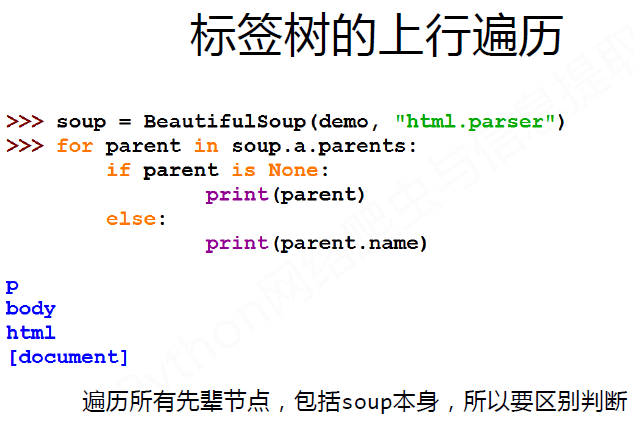
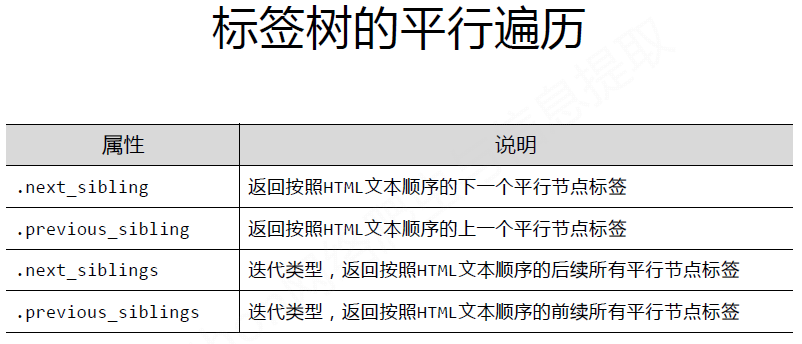
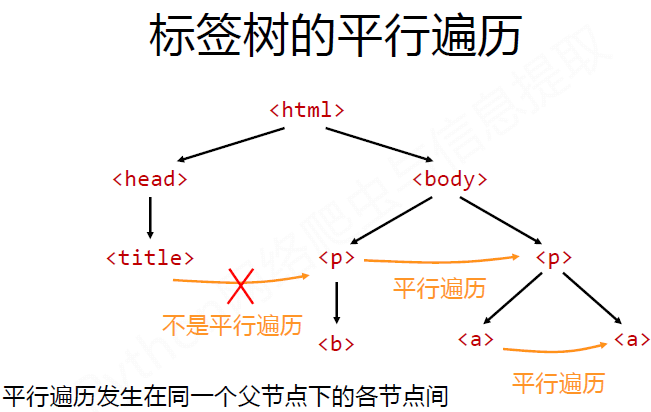
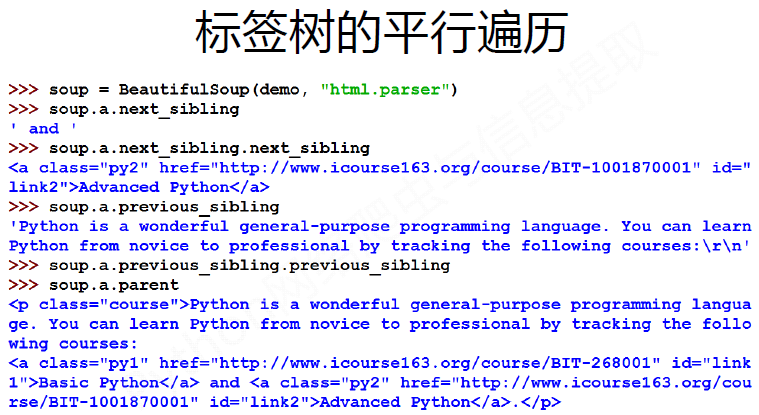
3. 基于bs4库的HTML内容遍历方法
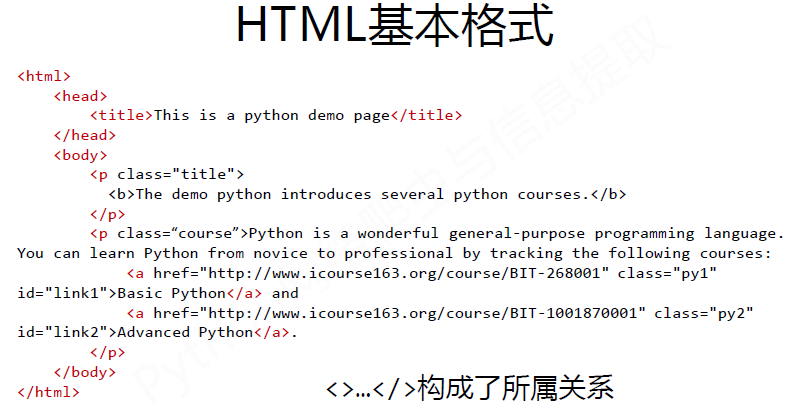


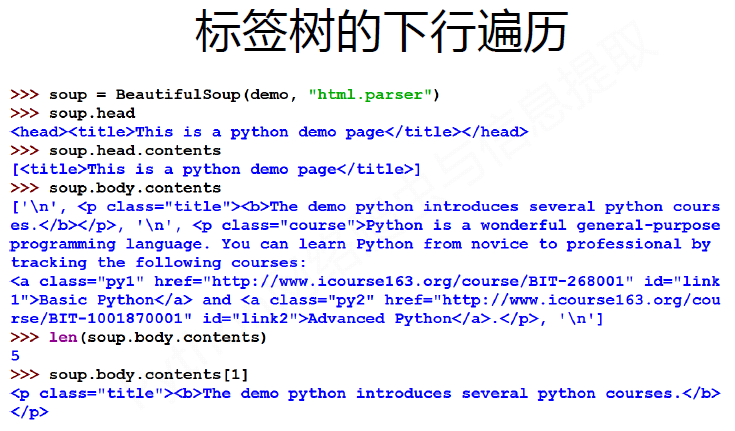
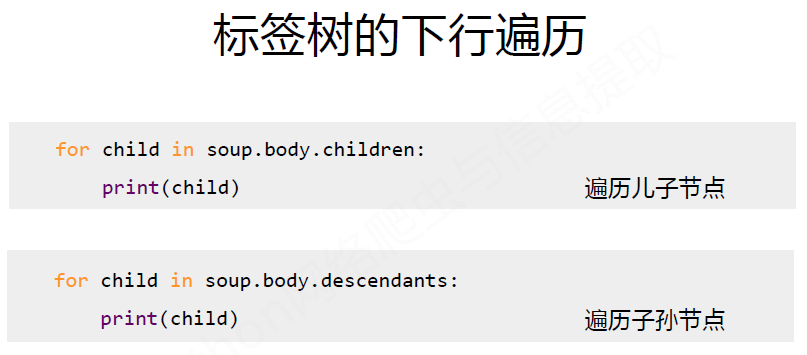
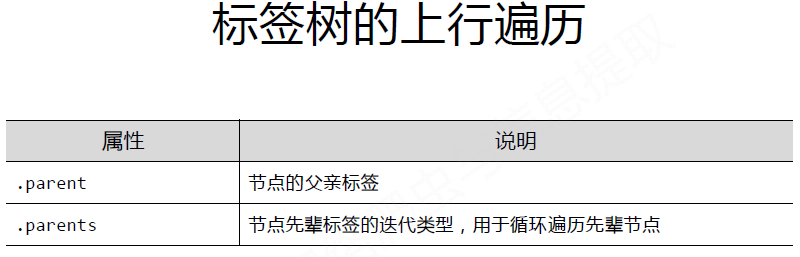
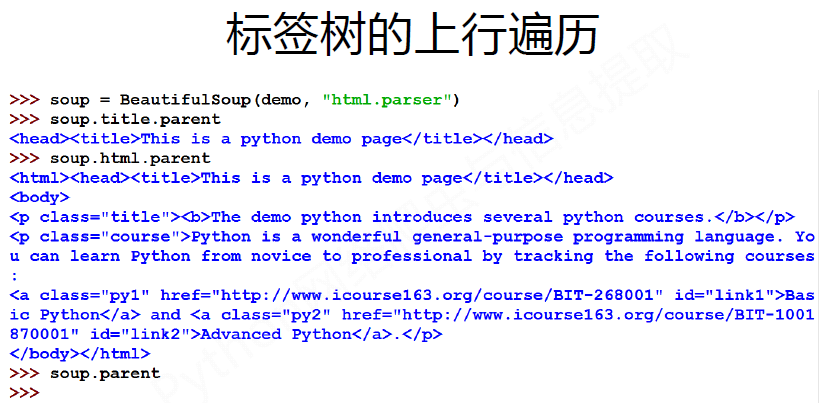
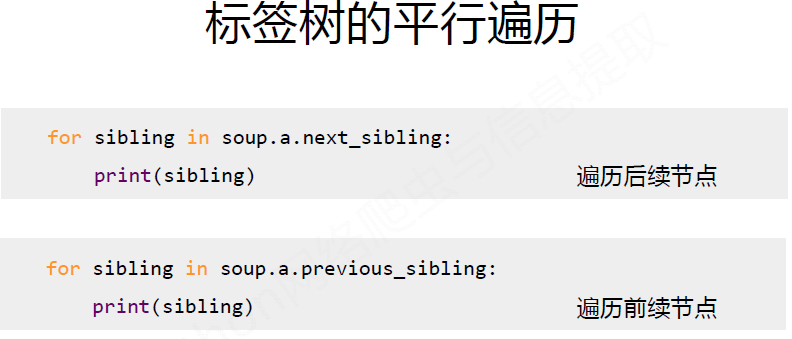
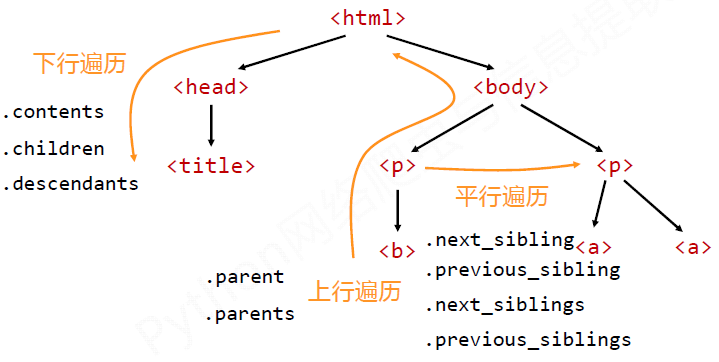
#CSS查询
1 print(soup.select('.sister'))        #按照class查找,并查找全部。注意查找要加.
2 print(soup.select('#link1'))       #按照id来查找,注意加#
3 print(soup.select('head > title')    #按照父子关系来找。

4 a_s = soup.select('a')           #利用循环遍历,打印所有的a标签的内容
5 for a in a_s:
6   print(a)
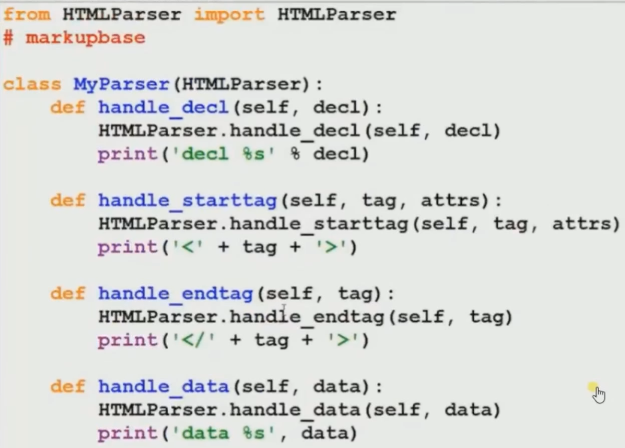
HTMLparse () # In Python 3.0, the HTMLParser module has been renamed to html.parser you can check about this here
Python 3.0
import html.parser

Python 2.2 and above
import HTMLParser

Sqlite3 #Python自带模块,体积小,方便灵活。
 1 import sqlite3
 2
 3 conn = sqlite3.connect('test')
 4 create_sql = 'create table company(id int primary key not null, emp_name test not null);'
 5 conn.execute(create_sql)
 6 insert_sql = 'insert into company values(?, ?)'    #使用了参数化的方法,防止sql注入攻击。拼字符串的化容易被攻击。
 7 conn.execute(insert_sql, (100, 'LY'))
 8 conn.execute(insert_sql, (200, 'July'))
 9 cursors = conn.execute('select id, emp_name from company')
10 for row in cursors:
11     print(row[0],row[1])
12
13 conn.close()
mysql注意事项:
1. mysql需要加 host(ip/port), username, psassword.
2. 在每一行执行代码的时候,要价conn.commit()
https://www.tutorialspoint.com/python/python_database_access.htm