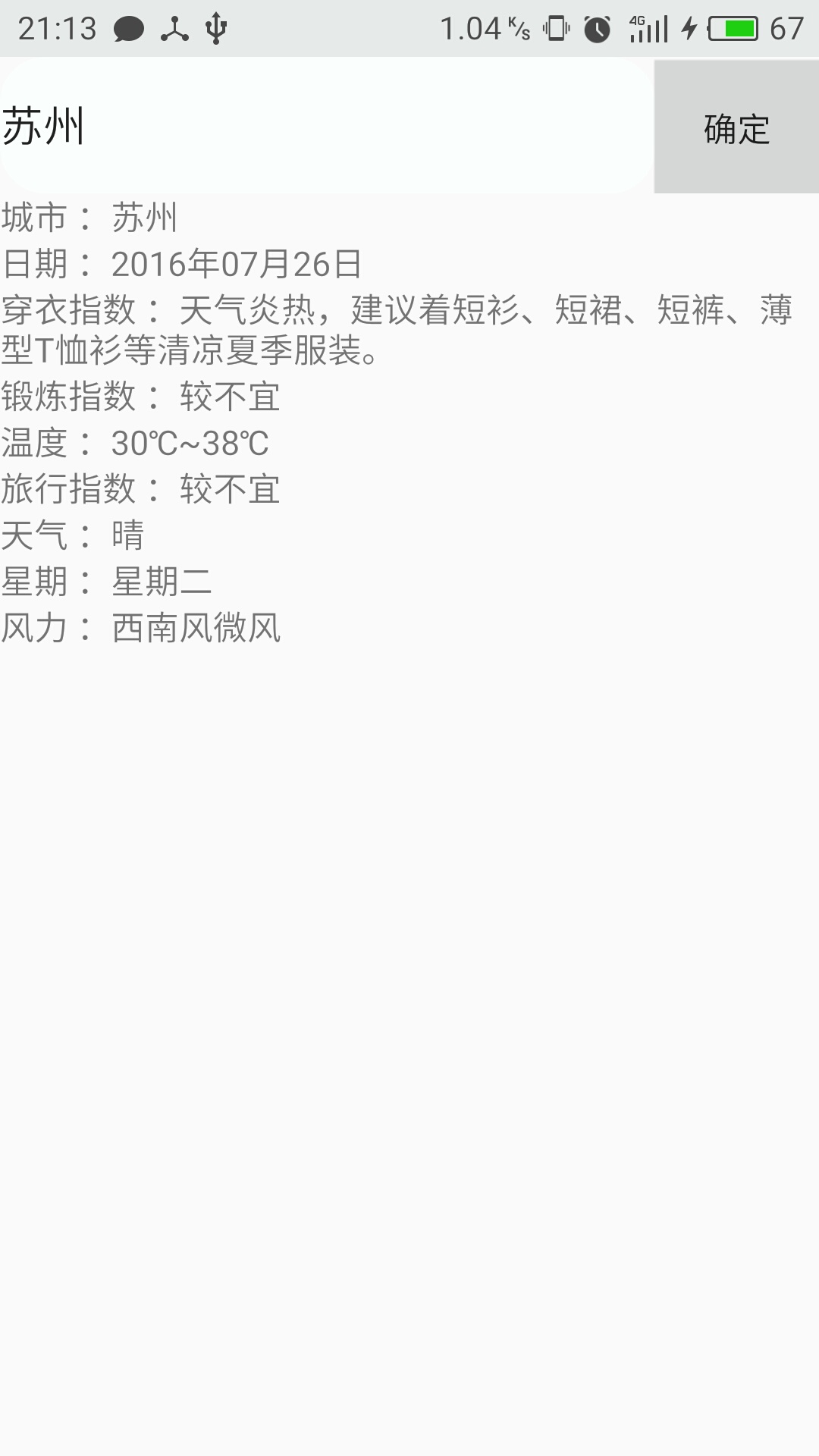
今天刚刚学到json解析,看了一整天,大概了解到json就是你通过一个API(我用的聚合数据的API)发送一个请求,接着会收到json数据,比如说天气预报吧,他会给你发送一大段字符串,大概是未来几天的天气情况了什么的,因为这个数据我们想把它规则的展现在手机屏幕上,但是我们得到的json数据未经处理的话,很乱没有美感,也不方便看,就需要我们解析出这些数据并展现在手机屏幕上
cityName = URLEncoder.encode(city,"UTF-8"); 这句话将汉字转化为UTF-8编码
1.首先是要获取json数据,我是直接使用了已经集成的Volley包,获得的数据,Volley又有get和post方法,这里使用get方法
Volley方法获得json数据:
private void volley_get()
    {
            String cityName;
            String  city;
            @Override
                Toast.makeText(MainActivity.this, cityName, Toast.LENGTH_SHORT).show();
                String url = "http://v.juhe.cn/weather/index?format=2&cityname=%E8%8B%8F%E5%B7%9E&=你申请的Key";
              /*
              * StringRequest中的第一个参数,是我们获取数据所调用的方法  Method.GET
              *第二个参数,是我们获得的API的接口  url
              *第三个参数,是当请求成功时所调用的参数
              * 第四个参数,是请求失败时所调用的参数
              * */
                StringRequest request = new StringRequest(Method.GET, url, new Response.Listener<String>()
                {
                    @Override
                    public void onResponse(String s)
                    {//参数s就是我们请求成功时返回的json数据
                        Toast.makeText(MainActivity.this, "加载数据成功", Toast.LENGTH_SHORT).show();
                    }, new Response.ErrorListener()
                    {
                        @Override
                        public void onErrorResponse(VolleyError volleyError)
                        {
                            Toast.makeText(MainActivity.this, "对不起,加载数据失败", Toast.LENGTH_SHORT).show();
                        }
                    });
                    request.setTag("abcGet");
                    MyApplication.getHttpQueues().add(request);//因为Volley方法就是通过请求队列的方法实现的,所以这里要加入队列

            });

    }
获得到的天气数据
{"resultcode":"200","reason":"successed!","result":{"sk":{"temp":"37","wind_direction":"西风","wind_strength":"2级","humidity":"49%","time":"18:28"},"today":{"temperature":"30℃~38℃","weather":"晴","weather_id":{"fa":"00","fb":"00"},"wind":"西南风微风","week":"星期二","city":"苏州","date_y":"2016年07月26日","dressing_index":"炎热","dressing_advice":"天气炎热,建议着短衫、短裙、短裤、薄型T恤衫等清凉夏季服装。","uv_index":"很强","comfort_index":"","wash_index":"较适宜","travel_index":"较适宜","exercise_index":"较适宜","drying_index":""},"future":[{"temperature":"30℃~38℃","weather":"晴","weather_id":{"fa":"00","fb":"00"},"wind":"西南风微风","week":"星期二","date":"20160726"},{"temperature":"29℃~39℃","weather":"晴","weather_id":{"fa":"00","fb":"00"},"wind":"西风微风","week":"星期三","date":"20160727"},{"temperature":"29℃~39℃","weather":"晴","weather_id":{"fa":"00","fb":"00"},"wind":"西南风微风","week":"星期四","date":"20160728"},{"temperature":"29℃~39℃","weather":"晴","weather_id":{"fa":"00","fb":"00"},"wind":"南风微风","week":"星期五","date":"20160729"},{"temperature":"28℃~37℃","weather":"晴","weather_id":{"fa":"00","fb":"00"},"wind":"东风微风","week":"星期六","date":"20160730"},{"temperature":"29℃~39℃","weather":"晴","weather_id":{"fa":"00","fb":"00"},"wind":"西南风微风","week":"星期日","date":"20160731"},{"temperature":"29℃~39℃","weather":"晴","weather_id":{"fa":"00","fb":"00"},"wind":"西风微风","week":"星期一","date":"20160801"}]},"error_code":0}
然后在上边的volley_get方法中解析json使其规则的显现
在上边的volley_get方法中 请求成功时调用的参数中实现
 public void onResponse(String s) { //参数s就是我们请求成功时返回的json数据
                   // tv_1.setText(s);
                    String weather_city = null;
                    String weather_date_y = null;
                    String weather_dressing_advice= null;
                    String weather_exercise_index= null;
                    String weather_temperature= null;
                    String weather_travel_index= null;
                    String weather_wea= null;
                    String weather_week= null;
                    String weather_wind= null;
    //
                    try {
                        JSONObject jsonObject = new JSONObject(s);
                        String resultcode = jsonObject.getString("resultcode");
                           if(resultcode.equals("200")){
                               JSONObject resultObject=jsonObject.getJSONObject("result");
                               JSONObject todayObject=resultObject.getJSONObject("today");
                              weather_city = todayObject.getString("city");
                            weather_date_y = todayObject.getString("date_y");
                            weather_dressing_advice = todayObject.getString("dressing_advice");
                            weather_exercise_index = todayObject.getString("exercise_index");
                            weather_temperature = todayObject.getString("temperature");
                            weather_travel_index = todayObject.getString("travel_index");
                            weather_wea = todayObject.getString("weather");
                            weather_week = todayObject.getString("week");
                            weather_wind = todayObject.getString("wind");
                        }
                    } catch (JSONException e) {
                        e.printStackTrace();
                    }
                    tv_1.setText("城市 :"+weather_city);
                    tv_2.setText("日期 :"+weather_date_y);
                    tv_3.setText("穿衣指数 :"+weather_dressing_advice);
                    tv_4.setText("锻炼指数 :"+weather_exercise_index);
                    tv_5.setText("温度 :"+weather_temperature);
                    tv_6.setText("旅行指数 :"+weather_travel_index);
                    tv_7.setText("天气 :"+weather_wea);
                    tv_8.setText("星期 :"+weather_week);
                    tv_9.setText("风力 :"+weather_wind);
                }
            }
操作结果: