1.在WEN-INF文件夹下面,添加一个login.jsp文件
<%@ page language="java" contentType="text/html; charset=UTF-8"
    pageEncoding="UTF-8"%>
<!DOCTYPE html PUBLIC "-//W3C//DTD HTML 4.01 Transitional//EN" "http://www.w3.org/TR/html4/loose.dtd">
<html>
<head>
<meta http-equiv="Content-Type" content="text/html; charset=UTF-8">
<title>用户登录</title>
</head>
<body>
<form action="user/login" method="post">
	用户名:<input type="text" name="username"/><br/>
	用户密码:<input type="password" name="password"/><br/>
	<input type="submit" value="用户登录"/>
</form>
</body>
</html>
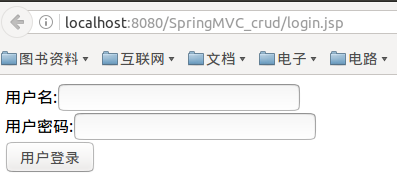
2.在UserController.java中加入login
	@RequestMapping(value="/login",method=RequestMethod.POST)
	public String login(String username,String password,HttpSession session){
		if(!users.containsKey(username)){
			throw new UserException("用户名不存在");
		}
		User u = users.get(username);
		if(!u.getPassword().equals(password)){
			throw new UserException("用户密码不正确");
		}
		session.setAttribute("loginUser", u);
		return "redirect:/user/users";
	}
3.其中需要new UserException,再创建UserException.java

package org.common.model;

public class UserException extends RuntimeException {

	/**
	 *
	 */
	private static final long serialVersionUID = 1L;

	public UserException() {
		super();
		// TODO Auto-generated constructor stub
	}

	public UserException(String message, Throwable cause) {
		super(message, cause);
		// TODO Auto-generated constructor stub
	}

	public UserException(String message) {
		super(message);
		// TODO Auto-generated constructor stub
	}

	public UserException(Throwable cause) {
		super(cause);
		// TODO Auto-generated constructor stub
	}


}
如果只是做到这些的话,当输出的用户名和密码错误的时候,报错如下图

4.在UserController.java中加入局部异常处理,并在jsp文件夹下面添加error.jsp
	//局部的异常处理,仅仅只能处理这个控制器中的异常
	@ExceptionHandler(value={UserException.class})
	public String handlerException(UserException e,HttpServletRequest req) {
		req.setAttribute("exception",e);
		return "error";
	}
<%@ page language="java" contentType="text/html; charset=UTF-8"
    pageEncoding="UTF-8"%>
<!DOCTYPE html PUBLIC "-//W3C//DTD HTML 4.01 Transitional//EN" "http://www.w3.org/TR/html4/loose.dtd">
<html>
<head>
<meta http-equiv="Content-Type" content="text/html; charset=UTF-8">
<title>Insert title here</title>
</head>
<body>
发现错误:
<h1>${exception.message}</h1>
</body>
</html>
这时候如果输入用户名或者密码输入,如下图
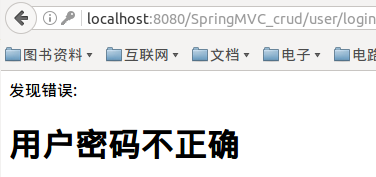
另外一种异常处理方法,全局异常
需要把Controller中的局部异常注释掉
然后在user-servlet.xml中加入
    <!-- 全局异常处理 -->
    <bean id="exceptionResolver" class="org.springframework.web.servlet.handler.SimpleMappingExceptionResolver">
		<property name="exceptionMappings">
			<props>
				<prop key="org.common.model.UserException">error</prop>
				<prop key="java.lang.nullpointerexception">exception</prop>
			</props>
		</property>
	</bean>
