简介
Python标准库使随着Python附带安装的,它包含很多有用的模块。所以对一个Python开发者来说,熟悉Python标准库是十分重要的。通过这些库中的模块,可以解决你的大部分问题。
sys模块
sys模块包含系统对应的功能。
import sys

def readfile(filename):
    '''Print a file to the standard output.'''
    f = open(filename)
    while True:
        line = f.readline()
        if len(line) == 0:
            break
        print(line)
    f.close()

#Script starts from here
if len(sys.argv) < 2:
    print('No action specified.')
    sys.exit()

if sys.argv[1].startswith('--'):
    print(sys.argv)
    option = sys.argv[1][2:]
    #fetch sys.argv[1] but without the first two characters
    if option == 'version':
        print('Version 1.2')
    elif option == 'help':
        print('''
This program prints files to the standard output.
Any number of files can be specified.
Options include:
    --version  : Prints the version number
    --help     : Display this help''')
    else:
        print('Unknown option.')/
    sys.exit()
else:
    for filename in sys.argv[1:]:
        readfile(filename)


print(sys.argv)
运行结果
这个我们通过DOS命令行运行。
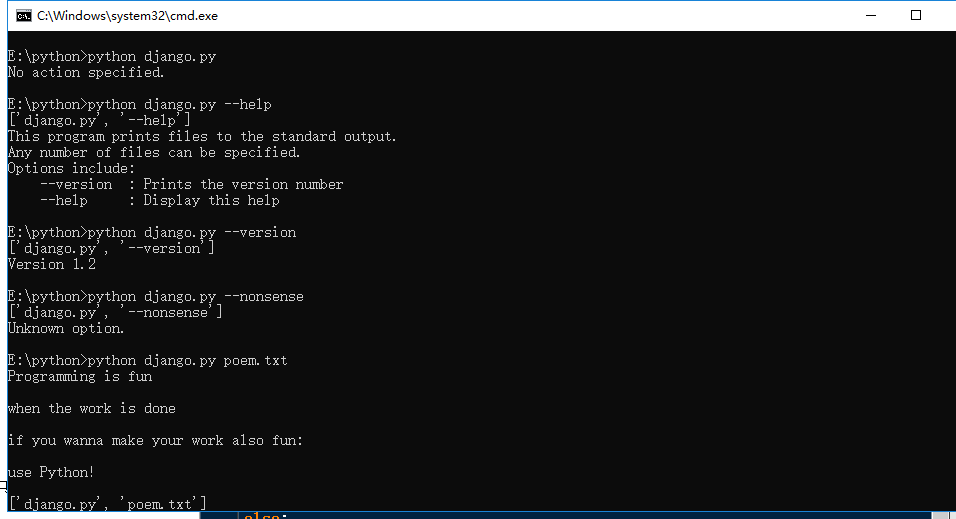
在Python程序运行的时候,即不是在交互模式下,在sys.argv列表中总是至少有一个项目。它就是当前运行的程序名称,作为sys.argv[0](由于Python从0开始计数)。其他的命令行参数在这个项目之后。
我们使用第一个参数来检验我们的程序是否被指定了选项。如果使用了--version选项,程序的版本号将被打印出来。类似地,如果指定了--help选项,我们提供一些关于程序的解释。我们使用sys.exit函数退出正在运行的程序。和以往一样,你可以看一下help(sys.exit)来了解更多详情。
os模块
这个模块包含普遍的操作系统功能。如果你希望你的程序能够与平台无关的话,这个模块是尤为重要的。即它允许一个程序在编写后不需要任何改动,也不会发生任何问题,就可以在Linux和Windows下运行。一个例子就是使用os.sep可以取代操作系统特定的路径分割符。
下面列出了一些在os模块中比较有用的部分。它们中的大多数都简单明了。
-
os.name字符串指示你正在使用的平台。比如对于Windows,它是'nt',而对于Linux/Unix用户,它是'posix'。 -
os.getcwd()函数得到当前工作目录,即当前Python脚本工作的目录路径。 -
os.getenv()和os.putenv()函数分别用来读取和设置环境变量。 -
os.listdir()返回指定目录下的所有文件和目录名。 -
os.remove()函数用来删除一个文件。 -
os.system()函数用来运行shell命令。 -
os.linesep字符串给出当前平台使用的行终止符。例如,Windows使用' ',Linux使用' '而Mac使用' '。 -
os.path.split()函数返回一个路径的目录名和文件名。>>> os.path.split('/home/swaroop/byte/code/poem.txt')
('/home/swaroop/byte/code', 'poem.txt') -
os.path.isfile()和os.path.isdir()函数分别检验给出的路径是一个文件还是目录。类似地,os.path.existe()函数用来检验给出的路径是否真地存在。
你可以利用Python标准文档去探索更多有关这些函数和变量的详细知识。你也可以使用help(sys)等等
转载于:https://www.cnblogs.com/liuhappy/p/10675003.html