通过前一章节,USB 权限到期提醒发出去之后不少同事已经按照正常的流程提交USB 权限申请,但还有部分同事没有反馈,针对这些未反馈的同事我们将按照计划进行权限关闭操作。
思路:
1、获取待关闭的计算机名单。 这里我们依旧采用Excel 表格的形式。
2、通过SEPM 的API 接口,来机型计算机权限的移除操作。
3、通知用户权限关闭事宜。
4另外好需要考虑诸如执行结果判定,日志等
闲言少叙 开工。
一:获取Excel中计算机名称。
过程见上一篇文章。
二:SEPM API 文档了解
参考文档:https://apidocs.symantec.com/home/SAEP#_authentication
第一步查阅SEPM API 文档,其介绍如下:

通过这个章节的了解 到如下信息:
1、路径:"/sepm/api/v1/computers"
2、方法:"PATCH"
3、参数类型:body,及参数形式为data。
4、参数选项:必选。
截至目前我们还不清楚如何填写这些参数,继续往后看。在3.35 章节,我们看到了补充信息如下。

看了computer 的参数格式,有很多信息,那些才是我们需要的,按照通常的思路,完成权限组的移动即知道目标计算机及目标组及可完成移动操作,为此我们看看那些参数可以唯一标识这两个信息的属性(Computer Name 和Group)。
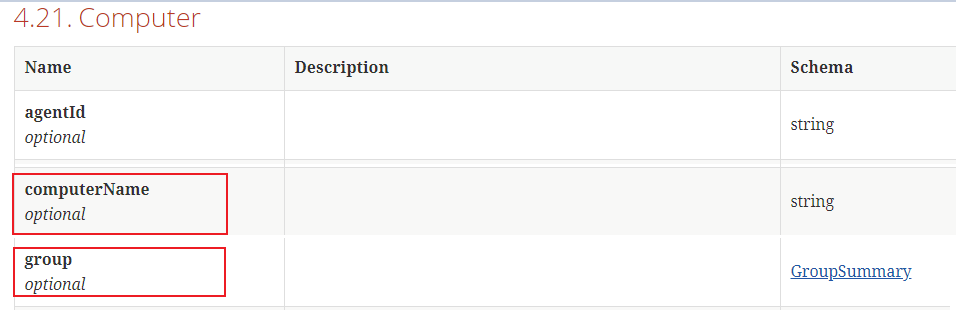
group 貌似不是简单的字符串,我们在点进去仔细看。
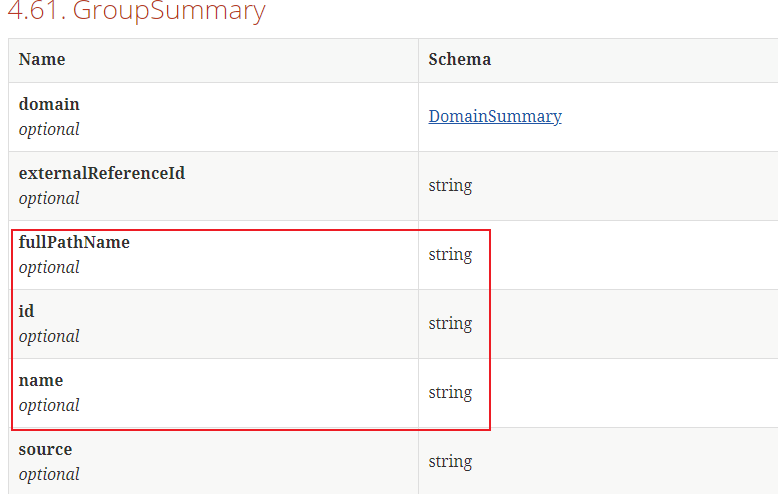
看样子能唯一标识一个安全组的信息有很多,那么我们到底选用哪个呢,得去系统里确认一下数据的样式。
这里我们做一个测试,选择的安全组为”My CompanyTemp1_ImagingDevice“


 1 headers= get_loginHeaders()
 2 group_info={
 3     "domain" : "B62A1588C0A88079014BDAAADD74F576",
 4     "pageSize" : "2",
 5     "mode" : "tree",
 6     "pageIndex" : "5",
 7     "fullPathName" : r"My CompanyTemp1_ImagingDevice"
 8 }
 9 res = requests.get(base_url+groups_url, verify=False, headers=headers, params=group_info)
10 print(res.json())
于是通过上面的代码获取到这一安全组的必要信息及数据呈现模式
 1 {
 2     'content': [{
 3         'id': 'A2CB6F58C0A88079677D78F44B201E62',
 4         'name': '01_ImagingDevice',
 5         'description': '图像设备(扫描仪、数码相机、读卡器)',
 6         'fullPathName': 'My Company\Temp\01_ImagingDevice',
 7         'numberOfPhysicalComputers': 27,
 8         'numberOfRegisteredUsers': 26,
 9         'createdBy': 'D6F6EE26C0A88079012D97C39331871B                                                                                                ',
10         'created': 1525327937426,
11         'lastModified': 1583991000111,
12         'policySerialNumber': 'A2CB-09/27/2020 05:08:28 648',
13         'policyDate': 1601183308648,
14         'customIpsNumber': '',
15         'domain': {
16             'id': 'B62A1588C0A88079014BDAAADD74F576',
17             'name': '默认值'
18         },
19         'policyInheritanceEnabled': False
20     }],
21     'number': 4,
22     'size': 2,
23     'sort': [{
24         'direction': 'ASC',
25         'property': 'NAME',
26         'ascending': True
27     }],
28     'numberOfElements': 1,
29     'totalPages': 1,
30     'lastPage': True,
31     'firstPage': False,
32     'totalElements': 1
33 }
3、编写python 代码。
重要:那么正式进入写代码环节,在3.35.1 环节,我们看到进行计算机安安全组的移动是需要管理员权限的,提前做好准备。

备注:进行移组操作的时候,发现只有使用如下参数才能执行完成操作。
 1 def move_computerToGroups(computername,GroupID):
 2     headers= get_loginHeaders()
 3     info =  [{
 4             "group" : {"id" : GroupID},
 5             "hardwareKey" : computername
 6     } ]
 7
 8     res = requests.patch(base_url+computers_url, verify=False, headers=headers, data=json.dumps(info))
 9     print(res.json())
10
11     move_computerToGroups("7A4031583B0152F67A49D0EBD3734D6B","A2CB6F58C0A88079677D78F44B201E62")
这就要求我们获取计算机的Hardware key 和计算机安全组的Id 信息。
过程就不写了,完整代码如下,除基础的执行操作还在家了判断及日志,便于其他调用。
 1 import requests, json, pprint
 2 import mail,time
 3 pagesize = 1000
 4 json_format = True
 5
 6 base_url = "https://192.168.xxx.xxx:8446/sepm/api/v1"
 7 authentication_url = "/identity/authenticate"
 8 version_url="/version"
 9 groups_url="/groups"
10 computers_url="/computers"
11
12 def make_logs(type,info):
13     with open('./move_computerGroupLog.log', 'a') as f:
14         f.write(type+time.strftime("%Y-%m-%d %H:%M:%S", time.localtime())+':'+str(info)+'
')
15 #获取token ,补充token信息以便其他函数调用
16 def get_loginHeaders():
17     headers = {"Content-Type":"application/json"}
18     info = {
19     "username" : "xxx",
20     "password" : "xxx",
21     "domain" : ""}
22     res = requests.post(base_url+authentication_url, verify=False, headers=headers, data=json.dumps(info))
23     try:
24         api_token=res.json()["token"]
25         headers = {'Content-Type': 'application/json', 'Authorization': 'Bearer {0}'.format(api_token)}
26         make_logs("INFO","Successed login with username:{0} ".format(info["username"]))
27         return(True,headers)
28     except:
29         make_logs("WARN","Failed login with username:{0} ".format(info["username"]))
30         return(False,headers)
31
32
33 #     # return headers
34 # login, headers=get_loginHeaders()
35 # print(login)
36 # print(headers)
37 def get_hardwareID(computerName,headers):
38
39     info = {
40             "computerName" : computerName
41             }
42     try:
43         res = requests.get(base_url+computers_url, verify=False, headers=headers, params=info)
44         Hardware_key=res.json()["content"][0]["hardwareKey"]
45         make_logs("INFO","Successed get Hardware_key info about computer: {0}".format(computerName))
46         return(True,Hardware_key)
47     except:
48         make_logs("WARN","Failed get Hardware_key info about computer: {0}".format(computerName))
49         Hardware_key=""
50         return(False,Hardware_key)
51
52
53 def get_groupsID(groupName,headers):
54     info={
55         "fullPathName" : groupName
56     }
57     try:
58         res = requests.get(base_url+groups_url, verify=False, headers=headers, params=info)
59         GroupID=res.json()["content"][0]["id"]
60         make_logs("INFO","Successed get GroupID info about group: {0}".format(groupName))
61         return(True,GroupID)
62     except:
63         GroupID=""
64         make_logs("WARN","Failed get GroupID info about group: {0}".format(groupName))
65         return(False,GroupID)
66
67
68 def move_computerToGroups(computerName,groupName):
69
70     headers_available,headers= get_loginHeaders()
71     if headers_available:
72         Hardware_key_available,Hardware_key=get_hardwareID(computerName,headers)
73         GroupID_available,GroupID=get_groupsID(groupName,headers)
74         print(Hardware_key_available)
75         print(GroupID_available)
76         if(Hardware_key_available and GroupID_available ):
77             info =  [{
78                 "group" : {"id" : GroupID},
79                 "hardwareKey" : Hardware_key
80                      } ]
81             print(info)
82             try:
83                 res = requests.patch(base_url+computers_url, verify=False, headers=headers, data=json.dumps(info))
84                 print(res.status_code)
85                 if res.status_code == 207:
86                     make_logs("INFO","Successed move computer: {0} to group: {1} ".format(computerName,groupName))
87                 else:
88                     make_logs("WARN","Failed move computer: {0} to group: {1} ".format(computerName,groupName))
89             except:
90                 make_logs("WARN","Failed move computer: {0} to group: {1} ".format(computerName,groupName))
91         else:
92             pass
93
94     else:
95         pass
96
97 move_computerToGroups("lw7cneczgwitzy1",r"My CompanyPCs_OF1_All")
执行日志
