1.选一个自己感兴趣的主题或网站。(所有同学不能雷同)
2.用python 编写爬虫程序,从网络上爬取相关主题的数据。
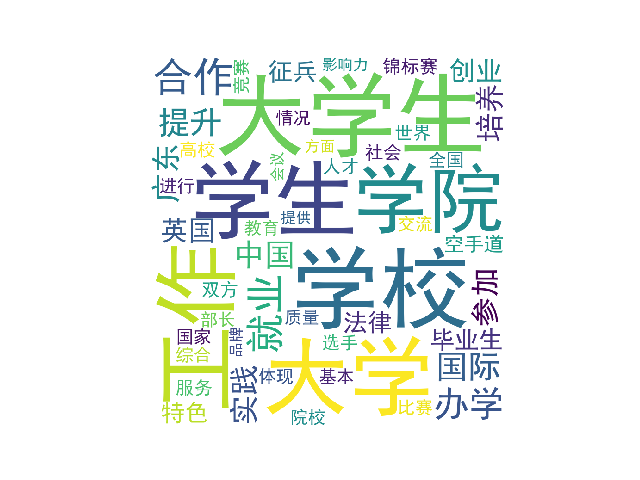
3.对爬了的数据进行文本分析,生成词云。
4.对文本分析结果进行解释说明。
5.写一篇完整的博客,描述上述实现过程、遇到的问题及解决办法、数据分析思想及结论。
6.最后提交爬取的全部数据、爬虫及数据分析源代码。
import re
import requests
from bs4 import BeautifulSoup
from datetime import datetime
import pandas


def writeNewsDetail(content):
    f = open('text.txt','a',encoding='utf-8')
    f.write(content)
    f.close()

def getClickCount(newsUrl):
    newId = re.search('\_(.*).html',newsUrl).group(1).split('/')[1]
    clickUrl = "http://oa.gzcc.cn/api.php?op=count&id={}&modelid=80".format(newId)
    return (int(requests.get(clickUrl).text.split('.html')[-1].lstrip("('").rstrip("');")))

def getNewDetail(newsUrl):
    resd = requests.get(newsUrl)
    resd.encoding = 'utf-8'
    soupd = BeautifulSoup(resd.text, 'html.parser')
    news = {}

    news['title'] = soupd.select('.show-title')[0].text
    info = soupd.select('.show-info')[0].text
    news['dt'] = datetime.strptime(info.lstrip('发布时间:')[0:19], '%Y-%m-%d %H:%M:%S')
    if info.find('来源:')>0:
        news['source'] = info[info.find('来源:'):].split()[0].lstrip('来源:')
    else:
        news['source'] = 'none'
    news['content'] = soupd.select('.show-content')[0].text.strip()
    writeNewsDetail(news['content'])
    news['clickCount'] = getClickCount(newsUrl)
    return (news)

def getNewsList(pageUrl):
    res = requests.get(pageUrl)
    res.encoding = "utf-8"
    soup = BeautifulSoup(res.text, "html.parser")
    newsList = []
    for news in soup.select('li'):
        if len(news.select('.news-list-title')) > 0:
            newsUrl = news.select('a')[0].attrs['href']
            newsList.append(getNewDetail(newsUrl))
    return (newsList)

def getpageN():
    res = requests.get('http://news.gzcc.cn/html/xiaoyuanxinwen/')
    res.encoding = "utf-8"
    soup = BeautifulSoup(res.text, "html.parser")
    n = int(soup.select('.a1')[0].text.rstrip('条'))
    return (n // 10 + 1)

newsTotal = []
url = 'http://news.gzcc.cn/html/xiaoyuanxinwen/'
newsTotal.extend(getNewsList(url))

n = getpageN()
for i in range(n,n+1):
    listPageUrl = 'http://news.gzcc.cn/html/xiaoyuanxinwen/{}.html'.format(i)
    newsTotal.extend(getNewsList(listPageUrl))

df = pandas.DataFrame(newsTotal)
# print(df)
df.to_excel('wxc.xlsx')
# print(df[(df['clickCount']>3000) & (df['source'] == '学校综合办')])
#print(df[['clickCount', 'title', 'source']].head(6))
sou = ['国际学院', '学生工作处']
print(df[df['source'].isin(sou)])

import jieba.analyse
from PIL import Image,ImageSequence
import numpy as np
import matplotlib.pyplot as plt
from wordcloud import WordCloud,ImageColorGenerator
lyric= ''
f=open('text.txt','r',encoding='utf-8')
for i in f:
    lyric+=f.read()


result=jieba.analyse.textrank(lyric,topK=50,withWeight=True)
keywords = dict()
for i in result:
    keywords[i[0]]=i[1]
print(keywords)


image= Image.open('1.jpg')
graph = np.array(image)
wc = WordCloud(font_path='./fonts/simhei.ttf',background_color='White',max_words=50,mask=graph)
wc.generate_from_frequencies(keywords)
image_color = ImageColorGenerator(graph)
plt.imshow(wc)
plt.axis("off")
plt.show()
wc.to_file('wxc.png')